

Kudos to Wan Qi Chen
Dashing widget to display the number of connected clients to a redis server, as well as the instance memory usage.
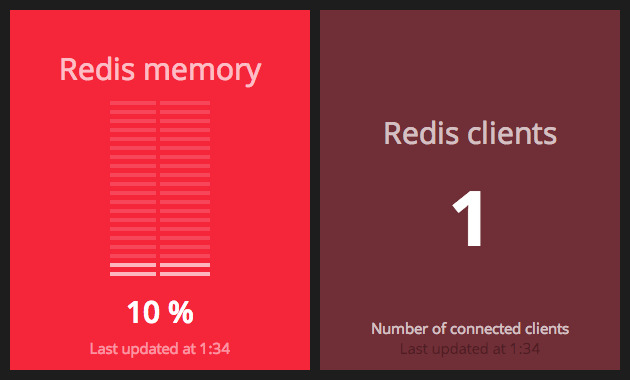
Add it to dashing's gemfile:
gem 'redis'
and run bundle install.
-
copy
redis.coffee,redis.html, andredis.scssinto the/widgets/redisdirectory of your Dashing app. -
Copy the
redis.rbfile into your/jobsfolder. -
Now copy over the
redis.ymlinto the root directory of your Dashing application. Be sure to replace the following options inside of the config file:
:redis_host: localhost:6379
:redis_password: 'your master password'
(or)
:redis_host: /tmp/redis.sock
:redis_password: 'your master password'
- copy
redis-background.pnginto your/assets/images/folder
Then include the widget in a dashboard, by adding the following snippet to your dashboard layout file:
- For the Redis clients widget:
    <li data-row="1" data-col="1" data-sizex="1" data-sizey="1">
        <div data-id="redis_connected_clients" data-view="Number" style="background-color: #6C3039" data-title="Redis clients"></div>
</li>- For the redis memory usage widget:
    <li data-row="1" data-col="1" data-sizex="1" data-sizey="1">
        <div data-id="redis_used_memory" data-view="Redis"  data-title="Redis memory"></div>
</li>For the memory usage widget, 100% usage means that your redis instance is using all the memory allocated to the redis server, defined by the maxmemory setting in redis.conf. If you didn't set a limit, the peak memory usage will be used as the maximum.