

##Preview
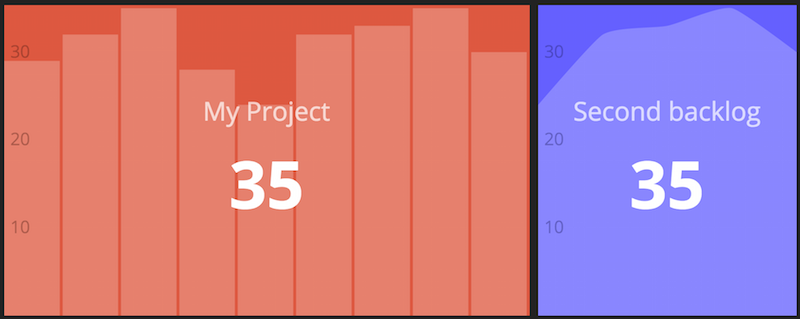
This is a Dashing widget to display current and historical velocity for Pivotal projects. Uses Pivotal Tracker API v5 via the tracker_api gem.
The heart of this widget is the job, with the view being a slightly tweaked version of the default graph widget.
##Dependencies
Add it to dashing's gemfile:
gem 'tracker_api'
and run bundle install.
##Usage
To use this widget, copy velocity.html, velocity.coffee, and velocity.scss into a /widgets/velocity directory. Update the velocity.rb file to include your Pivotal project ID(s) and place it in your /jobs folder.
To include the widget in a dashboard, add the following snippet to the dashboard layout file:
<li data-row="1" data-col="1" data-sizex="2" data-sizey="1">
  <div data-id="pivotal-1133342" data-view="Velocity" data-graphtype="bar" data-title="My Project"></div>
</li>
<li data-row="1" data-col="1" data-sizex="1" data-sizey="1">
  <div data-id="pivotal-1133342" data-view="Velocity" data-title="Second backlog" data-numiterations="5" style="background-color:#6666FF"></div>
</li>
Create a widget for each pivotal project, with the ID specified in the data-id attribute.
##Settings
Pivotal Project IDs: These are supplied in the jobs/velocity.rb file.
API Token: When you run dashing, you need to set the PIVOTAL_API_TOKEN environment variable. e.g. PIVOTAL_API_TOKEN=YOUR_API_TOKEN dashing start
Number of iterations: You can add a data-numiterations attribute in your dashboard erb file. See the example above
Graph type: You can set the graph type using the data-graphtype, just as you do with the default graph widget. The value can be any supported by Rickshaw.