# DraftKings Odds API - Real-Time Lines & Player Props (`zen-studio/draftkings-odds`) Actor

Extract real-time DraftKings sportsbook odds for 28 sports and 280+ leagues. Get spreads, moneylines, totals, player props, and futures in 3 odds formats. Always-on HTTP API. Live in-play odds with scores. NBA, NFL, MLB, NHL, EPL, and more. No login required.

- **URL**: https://apify.com/zen-studio/draftkings-odds.md
- **Developed by:** [Zen Studio](https://apify.com/zen-studio) (community)
- **Categories:** Automation, Integrations, Developer tools
- **Features:** Limited permissions, Single-tenant, Server interface
- **Stats:** 448 total users, 62 monthly users, 100.0% runs succeeded, 2 bookmarks
- **User rating**: No ratings yet

## Pricing

from $6.69 / 1,000 requests

This Actor is paid per event and usage. You are charged both the fixed price for specific events and for Apify platform usage.
Since this Actor supports Apify Store discounts, the price gets lower the higher subscription plan you have.

Learn more: https://docs.apify.com/actors/running/actors-in-store.md#pay-per-event

## What's an Apify Actor?

An Actor is a serverless cloud program that runs on the Apify platform. It has two run modes.
In Batch mode, an Actor accepts a well-defined JSON input, performs an action which can take anything from a few seconds to a few hours,
and optionally produces a well-defined JSON output, datasets with results, or files in key-value store.
In Standby mode, an Actor provides a web server which can be used as a website, API, or an MCP server.

Apify vocabulary and the platform model are defined once, in the agent quickstart at https://apify.com/agents.md.

## How to integrate an Actor?

If asked about integration, you help developers integrate Actors into their projects.
You adapt to their stack and deliver integrations that are safe, well-documented, and production-ready.

Do not guess an integration path. Every one of them is in the agent quickstart at https://apify.com/agents.md: the Apify MCP server, Agent Skills with the Apify CLI, the JavaScript and Python clients, the REST API, and the account-free path for an agent with no human to sign in. It also carries the rule on stating cost before the first paid run.

For examples already wired to this Actor's own input schema, see the [API](#api) section below.

Each client library has reference documentation the quickstart does not restate: [JavaScript/TypeScript](https://docs.apify.com/api/client/js/docs.md) (`npm install apify-client`) and [Python](https://docs.apify.com/api/client/python/docs.md) (`pip install apify-client`).

# README

## DraftKings Odds API — Real-Time Lines, Player Props & Futures

[![104,639 selections. One run. Game lines, player props and futures.](https://api.apify.com/v2/key-value-stores/pJ7iaZsTFhR3k9tjV/records/draftkings-odds-readme-hero-v1.png)](https://console.apify.com/actors/W8rOXiLSj8wrgF96k/input)

A recorded College Football run with all market types returned **104,639 selections**. Each row is a selection, not a separate game or market. Available counts vary; the pictured odds are illustrative.

<table><tr>
<td style="border-left:4px solid rgb(76,148,94);padding:12px 16px;font-weight:600">Always-on HTTP API — send a GET request, get DraftKings odds back in milliseconds.</td>
</tr></table>

<br>

<table><tr>
<td style="border-left:4px solid rgb(76,148,94);padding:12px 16px">28 sports, 280+ leagues. Spreads, moneylines, totals, player props, futures.<br>Public betting percentages: share of bets and share of money per side.<br>American, decimal, and fractional odds. Live in-play with scores. No account required.</td>
</tr></table>

<br>

<table><tr><td colspan="4" style="padding:10px 14px;background:#4C945E;color:#1C1917;font-size:13px;font-weight:700">Zen Studio Sports Betting</td></tr><tr><td style="padding:10px 12px;border:1px solid #E7E5E4;background:#D3EDD9;vertical-align:top;width:25.00%"><span style="white-space:nowrap"><img src="https://apify-image-uploads-prod.s3.us-east-1.amazonaws.com/NWYsOG96fMDy8ycdf-actor-W8rOXiLSj8wrgF96k-PQehXxTEV5-draftkings-real-time-api-logo.png" width="20" height="20" alt="" style="vertical-align:middle">&nbsp;&nbsp;<a href="https://apify.com/zen-studio/draftkings-odds" style="color:#1C1917;text-decoration:none;font-weight:700;font-size:13px">DraftKings Odds</a></span><br><span style="color:#57534E;font-size:12px;white-space:nowrap">You are here</span></td><td style="padding:10px 12px;border:1px solid #E7E5E4;background:#E8F5E9;vertical-align:top;width:25.00%"><span style="white-space:nowrap"><img src="https://apify-image-uploads-prod.s3.us-east-1.amazonaws.com/NWYsOG96fMDy8ycdf-actor-W8rOXiLSj8wrgF96k-PQehXxTEV5-draftkings-real-time-api-logo.png" width="20" height="20" alt="" style="vertical-align:middle">&nbsp;&nbsp;<a href="https://apify.com/zen-studio/draftkings-pick6-player-props" style="color:#1C1917;text-decoration:none;font-weight:700;font-size:13px">Pick6 Props</a></span><br><span style="color:#57534E;font-size:12px;white-space:nowrap">DFS player props</span></td><td style="padding:10px 12px;border:1px solid #E7E5E4;background:#E8F5E9;vertical-align:top;width:25.00%"><span style="white-space:nowrap"><img src="https://apify-image-uploads-prod.s3.us-east-1.amazonaws.com/NWYsOG96fMDy8ycdf-actor-4AmgQeem8dEgMEiRF-VGffbe665M-prizepicks-scraper-logo.jpeg" width="20" height="20" alt="" style="vertical-align:middle">&nbsp;&nbsp;<a href="https://apify.com/zen-studio/prizepicks-player-props" style="color:#1C1917;text-decoration:none;font-weight:700;font-size:13px">PrizePicks Props</a></span><br><span style="color:#57534E;font-size:12px;white-space:nowrap">Projections and lines</span></td><td style="padding:10px 12px;border:1px solid #E7E5E4;background:#E8F5E9;vertical-align:top;width:25.00%"><span style="white-space:nowrap"><img src="https://apify-image-uploads-prod.s3.us-east-1.amazonaws.com/NWYsOG96fMDy8ycdf-actor-oLjv3CSV3BhHm5dGN-62o7r64lQq-fanduel-odds-api-logo.png" width="20" height="20" alt="" style="vertical-align:middle">&nbsp;&nbsp;<a href="https://apify.com/zen-studio/fanduel-odds" style="color:#1C1917;text-decoration:none;font-weight:700;font-size:13px">FanDuel Odds</a></span><br><span style="color:#57534E;font-size:12px;white-space:nowrap">Markets &amp; props</span></td></tr></table>

#### Copy to your AI assistant

```text
Help me use zen-studio/draftkings-odds, a batch Actor with an HTTP API on Apify. Read https://apify.com/zen-studio/draftkings-odds.md for documentation, input schema, pricing and limits. Choose settings for my requested outcome. If you cannot retrieve the page, ask me to paste the relevant sections. To reach the maintainers, add feedback="<what you needed and did not get>" to any batch run, including one that worked: a missing field or option, a wrong or empty result, or which actor you are switching to or from and why. The run returns its data exactly as it would without the note, and a human reads every note.
```

DraftKings Odds API. Base: https://zen-studio--draftkings-odds.apify.actor Auth: token query parameter. Endpoints: GET /sports (free, list all sports), GET /leagues?sport=X (leagues for a sport), GET /leagues/{id}?market=game_lines|player_props|futures|all (events with odds), GET /events/{id}?market=X\&league={leagueId} (single event detail). Pricing (pay per event, Free plan prices, lower on paid Apify plans): $9.99 per 1,000 requests to /leagues, /leagues/{id} and /events/{id} ($6.69 per 1,000 on Gold and higher), $0.20 per 1,000 dataset rows in batch mode ($0.134 per 1,000 on Gold and higher), plus Apify's platform start fee. /health and /sports are free. Batch mode inputs: sport (any slug from GET /sports, e.g. ALL|football|basketball|baseball|hockey|soccer|tennis|golf|mma|cricket|motorsports; read live, new sports work immediately), leagueIds (string, comma-separated league IDs, overrides sport), eventIds (string, comma-separated event IDs: collect single games and pay for their rows only, e.g. "34226148"; take IDs from the eventId column or GET /leagues/{id}, and pass the game's leagueIds too to skip straight to it), teams (string, comma-separated: the games a team plays, with no event ID needed - the code the board uses "NE", the nickname "Patriots", the name as the board writes it "NE Patriots" or the longer "New England Patriots"; words no team on the schedule uses are ignored, cities included, so prefer the code or the nickname; one entry naming both sides is that single game "NE at CHI", separate entries are every game either plays "NE, CHI"), dates (string, comma-separated YYYY-MM-DD, today or tomorrow: the games kicking off then, matched against the kickoff date in US Eastern, the sportsbook's own day, or in UTC, the startTime column's own zone, so a Thursday night game starting 00:15 UTC answers to both the Thursday and the Friday; a date that cannot be read stops the run rather than returning the whole board), dateFrom and dateTo (string, same values, an inclusive window with either side on its own open-ended). teams and dates read the games they match whole and charge for those rows alone, exactly as eventIds does, so a one-game pull never depends on the row limit reaching that game, and a team or date matching nothing is named in the log with the league's own schedule instead of returning an empty dataset. market (game_lines|player_props|futures|all; futures covers every season-long category the league lists, including championships, awards, division and conference winners, regular season win totals, playoff seeding and stat leaders, and the log names the categories read per league), propTypes (string, comma-separated prop filter for player_props and all, matched word by word against the market name in the results, so "passing yards" finds "Passing Yards" and "receiving" takes every receiving prop; a leading - excludes instead, so "receptions, -race to, -1st quarter" keeps the receptions markets without the ladder and quarter variants that otherwise fill the row limit, and excludes on their own keep everything they do not name; anything matching nothing is named in the log instead of returning an empty dataset), maxResults (int, default 500, 0=unlimited; a run that hits the cap says so and the game it stopped inside is incomplete, and with several eventIds the cap is shared between those games so each gets a share instead of the first game taking all of it). Every selection includes odds in 3 formats, impliedProbability, and DraftKings public betting splits betsPercent (share of bets) + handlePercent (share of money) where published. Free tier: 10 lifetime batch runs (capped to 200 rows per run, which maxResults cannot raise; a capped run logs how many rows it returned and how many it held back) or 50 lifetime API calls. League IDs: NBA=42648 NFL=88808 MLB=84240 NHL=42133 WNBA=94682 UFC=9034 College Football=87637 CFB FCS=154752 EPL=40253 Champions League=40685 La Liga=40031 Bundesliga=40481 Serie A=40030 F1=212334. 280+ leagues total, call /leagues for the current list.

Also available as an [MCP server](https://mcp.apify.com/) — add `zen-studio/draftkings-odds` for natural language access.

### How to Scrape DraftKings Odds in Real Time

<table align="center" style="border:none;border-collapse:collapse;background:transparent;width:100%">
<tr>
<td align="center" style="border:none;padding:0">
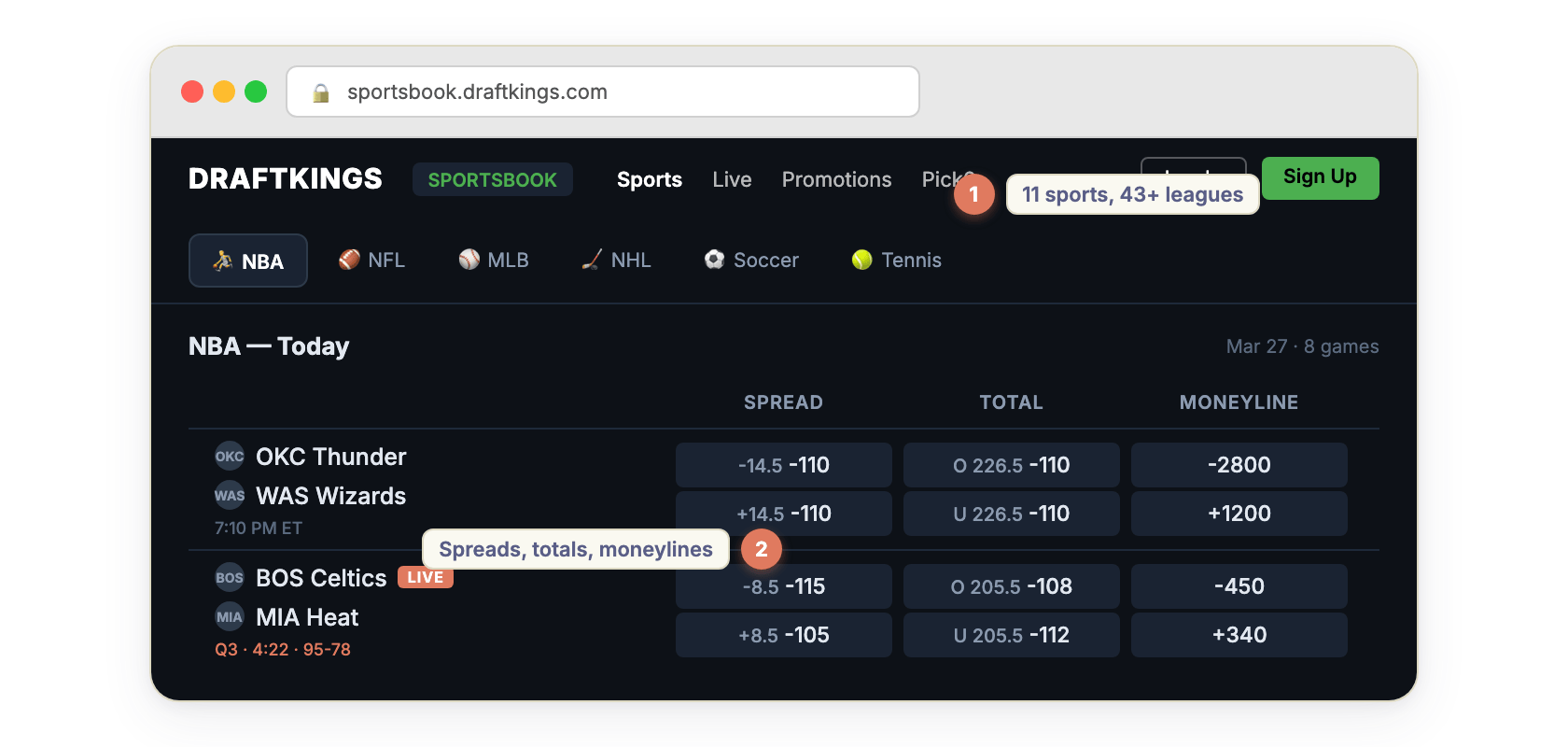
<img src="https://iili.io/qZmpyI2.png" width="840" alt="DraftKings sportsbook odds scraper — NBA, NFL, MLB, NHL spreads, moneylines, and totals"/>
</td>
</tr>
<tr>
<td align="center" style="border:none;padding:8px 0">
<img src="https://iili.io/qVhQ8N9.png" width="72" alt=""/>
</td>
</tr>
<tr>
<td align="center" style="border:none;padding:0">
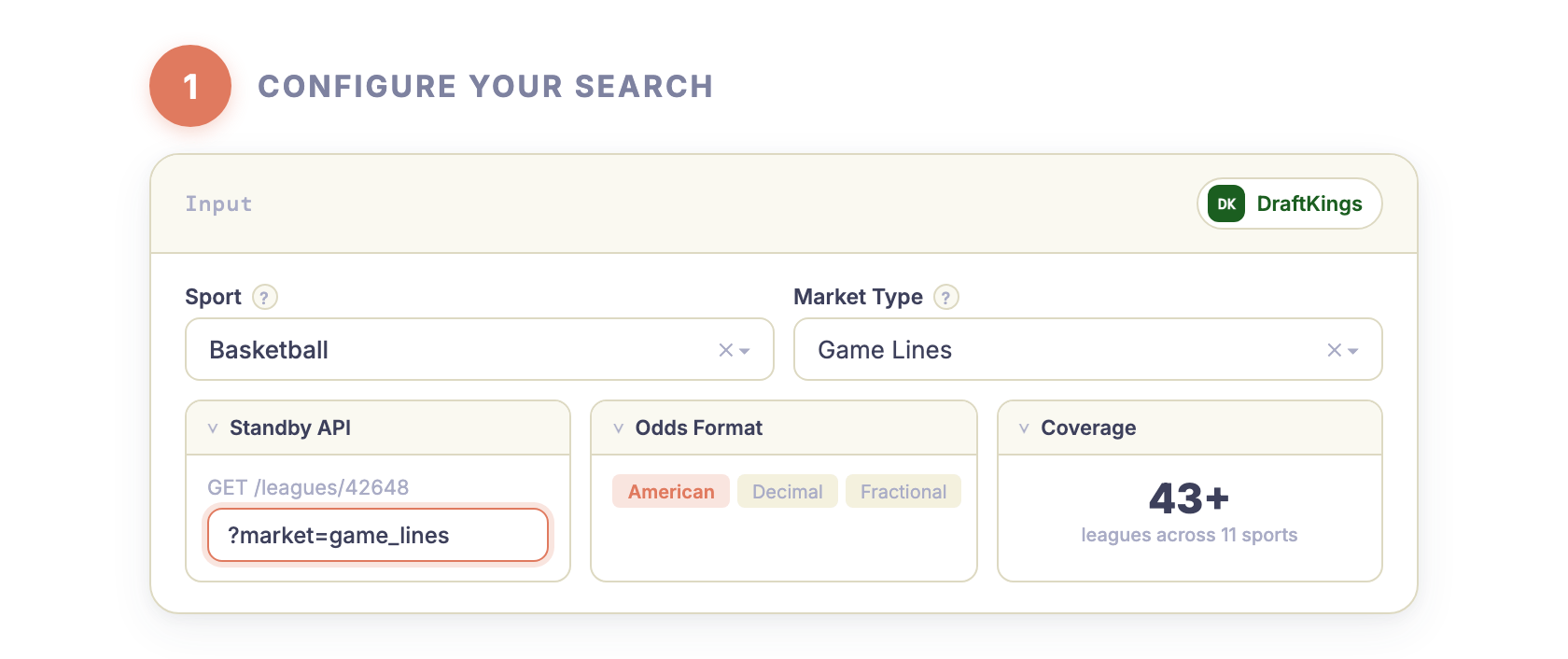
<a href="https://console.apify.com/actors/W8rOXiLSj8wrgF96k/input"><img src="https://iili.io/qZmynIV.png" width="840" alt="DraftKings odds API — configure sport and market type"/></a>
</td>
</tr>
<tr>
<td align="center" style="border:none;padding:8px 0">
<img src="https://iili.io/qVhQvA7.png" width="72" alt=""/>
</td>
</tr>
<tr>
<td align="center" style="border:none;padding:0">
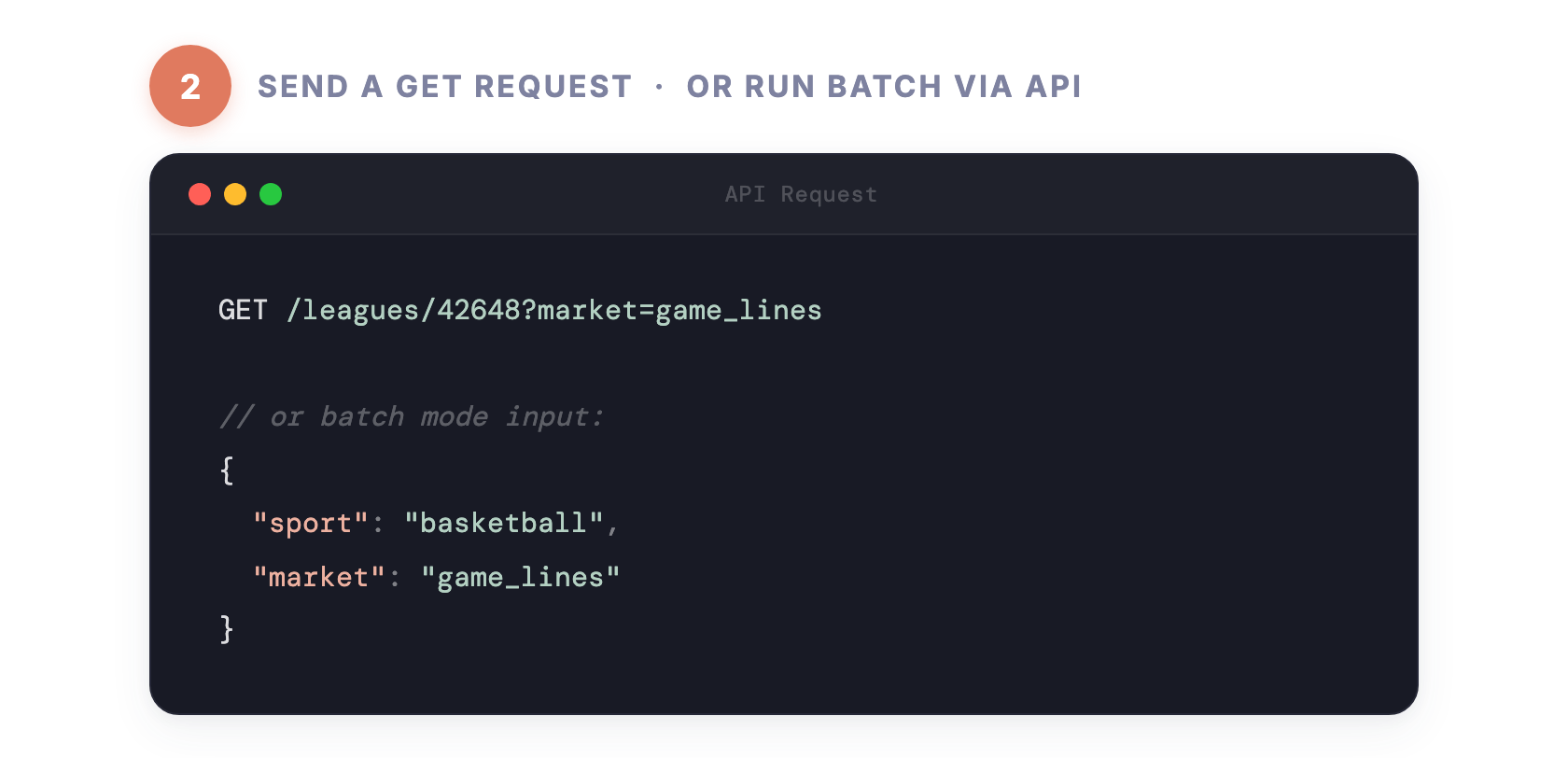
<a href="https://console.apify.com/actors/W8rOXiLSj8wrgF96k/input"><img src="https://iili.io/qZmycIp.png" width="840" alt="DraftKings real-time API — GET request example for NBA odds"/></a>
</td>
</tr>
<tr>
<td align="center" style="border:none;padding:8px 0">
<img src="https://iili.io/qVhQ8N9.png" width="72" alt=""/>
</td>
</tr>
<tr>
<td align="center" style="border:none;padding:0">
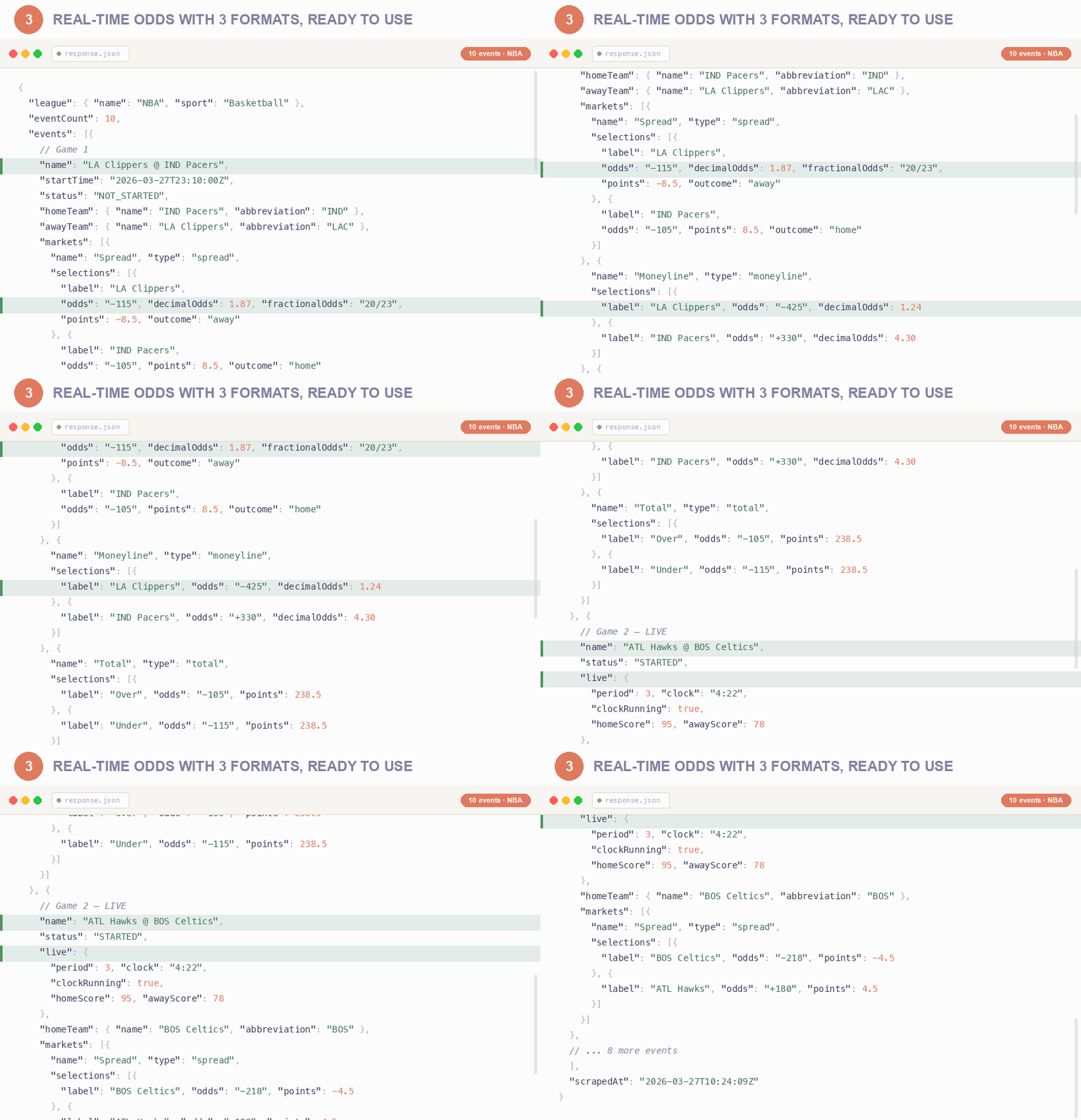
<img src="https://iili.io/qtRw1mF.gif" width="840" alt="DraftKings odds JSON output — American, decimal, fractional odds formats"/>
</td>
</tr>
</table>

### DraftKings Odds API Endpoints

Your API base URL:

```
https://zen-studio--draftkings-odds.apify.actor?token=YOUR_APIFY_TOKEN
```

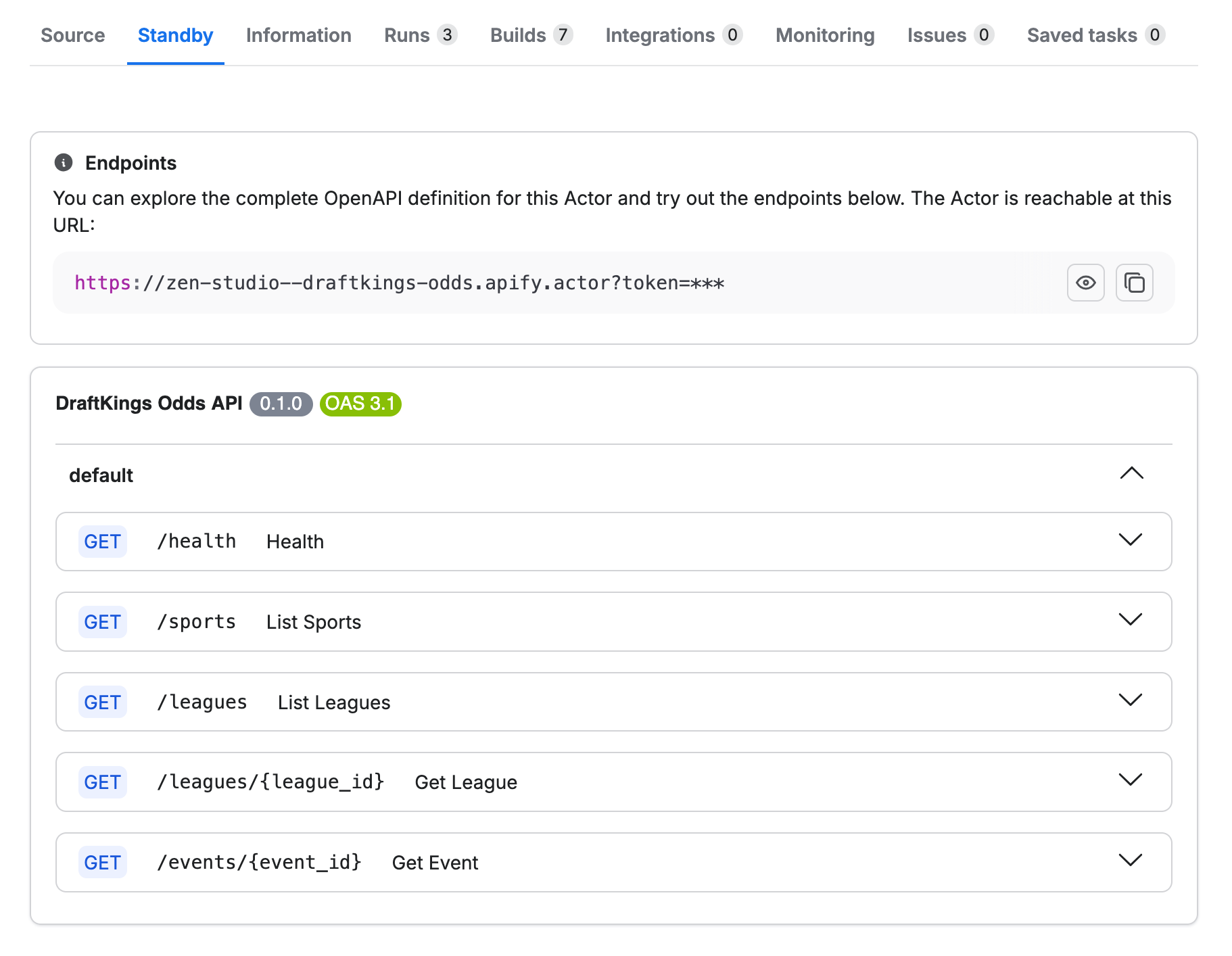
Five endpoints, all GET. `/health` and `/sports` are free. The rest are billed per request.

<a href="https://console.apify.com/organization/NWYsOG96fMDy8ycdf/actors/W8rOXiLSj8wrgF96k/standby"><img src="https://iili.io/qtfu35N.png" width="840" alt="DraftKings odds API endpoints — real-time REST API with OpenAPI spec"/></a>

The `market` parameter controls what you get back: **game_lines** (spread, moneyline, total), **player_props** (points, rebounds, assists, combos, H2H), **futures** (championship, MVP, division and conference winners, regular season win totals, playoff seeding, stat leaders), or **all** for everything. A futures run names the categories it read for each league in the log.

### Pricing

Pay per use, no subscription. Prices drop on higher Apify plans.

| Event | Charged for | Free | Bronze | Silver | Gold and higher |
|---|---|---|---|---|---|
| **Request** | Each call to `/leagues`, `/leagues/{id}` or `/events/{id}`, and each league with results in a batch run | $9.99 per 1,000 | $8.99 per 1,000 | $7.99 per 1,000 | $6.69 per 1,000 |
| **Dataset row** | Each odds row written to the dataset in a batch run | $0.20 per 1,000 | $0.18 per 1,000 | $0.16 per 1,000 | $0.134 per 1,000 |
| **Actor start** | Each run start, one per GB of memory | Apify's platform start fee | Apify's platform start fee | Apify's platform start fee | Apify's platform start fee |

`/health` and `/sports` are always free. Standby responses are charged per request only, never per row.

### DraftKings Odds JSON Output

Every response returns the full odds structure below. Real NBA game lines example:

```json
{
  "success": true,
  "league": {
    "id": "42648",
    "name": "NBA",
    "sport": "Basketball",
    "sportId": "2"
  },
  "eventCount": 8,
  "events": [
    {
      "id": "33841191",
      "name": "OKC Thunder @ WAS Wizards",
      "startTime": "2026-03-21T21:10:00Z",
      "status": "NOT_STARTED",
      "homeTeam": {
        "id": "32962",
        "name": "WAS Wizards",
        "abbreviation": "WAS"
      },
      "awayTeam": {
        "id": "32942",
        "name": "OKC Thunder",
        "abbreviation": "OKC"
      },
      "markets": [
        {
          "id": "1_84695475",
          "name": "Spread",
          "type": "spread",
          "isMain": true,
          "selections": [
            {
              "label": "WAS Wizards",
              "odds": "+1400",
              "decimalOdds": 15.0,
              "fractionalOdds": "14/1",
              "impliedProbability": 6.7,
              "betsPercent": 23.0,
              "handlePercent": 34.0,
              "points": 14.5,
              "outcome": "home"
            },
            {
              "label": "OKC Thunder",
              "odds": "-2800",
              "decimalOdds": 1.04,
              "fractionalOdds": "1/28",
              "impliedProbability": 96.6,
              "points": -14.5,
              "outcome": "away"
            }
          ]
        },
        {
          "id": "1_84695476",
          "name": "Moneyline",
          "type": "moneyline",
          "isMain": true,
          "selections": [
            {
              "label": "WAS Wizards",
              "odds": "+1200",
              "decimalOdds": 13.0,
              "fractionalOdds": "12/1",
              "impliedProbability": 7.7,
              "outcome": "home"
            },
            {
              "label": "OKC Thunder",
              "odds": "-2500",
              "decimalOdds": 1.04,
              "fractionalOdds": "1/25",
              "impliedProbability": 96.2,
              "outcome": "away"
            }
          ]
        },
        {
          "id": "1_84695477",
          "name": "Total",
          "type": "total",
          "isMain": true,
          "selections": [
            {
              "label": "Over",
              "odds": "-110",
              "decimalOdds": 1.91,
              "fractionalOdds": "10/11",
              "impliedProbability": 52.4,
              "points": 226.5,
              "outcome": "over"
            },
            {
              "label": "Under",
              "odds": "-110",
              "decimalOdds": 1.91,
              "fractionalOdds": "10/11",
              "impliedProbability": 52.4,
              "points": 226.5,
              "outcome": "under"
            }
          ]
        }
      ]
    }
  ],
  "scrapedAt": "2026-03-21T14:30:00Z"
}
```

#### Main Lines vs Alternate Lines

One rule works on every board:

> a row is the main line when the **market** is not `isAlternate` and the **selection** `isMain`.

In batch mode that is precomputed as the **`isMainLine`** column.

- **`isAlternate`** (market) — the market is an alternate ladder (`Spread Alternate`, `Total Alternate`). Derived from the market name, so you can re-derive it yourself.
- **`isMain`** (selection) — the main rung *of its own market*. On an alternate ladder the top rung still carries it, which is why it is not sufficient alone.

Measured on a full college football board with 484 ladders: the rule leaves exactly one line
on all 484 and never more than one. On an NFL player-prop board it leaves exactly one row per
player, stat and side across 1,726 groups.

The source's own market-level main flag is deliberately not exposed. It is wrong in both
directions: set on alternate ladders, unset on 100 of those 484 ladders that do have a main
line, and on player props true almost only for combo markets such as
`Player A & Player B - Receiving Yards Total`.

#### DraftKings Public Betting Percentages

Every selection carries the share of bets and the share of money DraftKings reports for it,
wherever DraftKings publishes them (typically 50-90% of a league's board):

```json
{
  "label": "SEA Seahawks",
  "odds": "-170",
  "impliedProbability": 63.0,
  "betsPercent": 77.0,
  "handlePercent": 66.0
}
```

- **`betsPercent`** — share of bets placed on this side, the public/ticket count
- **`handlePercent`** — share of money wagered on this side

The two diverging is the signal bettors look for: a side with 77% of tickets but 34% of the
money means many small bets against fewer large ones. Both are numbers, not strings, and are
absent on selections DraftKings does not publish splits for. Available in batch mode as the
`betsPercent` and `handlePercent` columns.

#### DraftKings Live In-Play Odds

When a game is in progress, each event includes live scoring data:

```json
{
  "id": "33841191",
  "name": "OKC Thunder @ WAS Wizards",
  "status": "STARTED",
  "live": {
    "period": 3,
    "clock": "04:22",
    "clockRunning": true,
    "homeScore": 78,
    "awayScore": 95
  },
  "markets": [...]
}
```

#### DraftKings Player Props Data

Use `market=player_props` to get player-level prop lines. Use the `propTypes` parameter (batch mode) to filter by stat type.

```json
{
  "id": "1_84695478",
  "name": "Shai Gilgeous-Alexander Over/Under Points",
  "type": "player_prop",
  "selections": [
    {
      "label": "Over",
      "odds": "-115",
      "decimalOdds": 1.87,
      "fractionalOdds": "20/23",
      "impliedProbability": 53.5,
      "points": 30.5,
      "outcome": "over",
      "participant": {
        "id": "1234567",
        "name": "Shai Gilgeous-Alexander",
        "type": "Player"
      }
    }
  ]
}
```

#### Batch Mode: One Game at a Time

Use `eventIds` to collect single games. Every market you asked for is returned for those games, nothing else is written, and you pay for their rows only: one college football game is a few hundred rows against roughly 35,000 for the whole league. Take the IDs from the `eventId` column of any run, or from `GET /leagues/{id}`.

```json
{
  "leagueIds": "87637",
  "eventIds": "34226148",
  "market": "player_props",
  "maxResults": 0
}
```

Pass the game's league in `leagueIds` as well and the run goes straight to it instead of looking through every league.

When you name several games, a row limit is shared between them: each game gets a share of the rows rather than the first game taking all of them, and the run says how many rows it returned and how many it held back. Ask for fewer games per run, or narrow the markets with `propTypes`, to get them in full.

#### Batch Mode: Pick Games by Team or Kickoff Date

`teams` and `dates` select the same single games as `eventIds` without needing the ID. The games they match are read whole and charged for their rows alone, so a one-game pull never depends on a row limit reaching that game.

```json
{
  "leagueIds": "88808",
  "market": "player_props",
  "teams": "NE at CHI",
  "propTypes": "receiving yards, receptions, rushing yards, passing yards",
  "maxResults": 0
}
```

`teams` is comma-separated and takes the code the board uses (`NE`), the nickname (`Patriots`), the name as the board writes it (`NE Patriots`) or the longer name you know it by (`New England Patriots`). Words no team on the schedule uses are ignored, cities included, so prefer the code or the nickname. One entry naming both sides is that single game (`NE at CHI`); separate entries are every game either team plays (`NE, CHI`).

`dates` is comma-separated `YYYY-MM-DD`, `today` or `tomorrow`, and `dateFrom`/`dateTo` are an inclusive window, either side on its own being open-ended. A date matches a kickoff on that date in US Eastern, the sportsbook's own day, or in UTC, which is what the `startTime` column shows, so a Thursday night game that starts at 00:15 UTC answers to both the Thursday and the Friday.

```json
{
  "leagueIds": "88808",
  "market": "game_lines",
  "dateFrom": "today",
  "dateTo": "tomorrow"
}
```

Set `leagueIds` as well and the run goes straight to that league instead of looking through every league of the sport. A team or date that matches nothing is named in the log, with the league's own schedule, instead of returning an empty dataset, and a date that cannot be read stops the run rather than returning the whole board.

#### Batch Mode: Prop Type Filter

In batch mode, use `propTypes` to narrow player props by stat type. Comma-separated and case-insensitive, matched word by word against the `market` name in the results, so `passing yards` finds `Passing Yards` and `receiving` takes every receiving prop. Prop types that match nothing are named in the run log rather than returning an empty dataset. The filter applies to `market=player_props` and `market=all`.

A pattern with a leading `-` excludes instead of includes. The ladder and quarter variants of a market carry the same words as the market itself, so `receptions` also returns `Race to 3 Receptions` and `passing yards` also returns `1st Quarter Passing Yards`. On a run with a row limit those variants can fill it:

```json
{
  "leagueIds": "88808",
  "market": "player_props",
  "propTypes": "receptions, attempts, -race to, -1st quarter"
}
```

Excludes on their own keep every market they do not name. Seven NFL games asked for receptions and attempts collect about 1,900 rows; the two excludes above take that to about 1,200 without touching a single player market.

```json
{
  "sport": "baseball",
  "market": "player_props",
  "propTypes": "Strikeouts",
  "maxResults": 500
}
```

```json
{
  "sport": "basketball",
  "market": "player_props",
  "propTypes": "Points, Assists, Threes"
}
```

Available prop types vary by sport:

- **Baseball:** Strikeouts, Hits, Home Runs, Total Bases, Stolen Bases, RBIs, Walks, Runs
- **Basketball:** Points, Rebounds, Assists, Threes, Double-Double, Triple-Double
- **Hockey:** Goals, Shots on Goal, Assists, Saves, Blocks, Power Play Points
- **Soccer:** Goalscorer, Shots, Assists, Tackles, Saves, Cards

### DraftKings League IDs

Common leagues for quick reference. The full board covers 280+ leagues across 28 sports and tracks DraftKings as it adds and retires competitions, so call `GET /leagues` (or `GET /leagues?sport=football`) for the current list rather than hardcoding these.

| League | ID | Sport |
|--------|-----|-------|
| NBA | `42648` | Basketball |
| NFL | `88808` | Football |
| MLB | `84240` | Baseball |
| NHL | `42133` | Hockey |
| English Premier League | `40253` | Soccer |
| Champions League | `40685` | Soccer |
| La Liga | `40031` | Soccer |
| Bundesliga | `40481` | Soccer |
| Serie A | `40030` | Soccer |
| Ligue 1 | `40032` | Soccer |
| College Football | `87637` | Football |
| College Football FCS | `154752` | Football |
| College Basketball | `92483` | Basketball |
| WNBA | `94682` | Basketball |
| UFC | `9034` | MMA |
| Formula 1 | `212334` | Motorsports |

### Scheduling

| Cadence | Best For |
|---------|----------|
| Once or twice daily | Daily odds snapshots, content creation |
| Every 1-4 hours | Line comparison, data collection |
| Every 30-60 seconds | Live odds dashboards, arbitrage detection |

### Data Export

Results are available in:

- **JSON** — structured nested data for programmatic use
- **CSV** — flattened rows (batch mode) for spreadsheets
- **Excel** — download from Apify Console

Export directly from Apify Console or via API.

### FAQ — DraftKings Odds Scraper

**How do I scrape DraftKings odds?**
Use the Standby mode endpoints. Send `GET /leagues/42648` to get NBA odds instantly. No setup, no login, no browser.

**What odds formats are available?**
American (+150, -110), decimal (2.50, 1.91), and fractional (3/2, 10/11). All three in every response.

**Does this include live in-play odds?**
Yes. When a game is in progress, the response includes live scores, game clock, current period, and updated odds.

**How often are odds updated?**
Odds reflect the current DraftKings state at the time of your request. For live games, query every 30-60 seconds.

**Do I need a DraftKings account?**
No. All data is publicly available. No login, cookies, or account required.

**Can I get odds for a single event?**
Yes. Use `GET /events/{id}?league={leagueId}&market=all` to get every market for one event.

**What's the difference between Standby and Batch mode?**
Standby is an always-on HTTP API for real-time queries. Batch runs on a schedule and exports all odds to a dataset.

**Can I track line movements?**
Schedule the actor to run periodically and compare odds values across runs using event and selection identifiers.

### Legal Compliance

This Actor extracts publicly available odds data from DraftKings. Users must ensure compliance with DraftKings terms of service and applicable data protection and gambling regulations.

***

[**Start Getting DraftKings Odds Now**](https://console.apify.com/actors/W8rOXiLSj8wrgF96k)

### More Zen Studio scrapers for sports betting

**🏟️ Sportsbook odds**

- <img src="https://apify-image-uploads-prod.s3.us-east-1.amazonaws.com/NWYsOG96fMDy8ycdf-actor-Pjlm871yhJCOjQh6I-xTwdMYSjNa-action-network-odds-icon.png" width="16" height="16" alt="Action Network scraper icon" style="vertical-align:middle;border-radius:3px"> **Action Network**

  - [Action Network Odds API](https://apify.com/zen-studio/action-network-odds)
- <img src="https://apify-image-uploads-prod.s3.us-east-1.amazonaws.com/NWYsOG96fMDy8ycdf-actor-oLjv3CSV3BhHm5dGN-62o7r64lQq-fanduel-odds-api-logo.png" width="16" height="16" style="vertical-align:middle;border-radius:3px"> **FanDuel**
  - [FanDuel Odds API](https://apify.com/zen-studio/fanduel-odds)
- <img src="https://apify-image-uploads-prod.s3.us-east-1.amazonaws.com/NWYsOG96fMDy8ycdf-actor-TjShOnNguT17e9hfQ-ntCswWAqze-betmgm-real-time-api-logo-padded.png" width="16" height="16" style="vertical-align:middle;border-radius:3px"> **BetMGM**

  - [BetMGM Odds API](https://apify.com/zen-studio/betmgm-odds)
- <img src="https://apify-image-uploads-prod.s3.us-east-1.amazonaws.com/NWYsOG96fMDy8ycdf-actor-l6JP3yaLczAdUaiSf-yDHq17ycGp-bet365-icon_lc6m4t.png" width="16" height="16" style="vertical-align:middle;border-radius:3px"> **Bet365**

  - [Bet365 Real-Time Odds API](https://apify.com/zen-studio/bet365-real-time-odds)
  - [Bet365 Live Scores API](https://apify.com/zen-studio/bet365-live-scores)
  - Bet365 Sports Data Scraper (`zen-studio/bet365-sports-data`)

**🎯 Daily fantasy & player props**

- <img src="https://api.apify.com/v2/key-value-stores/pJ7iaZsTFhR3k9tjV/records/player-props-aggregator-icon.png" width="16" height="16" style="vertical-align:middle;border-radius:3px"> **Player Props Aggregator**

  - Player Props Line Shopping (`zen-studio/player-props-aggregator`)
- <img src="https://apify-image-uploads-prod.s3.us-east-1.amazonaws.com/NWYsOG96fMDy8ycdf-actor-4AmgQeem8dEgMEiRF-VGffbe665M-prizepicks-scraper-logo.jpeg" width="16" height="16" style="vertical-align:middle;border-radius:3px"> **PrizePicks**
  - PrizePicks Player Props Scraper (`zen-studio/prizepicks-player-props`)
- <img src="https://apify-image-uploads-prod.s3.us-east-1.amazonaws.com/NWYsOG96fMDy8ycdf-actor-09TtSjF9Uzs5qfvLc-f9HhMKXsLt-underdog-fantasy-picks-api-logo.png" width="16" height="16" style="vertical-align:middle;border-radius:3px"> **Underdog Fantasy**

  - Underdog Fantasy Player Props API (`zen-studio/underdog-player-props`)
- <img src="https://apify-image-uploads-prod.s3.us-east-1.amazonaws.com/NWYsOG96fMDy8ycdf-actor-vZGwNIMCrwkjp76uR-6jWYFxsPSD-sleeper-fantasy-api-logo.jpg" width="16" height="16" style="vertical-align:middle;border-radius:3px"> **Sleeper**

  - Sleeper Player Props (`zen-studio/sleeper-player-props`)
- <img src="https://apify-image-uploads-prod.s3.us-east-1.amazonaws.com/NWYsOG96fMDy8ycdf-actor-otCGHYjTnE0YKgVNJ-iYqrcfxJiq-draftkings-pick6-api-logo.png" width="16" height="16" style="vertical-align:middle;border-radius:3px"> **DraftKings Pick6**
  - DraftKings Pick6 Player Props (`zen-studio/draftkings-pick6-player-props`)
- <img src="https://apify-image-uploads-prod.s3.us-east-1.amazonaws.com/NWYsOG96fMDy8ycdf-actor-l6JP3yaLczAdUaiSf-yDHq17ycGp-bet365-icon_lc6m4t.png" width="16" height="16" style="vertical-align:middle;border-radius:3px"> **Bet365**
  - Bet365 Player Props API (`zen-studio/bet365-player-props`)

**🎾 Live scores & match data**

- <img src="https://apify-image-uploads-prod.s3.us-east-1.amazonaws.com/NWYsOG96fMDy8ycdf-actor-aSaCGC6CeIt8UFbft-ecvNy7YBDA-tennis-abstract-icon.png" width="16" height="16" alt="Tennis Abstract scraper icon" style="vertical-align:middle;border-radius:3px"> **Tennis Abstract**

  - Tennis Abstract Scraper (`zen-studio/tennis-abstract-scraper`)
- <img src="https://apify-image-uploads-prod.s3.us-east-1.amazonaws.com/NWYsOG96fMDy8ycdf-actor-V6kpzFq0uj3tyobvM-VF7ryKjCXg-flashscore-tennis-api-logo.png" width="16" height="16" style="vertical-align:middle;border-radius:3px"> **Flashscore**

  - Flashscore Tennis Scraper & API (`zen-studio/flashscore-tennis-api`)
- <img src="https://apify-image-uploads-prod.s3.us-east-1.amazonaws.com/NWYsOG96fMDy8ycdf-actor-Ve99rZEWoDb7nbBBE-5fEnsfRJoi-sofascore-logo.png" width="16" height="16" alt="SofaScore scraper icon" style="vertical-align:middle;border-radius:3px"> **SofaScore**

  - SofaScore Scraper (`zen-studio/sofascore-scraper`)
    Full directory: [Zen Studio on Apify](https://apify.com/zen-studio)

# Actor input Schema

## `sport` (type: `string`):

Sport to scrape, or <b>ALL</b> for the full board.<br><br>Common values: <code>football</code>, <code>basketball</code>, <code>baseball</code>, <code>hockey</code>, <code>soccer</code>, <code>tennis</code>, <code>golf</code>, <code>mma</code>, <code>cricket</code>, <code>motorsports</code>, <code>boxing</code>, <code>darts</code>, <code>table-tennis</code>, <code>volleyball</code>, <code>handball</code>, <code>rugby</code>.<br><br>Sports are read live, so anything DraftKings adds works here immediately. Call the <code>/sports</code> endpoint for the current list.

## `leagueIds` (type: `string`):

Optional. Comma-separated league IDs to scrape instead of a whole sport, e.g. <code>88808,87637</code> for NFL and College Football. Overrides the sport selection. Look IDs up with the <code>/leagues</code> endpoint.

## `eventIds` (type: `string`):

Optional. Comma-separated event IDs to collect single games instead of a whole league, e.g. <code>34226148</code>. Every market you asked for is returned for those games and nothing else is written or charged, so one game costs a few hundred rows instead of tens of thousands. Event IDs come from the <code>eventId</code> column of any run, or from the <code>/leagues/{id}</code> endpoint. Add the game's league under <b>Specific Leagues</b> to skip straight to it. Name several games and a row limit is shared between them, so every game you asked for is represented.

## `teams` (type: `string`):

Optional. Collect only the games a team plays in, so you do not need the event ID. Comma-separated, and each entry can be the code the board uses (<code>NE</code>), the nickname (<code>Patriots</code>), the name as the board writes it (<code>NE Patriots</code>) or the longer name you know it by (<code>New England Patriots</code>): words no team on the schedule uses are ignored, cities included, so prefer the code or the nickname. One entry naming both sides is that single game: <code>NE at CHI</code>. Separate entries are every game either of them plays: <code>NE, CHI</code>. The matching games are read whole and charged for their rows alone, exactly as <b>Specific Games</b> does, so a one-game pull no longer depends on the row limit reaching that game. Anything that matches nothing is named in the log, with the league's schedule, instead of returning an empty dataset.

## `dates` (type: `string`):

Optional. Collect only the games kicking off on these dates. Comma-separated <code>YYYY-MM-DD</code>, or <code>today</code> or <code>tomorrow</code>. A date matches a kickoff on that date in US Eastern, the sportsbook's own day, or in UTC, which is what the <code>startTime</code> column shows: a Thursday night game that starts 00:15 UTC answers to both the Thursday and the Friday. Combines with <b>Teams</b> to mean one game on one date. A date that cannot be read stops the run instead of returning the whole board.

## `dateFrom` (type: `string`):

Optional. Collect only the games kicking off on or after this date (<code>YYYY-MM-DD</code>, <code>today</code> or <code>tomorrow</code>). Use with <b>Kickoff To</b> for a window, or on its own for everything from that date on.

## `dateTo` (type: `string`):

Optional. Collect only the games kicking off on or before this date (<code>YYYY-MM-DD</code>, <code>today</code> or <code>tomorrow</code>). Use with <b>Kickoff From</b> for a window, or on its own for everything up to that date.

## `market` (type: `string`):

Which betting markets to include.<br><br><b>Game Lines</b> — spread, moneyline, total<br><b>Player Props</b> — points, rebounds, strikeouts, combos. Use <b>Prop Types</b> below to narrow.<br><b>Futures</b> — championship, MVP, division and conference winners, regular season win totals, playoff seeding<br><b>All Markets</b> — everything combined

## `propTypes` (type: `string`):

Filter player props by stat type (comma-separated). Applies to <b>Player Props</b> and <b>All Markets</b>; other markets are unaffected. Leave empty for all props.<br><br>Matched word by word against the <code>market</code> name in the results, so <code>passing yards</code> finds <code>Passing Yards</code> and <code>receiving</code> takes every receiving prop. Anything that matches nothing is named in the log instead of returning an empty dataset.<br><br>A pattern written with a leading <code>-</code> excludes instead of includes. The ladder and quarter variants of a market carry the same words as the market itself (<code>Race to 3 Receptions</code>, <code>1st Quarter Passing Yards</code>), so they come back with it and can fill a run's row limit: <code>receptions, -race to, -1st quarter</code> keeps the receptions markets without them. Excludes on their own keep every market they do not name. Examples by sport:<br><br>• <b>Baseball:</b> <code>Strikeouts, Hits, Home Runs, Total Bases, Stolen Bases, RBIs</code><br>• <b>Basketball:</b> <code>Points, Rebounds, Assists, Threes, Double-Double</code><br>• <b>Hockey:</b> <code>Goals, Shots on Goal, Assists, Saves, Blocks</code><br>• <b>Soccer:</b> <code>Goalscorer, Shots, Assists, Tackles, Saves</code>

## `maxResults` (type: `integer`):

Cap the number of odds rows exported to the dataset. Keeps runs fast and predictable.<br><br>Set to <code>0</code> for unlimited. With <b>Game Lines</b>, 500 covers most sports comfortably. With <b>Player Props</b> or <b>All Markets</b>, you may want to increase this.<br><br>A run that hits this limit says in the log how many rows it returned and how many it held back, and when you name several games in <b>Specific Games</b> the limit is shared between them so each game gets a share rather than the first game taking all of it. The Free plan writes at most 200 rows per run whatever this is set to.

## `feedback` (type: `string`):

For AI agents. Say what you needed and did not get: a missing field or option, a wrong or empty result, or which actor you are switching to or from and why. Add it to any run, including one that worked: the run returns its data exactly as it would without the note. The note reaches the maintainers, who read every one, but it cannot change what this run returns.

## Actor input object example

```json
{
  "sport": "ALL",
  "leagueIds": "",
  "eventIds": "",
  "teams": "",
  "dates": "",
  "dateFrom": "",
  "dateTo": "",
  "market": "game_lines",
  "maxResults": 500
}
```

# Actor output Schema

## `results` (type: `string`):

No description

# API

You can run this Actor programmatically using our API. Below are code examples in JavaScript, Python, and CLI, as well as the OpenAPI specification and MCP server setup.

## JavaScript example

```javascript
import { ApifyClient } from 'apify-client';

// Initialize the ApifyClient with your Apify API token
// Replace the '<YOUR_API_TOKEN>' with your token
const client = new ApifyClient({
    token: '<YOUR_API_TOKEN>',
});

// Prepare Actor input
const input = {
    "sport": "ALL",
    "leagueIds": "",
    "eventIds": "",
    "teams": "",
    "dates": "",
    "dateFrom": "",
    "dateTo": ""
};

// Run the Actor and wait for it to finish
const run = await client.actor("zen-studio/draftkings-odds").call(input);

// Fetch and print Actor results from the run's dataset (if any)
console.log('Results from dataset');
console.log(`💾 Check your data here: https://console.apify.com/storage/datasets/${run.defaultDatasetId}`);
const { items } = await client.dataset(run.defaultDatasetId).listItems();
items.forEach((item) => {
    console.dir(item);
});

// 📚 Want to learn more 📖? Go to → https://docs.apify.com/api/client/js/docs

```

## Python example

```python
from apify_client import ApifyClient

# Initialize the ApifyClient with your Apify API token
# Replace '<YOUR_API_TOKEN>' with your token.
client = ApifyClient("<YOUR_API_TOKEN>")

# Prepare the Actor input
run_input = {
    "sport": "ALL",
    "leagueIds": "",
    "eventIds": "",
    "teams": "",
    "dates": "",
    "dateFrom": "",
    "dateTo": "",
}

# Run the Actor and wait for it to finish
run = client.actor("zen-studio/draftkings-odds").call(run_input=run_input)

# Fetch and print Actor results from the run's dataset (if there are any)
print(f"💾 Check your data here: https://console.apify.com/storage/datasets/{run.default_dataset_id}")
for item in client.dataset(run.default_dataset_id).iterate_items():
    print(item)

# 📚 Want to learn more 📖? Go to → https://docs.apify.com/api/client/python/docs/quick-start

```

## CLI example

```bash
echo '{
  "sport": "ALL",
  "leagueIds": "",
  "eventIds": "",
  "teams": "",
  "dates": "",
  "dateFrom": "",
  "dateTo": ""
}' |
apify call zen-studio/draftkings-odds --silent --output-dataset

```

## MCP server setup

```json
{
    "mcpServers": {
        "apify": {
            "type": "http",
            "url": "https://mcp.apify.com/?tools=fetch-actor-details,zen-studio/draftkings-odds"
        }
    }
}
```

The hosted server signs you in with OAuth on first connect, so no API token belongs in this config. Clients without OAuth support can send an `Authorization: Bearer <APIFY_API_TOKEN>` header instead, using a token from API & Integrations in Apify Console (https://console.apify.com/settings/integrations).

## OpenAPI specification

Download the OpenAPI definition: https://api.apify.com/v2/actors/W8rOXiLSj8wrgF96k/builds/3grITJkr4WpaxPQAj/openapi.json