# Snapchat Scraper & Video Downloader: Profile, Spotlight, Email (`memo23/snapchat-scraper`) Actor
Scrape Snapchat profiles, Spotlight clips, Stories, AR Lenses and hashtag feeds, and download Spotlight videos through direct video links. Accepts profile, Spotlight and t.snapchat.com share links. Emails and phones from bios, AI titles, transcripts, comments, views. JSON + CSV.
- **URL**: https://apify.com/memo23/snapchat-scraper.md
- **Developed by:** [Muhamed Didovic](https://apify.com/memo23) (community)
- **Categories:** Social media, Lead generation, Agents
- **Features:** Limited permissions
- **Stats:** 240 total users, 55 monthly users, 100.0% runs succeeded, 0 bookmarks
- **User rating**: No ratings yet
## Pricing
from $1.75 / 1,000 results
This Actor is paid per event. You are not charged for the Apify platform usage, but only a fixed price for specific events.
Learn more: https://docs.apify.com/actors/running/actors-in-store.md#pay-per-event
## What's an Apify Actor?
An Actor is a serverless cloud program that runs on the Apify platform. It has two run modes.
In Batch mode, an Actor accepts a well-defined JSON input, performs an action which can take anything from a few seconds to a few hours,
and optionally produces a well-defined JSON output, datasets with results, or files in key-value store.
In Standby mode, an Actor provides a web server which can be used as a website, API, or an MCP server.
Apify vocabulary and the platform model are defined once, in the agent quickstart at https://apify.com/agents.md.
## How to integrate an Actor?
If asked about integration, you help developers integrate Actors into their projects.
You adapt to their stack and deliver integrations that are safe, well-documented, and production-ready.
Do not guess an integration path. Every one of them is in the agent quickstart at https://apify.com/agents.md: the Apify MCP server, Agent Skills with the Apify CLI, the JavaScript and Python clients, the REST API, and the account-free path for an agent with no human to sign in. It also carries the rule on stating cost before the first paid run.
For examples already wired to this Actor's own input schema, see the [API](#api) section below.
Each client library has reference documentation the quickstart does not restate: [JavaScript/TypeScript](https://docs.apify.com/api/client/js/docs.md) (`npm install apify-client`) and [Python](https://docs.apify.com/api/client/python/docs.md) (`pip install apify-client`).
# README
## Snapchat Scraper & Spotlight Video Downloader: Profile, Story, Lens, Hashtag & Email

All-in-one Snapchat scraper — paste any mix of URL kinds in the same input list and the actor auto-classifies each one:
| Input | Row type emitted |
|---|---|
| **Profile URL** — `/@{u}`, `/add/{u}`, or bare `username` | profile row: bio, subscribers, AR Lenses, live 24h story, all Stories, all Spotlights with AI titles + keywords + scene descriptions + detected language + viewer comments, plus a **`contacts` panel (emails, phones, social handles, link aggregators)** |
| **Spotlight URL** — `/spotlight/{id}`, or a `t.snapchat.com/{code}` share link from the app | spotlight row: that clip + **full audio transcript** + **25 "more like this" related clips** + the clip's own comment thread |
| **Lens URL** — `/lens/{uuid}` or `/unlock?uuid={uuid}` | lens row: AR Lens detail + creator search tags + **12 related Lenses** + Spotlight clips that use this Lens |
| **Search / hashtag URL** — `/explore/{query}` (or `#hashtag`) | search row: matching Spotlights, creators, Lenses, Discover episodes, places and topics — all in one normalised payload |
One row per URL. JSON + CSV.
#### Download Snapchat Spotlight videos
Every Spotlight clip comes back with `mediaUrl`, a direct link to the video file on Snapchat's CDN, plus `thumbnailUrl` and `mediaPreviewUrl`. Paste the clip URLs (or the share links the Snapchat app copies, `https://t.snapchat.com/{code}`) and save the files from `mediaUrl`. Captions, creator, views, shares, comments and the audio transcript come in the same row. A profile URL gives you the `mediaUrl` of every Spotlight and Story snap on that profile.
> No Snapchat login, no cookies, no API key. Free-plan runs get a 100-row preview. JSON or CSV out.
***
### How it works
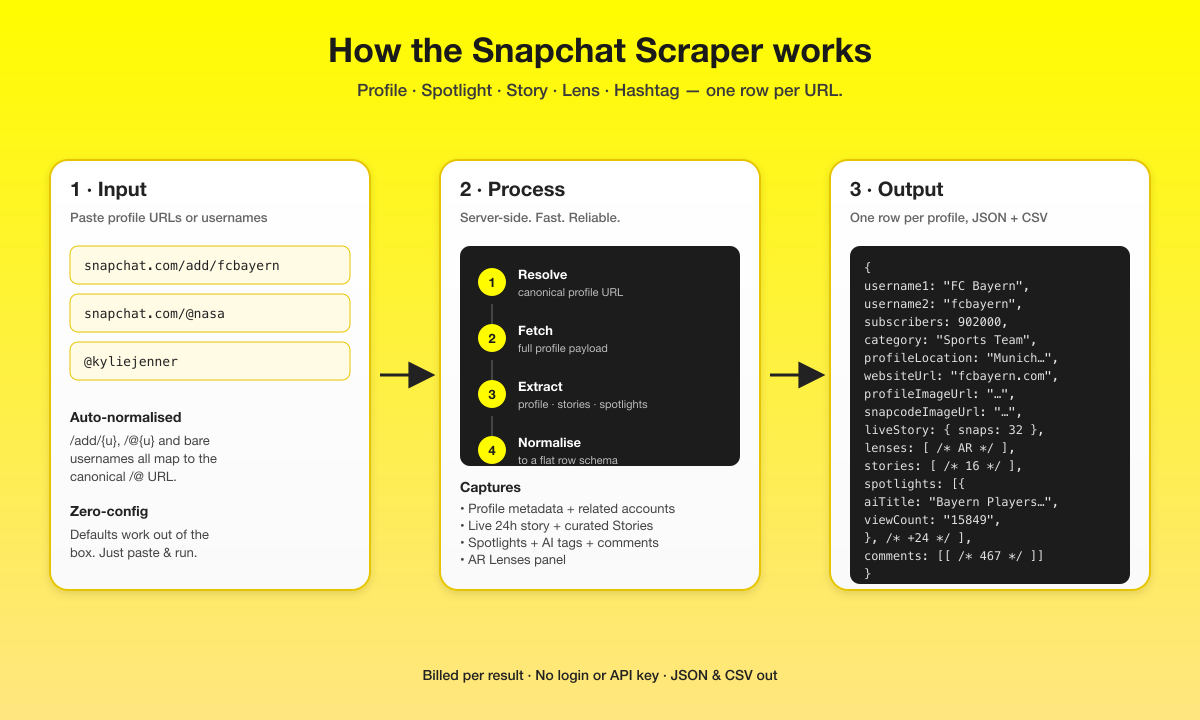
1. **Input.** Paste any mix of:
- Profile URLs — `https://www.snapchat.com/@fcbayern` or `https://www.snapchat.com/add/fcbayern`
- Spotlight clip URLs — `https://www.snapchat.com/spotlight/{shareId}` (or the canonical long form `/@{username}/spotlight/{shareId}`)
- Share links copied from the Snapchat app — `https://t.snapchat.com/{code}` or `https://snapchat.com/t/{code}`. The actor follows the redirect and scrapes whatever the link points at (clip, profile or Lens). Expired links are skipped with a warning in the log.
- Lens URLs — `https://www.snapchat.com/lens/{uuid}` or `https://www.snapchat.com/unlock?type=SNAPCODE&uuid={uuid}`
- Search / hashtag URLs — `https://www.snapchat.com/explore/{query}`
- Bare usernames — `fcbayern` or `@fcbayern`
- Bare hashtags — `#UCL`
- Bare lens UUIDs — `8124c89bb79642518622ddebb088ccc0`
2. **Process.** Server-side resolve, fetch, extract and normalise — typically about a second per URL.
3. **Output.** One row per URL — a profile row, spotlight-clip row, lens row, or search row — written to the Apify dataset.
***
### Input
Field | Type | Required | Notes
\--- | --- | --- | ---
`profileUrls` | `string[]` | yes | Any mix of profile URLs (`/add/{u}`, `/@{u}`, bare usernames), Spotlight URLs (`/spotlight/{id}`), app share links (`t.snapchat.com/{code}`), Lens URLs (`/lens/{uuid}` or `/unlock?uuid=...`), and search/hashtag URLs (`/explore/{q}` or `#hashtag`). Auto-classified. Default includes a profile, a Spotlight clip, a Lens, and a hashtag search.
`maxItems` | `integer` | no | Safety cap on billed output rows. In nested mode one URL = one row; with `oneRowPerClip` on, flat clip/snap rows count too. Default `1000`. Free-plan runs are capped at `100` rows.
`oneRowPerClip` | `boolean` | no | **Flat spreadsheet mode.** Profile URLs emit one row per Spotlight clip and per story snap (plus a profile summary row), each carrying the creator's handle, profile URL and subscriber count — drop the dataset straight into Excel, no JSON unnesting. Each flat row is a billed record. Default `false`.
`includeSpotlightComments` | `boolean` | no | Include the public viewer-comments thread under each Spotlight (default `false`). Each comment is billed at $0.0002. Comments typically run 300–500 per profile and are the heaviest field — disabling cuts row size by ~45%. The `spotlightComments[][]` shape is preserved (empty arrays), so downstream code that indexes by spotlight position keeps working.
`maxCommentsPerSpotlight` | `integer` | no | When `> 0`, keeps only the top-N comments per Spotlight by Snapchat's ranking score. Default `0` (no limit). Useful for sentiment analysis when you only need top engagement.
`maxConcurrency` / `minConcurrency` | `integer` | no | Per-actor parallelism. Default `5` / `1`.
`maxRequestRetries` | `integer` | no | Retries before a profile is given up. Default `5`.
`proxy` | object | no | Default: **off** — runs are cheapest that way. Enable a residential pool only for very large input lists.
#### Example input
Mix any URL kinds freely — auto-classified.
```json
{
"profileUrls": [
"https://www.snapchat.com/add/fcbayern",
"@kyliejenner",
"https://www.snapchat.com/spotlight/W7_EDlXWTBiXAEEniNoMPwAAYamRxY2h6Znl4AZ34_8b_AZ34_5HDAAAAAQ",
"https://www.snapchat.com/lens/8124c89bb79642518622ddebb088ccc0",
"https://www.snapchat.com/explore/UCL",
"#fcbarcelona"
],
"maxItems": 50,
"maxConcurrency": 5,
"includeSpotlightComments": true,
"maxCommentsPerSpotlight": 0,
"proxy": { "useApifyProxy": false }
}
```
Yields **6 rows**: 2 profile rows (Bayern + Kylie Jenner, each with a `contacts` panel), 1 Spotlight clip row (with audio transcript + 25 related clips), 1 Lens row (FC Barcelona AR lens + 12 related lenses), and 2 search rows (one per query — each aggregating ~24 matching Spotlights, ~5 creators and ~24 lenses).
#### Comment-toggle cheat sheet (measured on fcbayern, 25 spotlights)
`includeSpotlightComments` | `maxCommentsPerSpotlight` | Comments kept | Row size
\--- | --- | --- | ---
`true` (default) | `0` (default) | all 467 | ~322 KB
`true` | `5` | top 125 by ranking | ~218 KB
`true` | `20` | top ~400 by ranking | ~290 KB
`false` | — | 0 (empty threads) | ~177 KB
***
### Output schema
Four row shapes, distinguished by the `rowType` field:
- `rowType: "profile"` — emitted for profile URLs. Includes a `contacts` panel.
- `rowType: "spotlight"` — emitted for Spotlight clip URLs. Includes audio transcript + related-feed.
- `rowType: "lens"` — emitted for Lens URLs. Includes 12 related lenses + clips using this lens.
- `rowType: "search"` — emitted for `/explore/{query}` URLs and bare `#hashtags`. Aggregates matching spotlights, creators, lenses, episodes, places and topics.
With `oneRowPerClip: true`, profile URLs emit flat rows instead — built for CSV and Excel:
- `rowType: "clip"` — one row per Spotlight clip: engagement counts, AI title/keywords/description, transcript URL, direct video URL, plus `creatorUsername`, `creatorProfileUrl` and `creatorSubscribers` on every row. `clipPosition` keeps the tab order. Comments ride along in `comments` when the toggle is on.
- `rowType: "snap"` — one row per story snap, with `storyTitle`, `isLiveStory` and the same creator columns.
- The profile itself arrives as a summary row (bio, contacts, exact subscriber count) with `spotlightCount`, `storyCount`, `storySnapCount`, `lensCount` and `liveStorySnapCount` instead of the nested arrays.
> **Eats five competitor SKUs.** This actor folds the use cases of *Profile Scraper*, *Spotlight Clip Scraper*, *Email Scraper*, *Lens Scraper*, and *Hashtag/Discovery Scraper* — five separately-sold sister products on the Apify marketplace — into a single multi-URL-aware actor. And it surfaces fields that *none* of them expose: Snapchat's AI-generated Spotlight titles & scene descriptions, per-clip detected-language scores, audio-transcription URLs on Story snaps, full WebVTT audio transcripts, 25-clip related-feed, viewer comment threads.
#### Profile-level (top-level row)
```jsonc
{
"profileUrl": "https://www.snapchat.com/@fcbayern",
"username1": "FC Bayern", // display name
"username2": "fcbayern", // handle
"profileImageUrl": "https://cf-st.sc-cdn.net/…",
"profileDescription": "", // creator bio (when set)
"profileLocation": "Munich, Bavaria, Germany",
"subscribers": 902000, // integer
"category": "Sports Team",
"websiteUrl": "https://fcbayern.com",
"snapcodeImageUrl": "https://app.snapchat.com/…",
"badge": 1, // verified badge code
"sameAsLinks": [], // external profile links
"creationTimestampMs": "1557950746979",
"lastUpdateTimestampMs": "1778352327000",
"hasStory": false, // is a live 24h story posted right now?
"businessProfileId": "f035a3c6-9e43-4a23-a160-…", // UUID for joining datasets
"publisherType": null,
"primaryColor": null, // brand theme hex, if set
"squareHeroImageUrl": null, // wide hero banner, if set
"pageDescription": "FC Bayern is on Snapchat! (@fcbayern) | 902.0k Subscribers | Munich, Bavaria, Germany …",
"oneLinkUrl": "https://click.snapchat.com/aVHG?…", // universal mobile deeplink
"ogImageUrl": "https://us-east1-aws.api.snapchat.com/web-capture/…",
"relatedAccounts": [ // Snapchat's curated affinity list
{ "username": "juventus", "title": "Juventus", "badge": 1, "snapcodeImageUrl": null },
{ "username": "mancityofficial", "title": "Man City", "badge": 1, "snapcodeImageUrl": null },
{ "username": "chelseafc", "title": "Chelsea Football Club", "badge": 1, "snapcodeImageUrl": null }
],
"liveStory": { /* current 24h story — see below */ },
"lenses": [ /* AR Lenses tab — see below */ ],
"stories": [ /* see below */ ],
"spotlights": [ /* see below */ ],
"spotlightComments": [ /* per-spotlight viewer comments — see below */ ],
"contacts": { // see "Contacts" section below
"emails": ["press@example.com"],
"phones": ["+498912345678"],
"socialHandles": {
"instagram": "fcbayern",
"tiktok": "fcbayern",
"youtube": "fcbayerntv",
"twitter": "fcbayern",
"facebook": "FCBayern",
"telegram": null
},
"linktreeUrls": ["https://linktr.ee/…"],
"websiteUrls": ["https://fcbayern.com", "https://linktr.ee/…"]
},
"scrapedAt": "2026-05-11T08:21:09.412Z"
}
```
#### `contacts` — emails, phones, social handles extracted from bio + website
We run the profile's `profileDescription`, `websiteUrl`, and `sameAsLinks` through a contact-detection pass and surface:
- **`emails[]`** — every email address found in the bio
- **`phones[]`** — international-style phone numbers (digits-only, with leading `+`)
- **`socialHandles`** — Instagram, TikTok, YouTube, Twitter/X, Facebook, Telegram (bare handles, no `@`). Recognises both full URLs (`instagram.com/brand`) and bio shorthand (`IG: @brand`)
- **`linktreeUrls[]`** — `linktr.ee`, `linkin.bio`, `bio.link`, `beacons.ai`, `allmylinks.com`, `carrd.co` aggregator URLs
- **`websiteUrls[]`** — every http(s) URL found anywhere in the bio
If a creator hasn't put a given channel in their bio, the corresponding field is `null` or `[]`. The fields are always present so downstream code can index without null-guarding.
#### `stories[]` — curated highlight collections (chronological)
```jsonc
{
"storyType": 3,
"storyId": "",
"storyTitle": "",
"storySubtitle": null,
"emoji": null,
"thumbnailUrl": "https://cf-st.sc-cdn.net/d/BvC2b4GL…",
"canonicalUrlSuffix": null,
"videoTrackUrl": null,
"snapList": [
{
"snapId": "",
"snapMediaType": 1,
"mediaUrl": "https://cf-st.sc-cdn.net/d/…",
"mediaPreviewUrl": "https://cf-st.sc-cdn.net/d/…",
"overlayUrl": null,
"attachmentUrl": null,
"timestampInSec": "1778311147",
"snapTitle": null,
"snapSubtitles": null,
"lat": null, // geo-tag if the snap was tagged with a location
"lng": null,
"isSponsored": null,
"audioTranscriptionUrl": null // Snapchat-hosted WebVTT of the spoken audio, if available
}
// … up to ~15 snaps per story
]
}
```
#### `spotlights[]` — single-clip Spotlight posts with engagement + AI enrichments
```jsonc
{
"storyId": "W7_EDlXWTBiXAEEn…",
"thumbnailUrl": "https://bolt-gcdn.sc-cdn.net/bp/…",
"description": "🟥😤🟥 What we need from our fans against PSG 🤜🤛 #UCL #FCBPSG",
"hashtags": ["#UCL", "#FCBPSG"],
"timestampInSec": "1777998991",
"uploadDateMs": "1777998991811",
"durationMs": "44170",
"width": 540,
"height": 960,
"mediaUrl": "https://bolt-gcdn.sc-cdn.net/bp/…", // direct video file: download from here
"mediaPreviewUrl": "https://bolt-gcdn.sc-cdn.net/bp/…",
"contentUrl": "https://bolt-gcdn.sc-cdn.net/bp/…",
"deeplink": "https://click.snapchat.com/aVHG?…",
// Engagement
"viewCount": "15849",
"shareCount": "94",
"commentCount": "67",
"boostCount": "1455",
"recommendCount": "130",
// On-screen text + AI enrichments — exclusive to this actor
"embeddedTextCaption": null,
"aiTitle": "FC Bayern Players Urge Fans to Wear Red & Bring Energy for Champions League Match",
"aiDescription": "Athletes discussing fan engagement in soccer.",
"aiKeywords": [
"Bayern Munich training", "football fan energy", "Bayern Munich news",
"football motivation", "matchday tips"
// … up to ~25 LLM tags per clip
],
"contentKeywords": ["athlete training", "soccer", "fan engagement", "football", "team support"],
"detectedLanguages": [{ "languageCode": "de", "score": 0.9259 }],
// Linked sounds / business profile cards attached to the clip
"contextCards": [
{ "contextType": 2, "title": "Original Sound", "subtitle": "fcbayern", "url": null, "snapcodeUrl": null, "thumbnailUrl": "https://cf-st.sc-cdn.net/d/…", "hasBadge": false, "id": "108293712385" },
{ "contextType": 3, "title": "FC Bayern", "subtitle": "fcbayern", "url": "https://www.snapchat.com/@fcbayern", "snapcodeUrl": "https://app.snapchat.com/web/deeplink/snapcode?username=fcbayern&type=SVG&bitmoji=enable", "thumbnailUrl": "https://cf-st.sc-cdn.net/aps/bolt/…", "hasBadge": true, "id": "f035a3c6-9e43-4a23-a160-701dec6bb12b" }
]
}
```
#### `lenses[]` — the AR Lenses tab on the profile
```jsonc
{
"lensName": "FC Barcelona",
"lensCreatorDisplayName": "FC Barcelona",
"lensCreatorUsername": null,
"iconUrl": "https://bolt-gcdn.sc-cdn.net/3/RBXv7yxQeo4VeQLNNAJmM?…",
"previewImageUrl": "https://lens-preview-storage.storage.googleapis.com/previewmedia/preview_thumbnail/…webp",
"previewVideoUrl": "https://lens-storage.storage.googleapis.com/previewvideo/…",
"unlockUrl": "https://www.snapchat.com/unlock/?type=SNAPCODE&uuid=8124c89bb79642518622ddebb088ccc0&metadata=01",
"isOfficialSnapLens": false,
"lastUpdatedEpoch": 1777434016
}
```
#### `liveStory` — the creator's currently-live 24-hour ephemeral story (or `null`)
Same shape as a `stories[]` entry, but the content **disappears 24 hours after posting** — scrape it now or lose it. `storyType` is typically `5` for the live story (vs `3` for curated highlights). FC Barcelona had **32 active snaps** within the last 14 hours at the time of writing.
#### `spotlightComments[][]` — public viewer comments under each Spotlight clip
A 2-D array indexed by Spotlight position. `spotlightComments[i]` is the comment thread under `spotlights[i]`.
```jsonc
[
// comments under spotlights[0]:
[
{
"snapId": "W7_EDlXWTBiXAEEniNoMPwAA…",
"text": "Hala madrid",
"authorDisplayName": "Oswald🇮🇪⚽️✝️",
"authorBitmojiAvatarId": "105791014945_7-s5",
"timestampMs": "1778424523857",
"threadedReplyCount": 4,
"rankingScore": 1812,
"reactions": [{ "reactTypeId": "1", "reactCount": "10" }],
"totalReactions": 10
}
// … typically 15–25 top-level comments per spotlight on active profiles
]
]
```
Real volume from a single FC Barcelona scrape: **331 comments across 16 spotlights**. Bayern Munich: **467 comments across 25 spotlights**.
#### Spotlight clip row (`rowType: "spotlight"`)
Emitted when the input URL is a Spotlight clip (`/spotlight/{id}` or `/@{u}/spotlight/{id}`).
```jsonc
{
"rowType": "spotlight",
"spotlightUrl": "https://www.snapchat.com/spotlight/W7_EDl…",
"storyId": "W7_EDlXWTBiXAEEniNoMPwAA…",
"shareId": "W7_EDlXWTBiXAEEniNoMPwAA…",
"creator": {
"username": "fcbarcelona",
"displayName": "FC Barcelona",
"followerCount": "0",
"websiteUrl": null
},
// Same clip-level fields as a profile-row's spotlights[] entry:
"thumbnailUrl": "https://bolt-gcdn.sc-cdn.net/bp/…",
"description": "#fcbarcelona",
"hashtags": ["#fcbarcelona"],
"uploadDateMs": "1778418164840",
"durationMs": "9930",
"width": 540,
"height": 960,
"mediaUrl": "https://bolt-gcdn.sc-cdn.net/bp/…",
"mediaPreviewUrl": "https://bolt-gcdn.sc-cdn.net/bp/…",
"contentUrl": "https://bolt-gcdn.sc-cdn.net/bp/…",
"deeplink": "https://click.snapchat.com/aVHG?…",
"viewCount": "16408",
"shareCount": "97",
"commentCount": "93",
"boostCount": "2751",
"recommendCount": "305",
"embeddedTextCaption": null,
// AI enrichments (same shape as in profile-row spotlights):
"aiTitle": "FC Barcelona Players Celebrate Birthday with Teammates",
"aiKeywords": [ /* up to ~25 LLM tags */ ],
"aiDescription": "Athletes discussing fan engagement in soccer.",
"contentKeywords": ["athlete training", "soccer", "fan engagement"],
"detectedLanguages": [{ "languageCode": "en", "score": 0.9921 }],
"contextCards": [ /* linked sound + business profile */ ],
// SPOTLIGHT-URL EXCLUSIVES (not available from the profile page):
"transcriptUrl": "https://bolt-gcdn.sc-cdn.net/3/pLovkAlk…vtt?…",
"transcript": "Hey coolers, it's Olivia Rodrigo and I am wishing the FC Barcelona team a successful El Clasico. Forza Barça!",
"comments": [ /* 22 comments under THIS clip, flat list */ ],
"relatedSpotlights": [
/* up to 25 "more like this" clips, each a full SnapchatSpotlight
object with its own AI title / keywords / detected language
/ engagement stats / context cards. Snapchat ranks them by
relevance to the input clip. */
],
"scrapedAt": "2026-05-11T08:21:09.412Z"
}
```
**Why this is exclusive:** the WebVTT audio transcript and the 25-clip related-feed are only present on the Spotlight clip page. Scraping the creator's profile gives you the same clip's metadata + engagement + AI enrichments — but no transcript and no related-feed.
#### Lens row (`rowType: "lens"`)
Emitted from `/lens/{uuid}` or `/unlock?uuid={uuid}` URLs (bare 32-char hex UUIDs are also auto-canonicalised).
```jsonc
{
"rowType": "lens",
"lensUrl": "https://www.snapchat.com/lens/8124c89bb79642518622ddebb088ccc0",
"scannableUuid": "8124c89bb79642518622ddebb088ccc0",
"lensId": "53181080886",
"lensName": "FC Barcelona",
"lensCreatorDisplayName": "FC Barcelona",
"lensCreatorUsername": "fcbarcelona",
"creatorProfileUrl": "https://www.snapchat.com/@fcbarcelona",
"iconUrl": "https://bolt-gcdn.sc-cdn.net/3/…",
"previewImageUrl": "https://lens-preview-storage.storage.googleapis.com/…webp",
"previewVideoUrl": "https://lens-storage.storage.googleapis.com/previewvideo/…",
"unlockUrl": "https://snapchat.com/unlock/?type=SNAPCODE&uuid=…&metadata=01",
"creatorSearchTags": ["event", "football", "game", "sport", "Barcelona", "FCB"],
"isOfficialSnapLens": false,
"lastUpdatedEpoch": 1777434016,
"moreLenses": [ /* up to 12 Snapchat-curated related Lenses */ ],
"spotlightsUsingThisLens":[ /* Spotlight clips that USE this Lens — often empty for brand lenses, populated for trending creator lenses */ ]
}
```
#### Search row (`rowType: "search"`)
Emitted from `/explore/{query}` URLs and bare `#hashtags`. Aggregates all 6 of Snapchat's search sections into a single normalised payload.
```jsonc
{
"rowType": "search",
"searchUrl": "https://www.snapchat.com/explore/UCL",
"query": "UCL",
"spotlights": [
/* up to 24 Spotlight clips matching the query — same shape as the
per-profile spotlights[] entries (engagement stats, hashtags,
content keywords, media URLs). AI enrichments are not on the search
payload — use the Spotlight URL row type if you need aiTitle etc. */
],
"creators": [
{
"username": "ucl",
"title": "ᴬ ᴼ ᴬ 🌪️",
"badge": null,
"subscriberCount": 805,
"bio": "🐎 …",
"profilePictureUrl": "https://cf-st.sc-cdn.net/aps/bolt/…",
"snapcodeImageUrl": null,
"businessProfileId": "cfa17514-24d6-4e2d-9def-…"
}
],
"lenses": [
{
"lensName": "UCL Final 2020",
"lensCreatorDisplayName": "Nabhan Mohtesham",
"lensCreatorUsername": null,
"iconUrl": "https://lens-storage.storage.googleapis.com/png/…",
"previewImageUrl": null,
"previewVideoUrl": null,
"unlockUrl": "https://www.snapchat.com/unlock/?type=SNAPCODE&uuid=…",
"isOfficialSnapLens": false,
"lastUpdatedEpoch": null
}
],
"episodes": [ { "title": "Beckham pulled this off for his first UCL match with PSG 😳", "publisherName": null } ],
"places": [ { "title": "Champions League Stadium", "subtitle": "London, UK" } ],
"topics": ["ucl"],
"counts": { "spotlights": 24, "creators": 4, "lenses": 24, "episodes": 12, "places": 10, "topics": 1 }
}
```
#### What makes this richer than the competition
We surveyed all 17 Snapchat actors on the Apify marketplace (May 2026):
Capability | Competitor actors | **This actor**
\--- | --- | ---
Per-profile top-level fields | ~12 | **31**
Per-Spotlight fields | ~6 | **25**
Per-Spotlight-clip-row fields | n/a (separate SKU) | **33** (incl. transcript + 25-clip related feed)
Per-Story-snap fields | 4–5 | **13** (incl. geo, on-screen text, audio-transcript URL)
AI-generated `aiTitle` per Spotlight | ❌ | ✅ (15 / 16 clips for active creators)
AI-generated `aiKeywords` (up to 25) | ❌ | ✅
AI scene `aiDescription` | ❌ | ✅
Snapchat content-classification keywords | ❌ | ✅
Per-clip `detectedLanguages` with confidence | ❌ | ✅
**Public viewer comments under each Spotlight** | ❌ | ✅ (300–500 per profile)
**Live 24h ephemeral story snaps** | Separate sister product | ✅ (folded into the same row)
**AR `lenses[]` panel** | 1 of 17 actors | ✅
Snapchat's "Related Accounts" affinity panel | 2 of 17 actors | ✅
Live-story flag (`hasStory`) | ❌ | ✅
Business profile UUID (join key) | ❌ | ✅
Universal deeplink + OG share image | ❌ | ✅
Spotlight `contextCards` (linked sound + biz card) | ❌ | ✅
**Single Spotlight clip URL → row (separate product)** | `easyapi/snapchat-spotlight-detail-scraper`, `crawlerbros/snapchat-spotlight-video-downloader` | ✅ (folded into the same actor, with the direct video `mediaUrl`)
**`t.snapchat.com` / `snapchat.com/t/` share links from the app** | `crawlerbros/snapchat-spotlight-video-downloader` | ✅ (redirect followed, any target kind)
**Full WebVTT audio transcript** of a Spotlight clip | ❌ | ✅ (`transcript` + `transcriptUrl`)
**25-clip "more like this" related-feed** per Spotlight URL | ❌ | ✅ (with full AI enrichment per related clip)
**Email / phone / social-handle extraction** from profile bios | `easyapi/snapchat-email-scraper` (740 users — separate product) | ✅ (folded into every profile row's `contacts` panel)
**Lens URL → row (separate product)** | ❌ | ✅ (incl. 12 related lenses + clips using the lens)
**Flat spreadsheet mode** (one row per clip/snap, creator columns on every row) | 1 of 17 actors | ✅ (`oneRowPerClip`, opt-in — nested mode stays the default)
**Search / hashtag URL → row (separate product)** | `crawlerbros/snapchat-hashtag-scraper` (7 users), `easyapi/snapchat-popular-accounts-scraper` (92 users — separate products) | ✅ (folded into one search row aggregating 6 sections)
***
### Pricing
Event | When | Price
\--- | --- | ---
Actor start | Once per run | $0.001
`result` | Once per row: a profile, Spotlight clip, Lens or search row — in flat mode (`oneRowPerClip`), each clip, snap and summary row | **$1.75 per 1,000 rows** ($0.00175 each)
Viewer comment | Once per viewer comment, only with `includeSpotlightComments` on | $0.20 per 1,000 ($0.0002 each)
Everything else in a row comes with it: a profile's stories, Spotlight clips, Lenses, related accounts and live story snaps, a clip's 25 related clips and transcript, a Lens's related lenses, and all six sections of a search row.
#### Real-world cost preview
Measured 2026-10-18 with default settings (comments off):
Input | Rows | Price
\--- | --- | ---
2 profiles (`@nasa`, `@fcbayern`) | 2 | $0.0045 ($0.001 start + 2 × $0.00175)
Same 2 profiles with comments on (605 comments) | 2 | $0.126
Set `maxCommentsPerSpotlight` to keep only the top-ranked comments per clip and pay for fewer.
Free-tier users are capped at 100 rows per run.
***
### Pagination & limits
For each profile row, the actor returns **the first batch of items per tab** — the same set Snapchat itself shows on the anonymous profile landing page:
| Tab | Typical first-batch size |
|---|---|
| Stories (curated highlights) | up to **16** |
| Spotlight clips | up to **~25** |
| Lenses (AR) | typically 0–12 — full list |
| Live 24h story | all snaps in the active window |
| Related accounts | 3 (Snapchat's hard cap) |
| Spotlight comments per clip | all top-level comments (~15–30) |
**Why first-batch only:** the anonymous profile page carries only its first batch of content per tab. Loading older history would require an authenticated Snapchat account — out of scope for a public-data scraper.
This is the **same ceiling every other Snapchat scraper on the Apify marketplace hits** — none paginate. For most accounts the first batch covers all recent activity; for heavily-active creators with 50+ archived stories, older content is not retrievable without auth.
### Notes & limitations
- **Public profiles only.** Private accounts, age-gated content, and deactivated users are skipped and logged.
- **Stories vs spotlights.** `stories[]` are chronological collections of snaps a creator pinned to their profile. `spotlights[]` are single-clip TikTok-style snaps with engagement metrics (views, shares, comments).
- **Subscribers** are returned as an integer.
- **Category** is the human label that Snapchat displays on the profile (e.g. `"Sports Team"`).
- **Built to last.** The actor adapts automatically if Snapchat changes its pages over time — no input changes needed on your end.
***
### Support
Issues, feature requests, or custom output shapes? Open a ticket on the actor's Apify page or message the maintainer.
***
### 🤖 For AI Agents & LLM Apps
Compact reference for AI agents calling this actor via the [Apify MCP server](https://mcp.apify.com) or the Apify API (actor: `memo23/snapchat-scraper`).
**Purpose:** All-in-one Snapchat scraper — profiles, Spotlight clips, Lenses, and search/hashtag feeds are auto-classified from one mixed URL list, emitting one dataset row per URL.
**Minimal input:**
```json
{
"profileUrls": ["https://www.snapchat.com/add/fcbayern"],
"maxItems": 25,
"includeSpotlightComments": true,
"maxCommentsPerSpotlight": 0,
"maxConcurrency": 5,
"minConcurrency": 1,
"maxRequestRetries": 5,
"proxy": { "useApifyProxy": false }
}
```
Bare usernames, `#hashtags`, Spotlight URLs (`/spotlight/{id}`), Lens URLs (`/lens/{uuid}`), and `/explore/{query}` search URLs can be mixed into `profileUrls` too.
**Output:** one row per URL, keyed by `rowType` (`profile` / `spotlight` / `lens` / `search`). Profile rows: profileUrl, username1, username2, subscribers, category, websiteUrl, businessProfileId, hasStory, relatedAccounts, liveStory, lenses, stories, spotlights (with aiTitle, aiKeywords, detectedLanguages, engagement counts), spotlightComments, contacts (emails, phones, socialHandles, linktreeUrls, websiteUrls), scrapedAt. Spotlight rows add transcript, transcriptUrl, comments, relatedSpotlights. Lens rows add scannableUuid, creatorSearchTags, moreLenses, spotlightsUsingThisLens. Search rows add query, spotlights, creators, lenses, episodes, places, topics, counts.
**Behaviors an agent should know:**
- Every `profileUrls` entry is auto-classified by URL shape; one row per URL.
- Set `maxItems` to cap billed rows (default 1000; free-plan runs capped at 100).
- `oneRowPerClip: true` turns profile URLs into flat rows — `rowType: "clip"` per Spotlight and `rowType: "snap"` per story snap, each with creatorUsername, creatorProfileUrl and creatorSubscribers, plus a profile summary row with counts. Each flat row is a billed record; nested mode (default) stays one row per URL.
- `includeSpotlightComments` (default false) is the heaviest field (~150–500 comments per profile, $0.0002 each); `maxCommentsPerSpotlight: N` keeps only the top N per clip.
- Proxy is off by default; enable a residential pool only on rate limits.
- Billing: $0.00175 per row plus $0.001 per run; viewer comments, when turned on, $0.0002 each.
- Public profiles only, first-batch per tab (no deep pagination without auth); private/age-gated accounts are skipped.
***
### ⚠️ Disclaimer
This Actor is an independent tool and is not affiliated with, endorsed by, or sponsored by Snap Inc. or any of its subsidiaries. All trademarks mentioned — including Snapchat, Spotlight, and Snap — are the property of their respective owners.
The scraper accesses only publicly available Snapchat profile, Spotlight, Lens, and search pages — no authenticated endpoints, private accounts, age-gated content, or data behind the Snapchat login wall. Users are responsible for ensuring their use complies with Snapchat's Terms of Service, applicable data-protection law (GDPR, CCPA, etc.), and any contractual obligations of their own organisation.
***
### SEO Keywords
snapchat scraper, scrape snapchat, snapchat video downloader, snapchat spotlight video downloader, download snapchat spotlight videos, snapchat spotlight downloader, snapchat share link, t.snapchat.com, snapchat profile scraper, snapchat spotlight scraper, snapchat lens scraper, snapchat hashtag scraper, snapchat story scraper, snapchat api, Apify snapchat, snapchat email scraper, snapchat contacts scraper, snapchat data extraction, social media intelligence, influencer discovery data, creator analytics, spotlight video data, ar lens data, snapchat comments scraper, snapchat username scraper, snapchat marketing data
# Actor input Schema
## `profileUrls` (type: `array`):
Paste any mix of:
• Profile URLs — `https://www.snapchat.com/add/{u}` or `/@{u}` (or just `username`)
• Spotlight clip URLs — `https://www.snapchat.com/spotlight/{id}`
• Share links from the Snapchat app — `https://t.snapchat.com/{code}` or `https://snapchat.com/t/{code}` (resolved to the clip, profile or Lens they point at)
• Lens URLs — `https://www.snapchat.com/lens/{uuid}` or `/unlock?uuid={uuid}`
• Search / hashtag URLs — `https://www.snapchat.com/explore/{query}` (or just `#hashtag`)
Each entry is auto-classified and the scraper emits the matching row type — one row per URL. Profile rows include AR Lenses, live story, Stories, Spotlights with AI titles + audio-transcription URLs, viewer comments and a contacts panel. Spotlight rows include the full audio transcript + 25-clip 'more like this' feed. Lens rows include the AR Lens detail + clips using it. Search rows aggregate matching spotlights, creators, lenses, episodes, places and topics.
## `maxItems` (type: `integer`):
Safety cap on billed output rows. In the default nested mode one URL = one row = one paid record; with 'One row per clip' on, every clip/snap row counts too. Useful to test cost on the first N rows before a full job. Free-plan runs are capped at 100 rows regardless. Default: 1000.
## `oneRowPerClip` (type: `boolean`):
Profile URLs emit flat rows instead of one nested row: a profile summary row (bio, subscriber count, contacts, counts), then one row per Spotlight clip (views, shares, comments, AI title/keywords, transcript URL, direct video URL) and one row per story snap — each carrying the creator's username, profile URL and subscriber count, so every row stands alone in CSV or Excel. Each flat row is a billed output record and counts against Max output rows. Default: false (one nested row per URL).
## `includeSpotlightComments` (type: `boolean`):
Add the public viewer comments under each Spotlight clip: text, reactions, author display name and Bitmoji id, time, reply count and ranking score. A profile typically has 150–500. Each comment is billed at $0.0002 (see Pricing); stories, Spotlights, Lenses and related accounts in the row are not billed extra. Default: off.
## `maxCommentsPerSpotlight` (type: `integer`):
When > 0, keeps only the top-N comments per Spotlight by Snapchat's ranking score. Useful for sentiment analysis when you only need top engagement. Ignored when the toggle above is OFF.
## `maxConcurrency` (type: `integer`):
Maximum number of profile pages processed in parallel.
## `minConcurrency` (type: `integer`):
Minimum number of profile pages processed in parallel.
## `maxRequestRetries` (type: `integer`):
Number of retries before a failed request is given up.
## `proxy` (type: `object`):
Apify proxy settings. Proxy is off by default and runs are cheapest that way. Enable a residential pool only for very large input lists.
## Actor input object example
```json
{
"profileUrls": [
"https://www.snapchat.com/add/fcbayern",
"https://www.snapchat.com/spotlight/W7_EDlXWTBiXAEEniNoMPwAAYamRxY2h6Znl4AZ34_8b_AZ34_5HDAAAAAQ",
"https://www.snapchat.com/lens/8124c89bb79642518622ddebb088ccc0",
"https://www.snapchat.com/explore/UCL"
],
"maxItems": 1000,
"oneRowPerClip": false,
"includeSpotlightComments": false,
"maxCommentsPerSpotlight": 0,
"maxConcurrency": 5,
"minConcurrency": 1,
"maxRequestRetries": 5,
"proxy": {
"useApifyProxy": false
}
}
```
# Actor output Schema
## `rows` (type: `string`):
Every output row: profiles with bios, subscriber counts and contacts; Spotlight clips with engagement counts, AI titles and transcripts; Lenses; search results.
# API
You can run this Actor programmatically using our API. Below are code examples in JavaScript, Python, and CLI, as well as the OpenAPI specification and MCP server setup.
## JavaScript example
```javascript
import { ApifyClient } from 'apify-client';
// Initialize the ApifyClient with your Apify API token
// Replace the '' with your token
const client = new ApifyClient({
token: '',
});
// Prepare Actor input
const input = {
"profileUrls": [
"https://www.snapchat.com/add/fcbayern",
"https://www.snapchat.com/spotlight/W7_EDlXWTBiXAEEniNoMPwAAYamRxY2h6Znl4AZ34_8b_AZ34_5HDAAAAAQ",
"https://www.snapchat.com/lens/8124c89bb79642518622ddebb088ccc0",
"https://www.snapchat.com/explore/UCL"
],
"proxy": {
"useApifyProxy": false
}
};
// Run the Actor and wait for it to finish
const run = await client.actor("memo23/snapchat-scraper").call(input);
// Fetch and print Actor results from the run's dataset (if any)
console.log('Results from dataset');
console.log(`💾 Check your data here: https://console.apify.com/storage/datasets/${run.defaultDatasetId}`);
const { items } = await client.dataset(run.defaultDatasetId).listItems();
items.forEach((item) => {
console.dir(item);
});
// 📚 Want to learn more 📖? Go to → https://docs.apify.com/api/client/js/docs
```
## Python example
```python
from apify_client import ApifyClient
# Initialize the ApifyClient with your Apify API token
# Replace '' with your token.
client = ApifyClient("")
# Prepare the Actor input
run_input = {
"profileUrls": [
"https://www.snapchat.com/add/fcbayern",
"https://www.snapchat.com/spotlight/W7_EDlXWTBiXAEEniNoMPwAAYamRxY2h6Znl4AZ34_8b_AZ34_5HDAAAAAQ",
"https://www.snapchat.com/lens/8124c89bb79642518622ddebb088ccc0",
"https://www.snapchat.com/explore/UCL",
],
"proxy": { "useApifyProxy": False },
}
# Run the Actor and wait for it to finish
run = client.actor("memo23/snapchat-scraper").call(run_input=run_input)
# Fetch and print Actor results from the run's dataset (if there are any)
print(f"💾 Check your data here: https://console.apify.com/storage/datasets/{run.default_dataset_id}")
for item in client.dataset(run.default_dataset_id).iterate_items():
print(item)
# 📚 Want to learn more 📖? Go to → https://docs.apify.com/api/client/python/docs/quick-start
```
## CLI example
```bash
echo '{
"profileUrls": [
"https://www.snapchat.com/add/fcbayern",
"https://www.snapchat.com/spotlight/W7_EDlXWTBiXAEEniNoMPwAAYamRxY2h6Znl4AZ34_8b_AZ34_5HDAAAAAQ",
"https://www.snapchat.com/lens/8124c89bb79642518622ddebb088ccc0",
"https://www.snapchat.com/explore/UCL"
],
"proxy": {
"useApifyProxy": false
}
}' |
apify call memo23/snapchat-scraper --silent --output-dataset
```
## MCP server setup
```json
{
"mcpServers": {
"apify": {
"type": "http",
"url": "https://mcp.apify.com/?tools=fetch-actor-details,memo23/snapchat-scraper"
}
}
}
```
The hosted server signs you in with OAuth on first connect, so no API token belongs in this config. Clients without OAuth support can send an `Authorization: Bearer ` header instead, using a token from API & Integrations in Apify Console (https://console.apify.com/settings/integrations).
## OpenAPI specification
Download the OpenAPI definition: https://api.apify.com/v2/actors/b0U2adke25SLUKTG5/builds/vdSfg0eWrwr34Vih5/openapi.json