# Rumble Scraper \[$1/1K 💰] Videos, Channels & Transcripts (`memo23/rumble-scraper`) Actor
Rumble Scraper — extract videos from any Rumble.com search, channel, user, category or video URL: title, views, likes, dislikes, comments, duration, upload date, channel + followers, tags and direct MP4/audio download URLs. One row per video, JSON/CSV. No browser.
- **URL**: https://apify.com/memo23/rumble-scraper.md
- **Developed by:** [Muhamed Didovic](https://apify.com/memo23) (community)
- **Categories:** Videos, Social media, AI
- **Features:** Limited permissions
- **Stats:** 32 total users, 9 monthly users, 97.8% runs succeeded, 0 bookmarks
- **User rating**: No ratings yet
## Pricing
from $1.00 / 1,000 video results
This Actor is paid per event. You are not charged for the Apify platform usage, but only a fixed price for specific events.
Learn more: https://docs.apify.com/actors/running/actors-in-store.md#pay-per-event
## What's an Apify Actor?
An Actor is a serverless cloud program that runs on the Apify platform. It has two run modes.
In Batch mode, an Actor accepts a well-defined JSON input, performs an action which can take anything from a few seconds to a few hours,
and optionally produces a well-defined JSON output, datasets with results, or files in key-value store.
In Standby mode, an Actor provides a web server which can be used as a website, API, or an MCP server.
Apify vocabulary and the platform model are defined once, in the agent quickstart at https://apify.com/agents.md.
## How to integrate an Actor?
If asked about integration, you help developers integrate Actors into their projects.
You adapt to their stack and deliver integrations that are safe, well-documented, and production-ready.
Do not guess an integration path. Every one of them is in the agent quickstart at https://apify.com/agents.md: the Apify MCP server, Agent Skills with the Apify CLI, the JavaScript and Python clients, the REST API, and the account-free path for an agent with no human to sign in. It also carries the rule on stating cost before the first paid run.
For examples already wired to this Actor's own input schema, see the [API](#api) section below.
Each client library has reference documentation the quickstart does not restate: [JavaScript/TypeScript](https://docs.apify.com/api/client/js/docs.md) (`npm install apify-client`) and [Python](https://docs.apify.com/api/client/python/docs.md) (`pip install apify-client`).
# README
## Rumble Scraper — Videos, Channels & Search
Extract videos and channels from **Rumble.com** at scale. Paste any search, channel, user, category, playlist, editor-picks, trending feed, or single-video URL and get one clean row per video: title, description, views, likes, dislikes, comments, duration, upload date, channel + followers, categories, tags, thumbnail, and **per-resolution MP4 + audio download URLs**. Channel URLs also return a channel row with followers, total views, join date, social links and public contact email. Full transcripts are one toggle away. Pure HTTP, no browser, **$1 per 1,000 videos**.
### Why use this scraper
- **Full video transcripts, no speech-to-text.** Rumble auto-generates English captions for roughly 9 in 10 videos and serves them as a plain caption file — this scraper downloads and parses them into clean text plus timestamped segments, so you get searchable transcripts at scraping cost, not transcription cost.
- **Every URL type in one run**: search results, channels (`/c/…`), users (`/user/…`), categories (`/category/…`), playlists, Editor Picks, the trending `/videos` feed, and direct video pages. Mix them freely.
- **Channel leads**: each channel or user URL also yields a `type: "channel"` row with followers, total channel views, join date, verified flag, social links (X/Twitter, Facebook, Instagram, Truth Social, YouTube, TikTok, Telegram), website and the public contact email from the About tab.
- **Direct download URLs** — the only Rumble scraper that returns the actual MP4 stream URLs at **every resolution** (360/480/720/1080) plus the audio-only track. Turns the scraper into a downloader.
- **Rich metadata** — title, full description, view count, exact duration, publish date, channel name + URL, categories, dimensions (width/height/fps), live flag, embed and share URLs.
- **Browser-free** — plain HTTP + Rumble's own `embedJS` JSON API. No Chromium, so it's fast and low-cost.
- **One row per video** — no padding rows; you pay per result.
### Supported inputs
| Type | Example URL |
|---|---|
| 🔍 Search | `https://rumble.com/search/video?q=news` |
| 📺 Channel | `https://rumble.com/c/GameOnShow` |
| 👤 User | `https://rumble.com/user/RealAmericasVoice` |
| 📂 Category | `https://rumble.com/category/news` |
| 📃 Playlists tab | `https://rumble.com/c/NewsmaxTV/playlists` |
| 🎞️ Playlist | `https://rumble.com/playlists/bIiAjWZmvAg` |
| 🔍 Channel search | `https://rumble.com/search/channel?q=news` |
| ⭐ Editor Picks | `https://rumble.com/editor-picks` |
| 📈 Trending feed | `https://rumble.com/videos?sort=views&date=today` |
| 🎬 Video | `https://rumble.com/v7cwvbs-white-nukes-fox-news.html` |
### Use cases
- **Media monitoring** — track a channel's uploads, views, and publish cadence.
- **Content archiving** — pull the direct MP4/audio URLs to back up videos.
- **Trend research** — scrape category or search feeds to see what's gaining traction.
- **Dataset building** — collect video metadata for ML / analytics.
### How it works
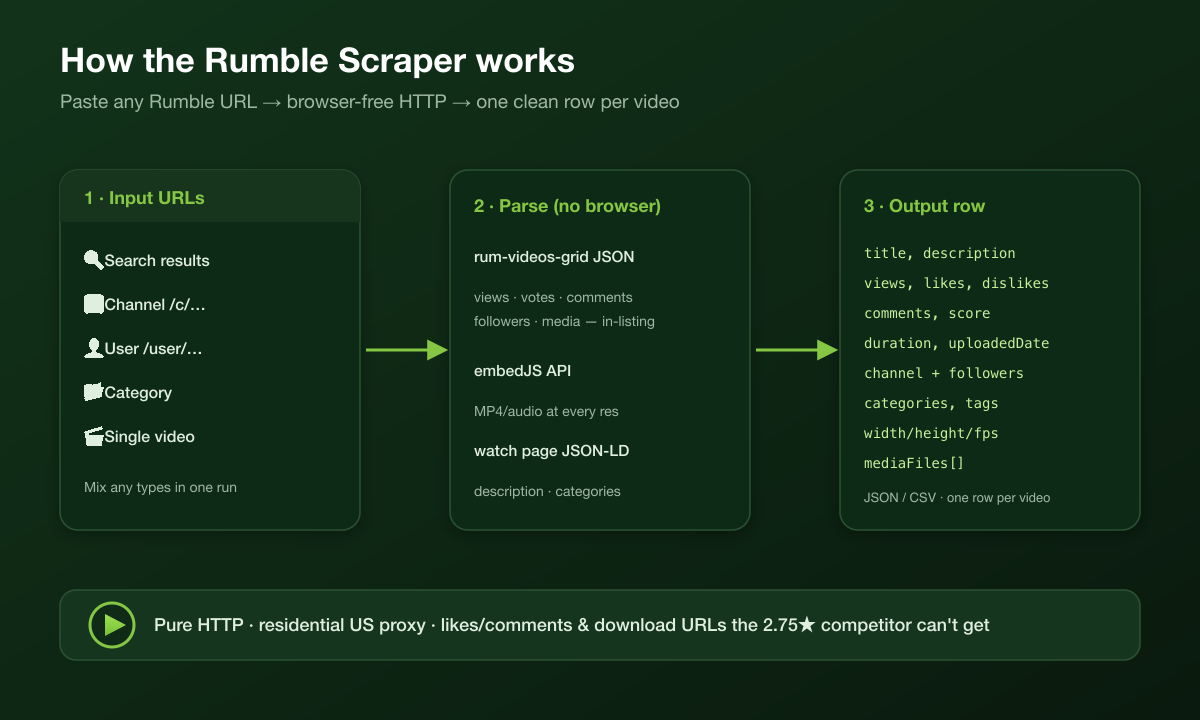
1. Each start URL is classified (video vs listing).
2. Listing surfaces are paged through (`?page=N`) and every video card is parsed.
3. With **Fetch full details** on, each video is enriched from its watch page (JSON-LD, categories, views) and Rumble's `embedJS` API (media URLs, exact duration, author, dimensions).
4. Rows are pushed to the dataset (flattened for CSV/Excel by default).
### Input configuration
| Field | Description |
|---|---|
| `startUrls` | Rumble URLs (any mix of the types above). Optional if `searchQueries` is set. |
| `searchQueries` | Keywords. Built into `/search/video` or `/search/channel` URLs. |
| `searchType` | `video` (default) or `channel`. |
| `sortingOrder` | `relevance`, `date`, `views`, or `rating`. |
| `dateFilter` | `any`, `today`, `this-week`, `this-month`, `this-year`. |
| `lengthFilter` | `any`, `short`, or `long`. |
| `includeChannelInfo` | Also emit a `type=channel` row (followers, joined, socials, email) for channel/user URLs. Default on. |
| `maxItems` | Max rows per run (0 = unlimited). |
| `fetchDetails` | Enrich each video with description, views, categories, dimensions, and per-resolution media URLs. Default on. |
| `extractTranscript` | Download each video's caption track and return the full transcript plus timestamped segments. Off by default; turning it on enables `fetchDetails` automatically. Billed **$0.005 per transcript** on top of the result price — videos with no caption track are not charged. |
| `maxPagesPerList` | Pagination cap per listing surface. |
| `detailConcurrency` | Parallel detail fetches. |
| `flatten` | Flatten nested fields for tabular export. Default on. |
| `proxy` | Proxy configuration (non-paying users). |
### Output — key fields
**Captions & transcript**
| Field | Notes |
|---|---|
| `captionsAvailable` | Whether Rumble has a caption track for this video. Always reported when details are fetched — costs no extra request. |
| `captionLanguages` | Available caption language codes, e.g. `["en-auto"]`. |
| `captionUrl` | Direct link to the caption file. |
| `transcript` | Full plain-text transcript, consecutive duplicate lines collapsed. Only with `extractTranscript`. |
| `transcriptSegments` | `[{ start, end, text }]` in seconds, every cue kept verbatim. Only with `extractTranscript`. |
| Field | Description |
|---|---|
| `title`, `description` | Video title and full description. |
| `url`, `id`, `embedId` | Watch URL, numeric id, short embed id. |
| `views` | View count. |
| `likes`, `dislikes`, `score` | Rumble up-votes, down-votes, net score. |
| `comments` | Comment count. |
| `durationSeconds`, `duration` | Length in seconds and `h:mm:ss`. |
| `uploadedDate` | ISO publish date. |
| `channelName`, `channelUrl`, `channelFollowers` | Uploading channel/user + follower count. |
| `categories`, `tags` | Category and tag labels. |
| `isShort`, `isLive`, `isMonetized`, `isAgeRestricted` | Content flags. |
| `thumbnail` | Poster image URL. |
| `width`, `height`, `fps` | Video dimensions and frame rate. |
| `embedUrl`, `shareUrl` | Embed and share links. |
| `mediaFiles` | **Array of `{quality, url, type, width, height}`** — direct MP4 URLs at each resolution + audio. |
**Channel row** (`type: "channel"`, one per channel/user URL while `includeChannelInfo` is on)
| Field | Description |
|---|---|
| `channelName`, `channelUrl`, `channelIsVerified` | Channel identity and verified badge. |
| `channelFollowers`, `views` | Follower count and total channel views. |
| `joinedDate`, `description` | Join date and About-tab text. |
| `socials` | Social profile links found on the channel. |
| `email`, `website` | Public contact email and website, when the channel lists them. |
```json
{
"type": "channel",
"channelName": "Game On!",
"channelUrl": "https://rumble.com/c/GameOnShow",
"channelIsVerified": true,
"channelFollowers": 62500,
"views": 12041650,
"joinedDate": "Nov 22, 2020",
"socials": ["https://twitter.com/gameon_picks", "https://instagram.com/gameonpodcast/", "https://truthsocial.com/@gameonshow"],
"email": null,
"website": null
}
```
#### Output sample
```json
{
"portal": "rumble",
"type": "video",
"id": "441288236",
"embedId": "v7aqc6k",
"url": "https://rumble.com/v7cwvbs-white-nukes-fox-news.html",
"title": "WHITE NUKES FOX NEWS",
"views": 1932,
"durationSeconds": 36,
"duration": "0:36",
"uploadedDate": "2026-07-18T14:01:14+00:00",
"channelName": "RealAmericasVoice",
"channelUrl": "https://rumble.com/user/RealAmericasVoice",
"width": 1920, "height": 1080, "fps": 30,
"isLive": false,
"mediaFiles": [
{ "quality": "1080", "url": "https://…/…mp4", "type": "mp4", "width": 1920, "height": 1080 },
{ "quality": "audio", "url": "https://…/…", "type": "audio" }
]
}
```
### How it compares
| Capability | Typical Rumble scrapers | This actor |
|---|---|---|
| Videos from search, channels, users, categories, playlists | ✅ | ✅ |
| Editor Picks and trending feed | some | ✅ |
| Likes, dislikes, comment count, followers | partial | ✅ on every row |
| Channel row with socials + public email | some | ✅ |
| Direct MP4 at every resolution + audio track | ❌ | ✅ |
| Full transcripts with timestamps | ❌ | ✅ ($0.005 each, only when found) |
| Price per 1,000 videos | varies | **$1.00** |
### Free tier
You can run this scraper on a free Apify account before paying anything:
| | Free account |
|---|---|
| Results per run | up to **60** |
| Start URLs per run | up to **1** |
| Cost | nothing — the free plan includes monthly platform credit |
That is enough to check the field list and the data quality against your own URLs. Paid plans lift both caps; see [Apify pricing](https://apify.com/pricing).
### FAQ
**Does it need a browser or proxy?** No browser. Rumble's anti-bot is light, so it runs over plain HTTP; residential proxy is used automatically for paying users at scale.
**Are likes, dislikes and comment counts included?** Yes. Channel, category, and search listings expose a rich embedded JSON payload, so `views`, `likes` (rumbles), `dislikes`, `comments`, `channelFollowers`, `tags`, and the media URLs come straight from the listing — reliably populated, no extra request. (`description` is added from the watch page when **Fetch full details** is on.)
**Can I download the videos?** Yes — `mediaFiles` contains the direct MP4/audio URLs at each resolution.
**How is pagination handled?** Search/channel/category feeds are paged automatically up to `maxPagesPerList`.
### Support
Found a bug or want a new field? Open an issue on the actor's Issues tab.
### 🤖 For AI Agents & LLM Apps
**Purpose:** Turn any Rumble URL into structured video data (metadata + engagement + direct media URLs). Browser-free, one row per video.
**Minimal input (tested):**
```json
{ "startUrls": [{ "url": "https://rumble.com/c/GameOnShow" }], "maxItems": 20 }
```
**Output fields (flat):** `id`, `embedId`, `url`, `title`, `description`, `thumbnail`, `views`, `likes`, `dislikes`, `score`, `comments`, `durationSeconds`, `duration`, `uploadedDate`, `channelName`, `channelUrl`, `channelFollowers`, `categories`, `tags`, `isLive`, `isShort`, `isMonetized`, `isAgeRestricted`, `width`, `height`, `fps`, `embedUrl`, `shareUrl`, `mediaFiles[]` (`{quality,url,type,width,height}`).
**Behaviors agents should know:**
- Accepts video, search, channel (`/c/`), playlists (`/playlists/…` and `/c/…/playlists`), user (`/user/`), category, `/editor-picks` and `/videos` (trending) URLs. Mix freely.
- Channel/user URLs also emit one `type: "channel"` row (`channelFollowers`, `views`, `joinedDate`, `socials[]`, `email`, `website`) unless `includeChannelInfo: false`. `searchQueries` builds search URLs with sort/date/duration filters.
- `transcript` and `transcriptSegments` need `extractTranscript: true`; `captionsAvailable`/`captionLanguages`/`captionUrl` come free with the detail pass.
- `views`/`likes`/`dislikes`/`comments`/`channelFollowers`/`mediaFiles` populate from listing pages with **no** extra request; `description` needs `fetchDetails: true` (default).
- Billing is per video row (`apify-default-dataset-item`) plus one `apify-actor-start` per run. Cap spend with `maxItems`.
- Pure HTTP, US residential proxy handled automatically — no browser, no CAPTCHA step.
### ⚠️ Disclaimer
This scraper collects only publicly available data from Rumble.com. Use it in compliance with Rumble's Terms of Service and applicable laws (including copyright and data-protection rules). You are responsible for how you use the scraped data. This actor does not bypass logins, paywalls, or any access controls.
### SEO Keywords
Rumble scraper, Rumble video scraper, Rumble channel email scraper, Rumble editor picks, Rumble trending videos, Rumble transcript scraper, Rumble.com API, scrape Rumble videos, Rumble channel scraper, Rumble search scraper, Rumble category scraper, Rumble video downloader, Rumble MP4 URL, Rumble metadata, video views scraper, Rumble data export, Rumble JSON CSV, Apify Rumble.
# Actor input Schema
## `startUrls` (type: `array`):
Paste any Rumble URLs — mix them freely in one run:
🎬 Video — https://rumble.com/v7cwvbs-white-nukes-fox-news.html
🔍 Search — https://rumble.com/search/video?q=news or /search/channel?q=news
📺 Channel — https://rumble.com/c/GameOnShow
📃 Playlists tab — https://rumble.com/c/NewsmaxTV/playlists
🎞️ Playlist — https://rumble.com/playlists/bIiAjWZmvAg
👤 User — https://rumble.com/user/RealAmericasVoice
📂 Category — https://rumble.com/category/news
⭐ Editor Picks — https://rumble.com/editor-picks
📈 Trending — https://rumble.com/videos?sort=views\&date=today
Each result is one row; type is video, channel, or playlist. Optional if you set search queries.
## `searchQueries` (type: `array`):
Keywords to search on Rumble. Each query becomes a search URL. Use this instead of (or as well as) pasting search URLs.
## `searchType` (type: `string`):
What Rumble search tab to hit for searchQueries.
## `sortingOrder` (type: `string`):
Order for searchQueries (and ignored for non-search start URLs).
## `dateFilter` (type: `string`):
Limit searchQueries to videos uploaded in this window.
## `lengthFilter` (type: `string`):
Limit searchQueries to short (under ~5 min) or long (over ~20 min) videos.
## `includeChannelInfo` (type: `boolean`):
When a channel or user URL is scraped, also write a type=channel row (followers, joined date, socials, public email) before the videos.
## `maxItems` (type: `integer`):
Maximum number of video rows to scrape per run. Set to 0 for unlimited.
## `fetchDetails` (type: `boolean`):
Open each video to enrich the row with description, exact views, rumbles (likes), comments, categories, dimensions/fps, and per-resolution MP4 + audio download URLs. Turn off for a faster, listing-only scrape (title, channel, duration, thumbnail, upload date).
## `extractTranscript` (type: `boolean`):
Download each video's caption track and return it as a full plain-text transcript plus timestamped segments. Rumble auto-generates English captions for roughly 9 in 10 videos, so no speech-to-text is involved - it is a direct download and adds about one request per video. Billed $0.005 per transcript on top of the result price; videos with no caption track, or whose download failed, are not charged. Requires 'Fetch video details'; turning this on enables it automatically. Availability (captionsAvailable, captionLanguages, captionUrl) is always reported even with this off.
## `maxPagesPerList` (type: `integer`):
Pagination safety cap for each search / channel / category surface.
## `detailConcurrency` (type: `integer`):
How many video detail pages to fetch in parallel. Each is an independent HTTP request. Higher = faster; keep it reasonable to stay polite.
## `flatten` (type: `boolean`):
Flatten nested fields (media files, categories) into dotted columns for tabular export. Turn off to keep nested JSON.
## `proxy` (type: `object`):
Proxy servers used to hide the scraper's origin (non-paying users). Rumble anti-bot is light, so the default Apify proxy is plenty.
## Actor input object example
```json
{
"startUrls": [
{
"url": "https://rumble.com/search/video?q=news"
},
{
"url": "https://rumble.com/c/GameOnShow"
}
],
"searchType": "video",
"sortingOrder": "relevance",
"dateFilter": "any",
"lengthFilter": "any",
"includeChannelInfo": true,
"maxItems": 200,
"fetchDetails": true,
"extractTranscript": false,
"maxPagesPerList": 20,
"detailConcurrency": 4,
"flatten": true,
"proxy": {
"useApifyProxy": true
}
}
```
# API
You can run this Actor programmatically using our API. Below are code examples in JavaScript, Python, and CLI, as well as the OpenAPI specification and MCP server setup.
## JavaScript example
```javascript
import { ApifyClient } from 'apify-client';
// Initialize the ApifyClient with your Apify API token
// Replace the '' with your token
const client = new ApifyClient({
token: '',
});
// Prepare Actor input
const input = {
"startUrls": [
{
"url": "https://rumble.com/search/video?q=news"
},
{
"url": "https://rumble.com/c/GameOnShow"
}
],
"proxy": {
"useApifyProxy": true
}
};
// Run the Actor and wait for it to finish
const run = await client.actor("memo23/rumble-scraper").call(input);
// Fetch and print Actor results from the run's dataset (if any)
console.log('Results from dataset');
console.log(`💾 Check your data here: https://console.apify.com/storage/datasets/${run.defaultDatasetId}`);
const { items } = await client.dataset(run.defaultDatasetId).listItems();
items.forEach((item) => {
console.dir(item);
});
// 📚 Want to learn more 📖? Go to → https://docs.apify.com/api/client/js/docs
```
## Python example
```python
from apify_client import ApifyClient
# Initialize the ApifyClient with your Apify API token
# Replace '' with your token.
client = ApifyClient("")
# Prepare the Actor input
run_input = {
"startUrls": [
{ "url": "https://rumble.com/search/video?q=news" },
{ "url": "https://rumble.com/c/GameOnShow" },
],
"proxy": { "useApifyProxy": True },
}
# Run the Actor and wait for it to finish
run = client.actor("memo23/rumble-scraper").call(run_input=run_input)
# Fetch and print Actor results from the run's dataset (if there are any)
print(f"💾 Check your data here: https://console.apify.com/storage/datasets/{run.default_dataset_id}")
for item in client.dataset(run.default_dataset_id).iterate_items():
print(item)
# 📚 Want to learn more 📖? Go to → https://docs.apify.com/api/client/python/docs/quick-start
```
## CLI example
```bash
echo '{
"startUrls": [
{
"url": "https://rumble.com/search/video?q=news"
},
{
"url": "https://rumble.com/c/GameOnShow"
}
],
"proxy": {
"useApifyProxy": true
}
}' |
apify call memo23/rumble-scraper --silent --output-dataset
```
## MCP server setup
```json
{
"mcpServers": {
"apify": {
"type": "http",
"url": "https://mcp.apify.com/?tools=fetch-actor-details,memo23/rumble-scraper"
}
}
}
```
The hosted server signs you in with OAuth on first connect, so no API token belongs in this config. Clients without OAuth support can send an `Authorization: Bearer ` header instead, using a token from API & Integrations in Apify Console (https://console.apify.com/settings/integrations).
## OpenAPI specification
Download the OpenAPI definition: https://api.apify.com/v2/actors/aWkOEyZIgVXk9eYl4/builds/R4AZeum42bHXPLdYh/openapi.json