# Funda.nl | Only $0.75💰 | Search By Url or Keywords/Filters (`memo23/funda-scraper`) Actor
💰$0.75 per 1,000 results. Funda.nl scraper — paste any search or listing URL, or just type a city + price range. Full Funda detail payload per home: price, address, geo, energy label, VVE, cadastral data, photos. Plus neighborhood demographics + agent emails. $0.75/1,000. Pure HTTP, JSON or CSV.
- **URL**: https://apify.com/memo23/funda-scraper.md
- **Developed by:** [Muhamed Didovic](https://apify.com/memo23) (community)
- **Categories:** Real estate, AI, Agents
- **Features:** Limited permissions
- **Stats:** 286 total users, 66 monthly users, 97.3% runs succeeded, 4 bookmarks
- **User rating**: 5.00 out of 5 stars
## Pricing
from $0.75 / 1,000 results
This Actor is paid per event. You are not charged for the Apify platform usage, but only a fixed price for specific events.
Learn more: https://docs.apify.com/actors/running/actors-in-store.md#pay-per-event
## What's an Apify Actor?
An Actor is a serverless cloud program that runs on the Apify platform. It has two run modes.
In Batch mode, an Actor accepts a well-defined JSON input, performs an action which can take anything from a few seconds to a few hours,
and optionally produces a well-defined JSON output, datasets with results, or files in key-value store.
In Standby mode, an Actor provides a web server which can be used as a website, API, or an MCP server.
Apify vocabulary and the platform model are defined once, in the agent quickstart at https://apify.com/agents.md.
## How to integrate an Actor?
If asked about integration, you help developers integrate Actors into their projects.
You adapt to their stack and deliver integrations that are safe, well-documented, and production-ready.
Do not guess an integration path. Every one of them is in the agent quickstart at https://apify.com/agents.md: the Apify MCP server, Agent Skills with the Apify CLI, the JavaScript and Python clients, the REST API, and the account-free path for an agent with no human to sign in. It also carries the rule on stating cost before the first paid run.
For examples already wired to this Actor's own input schema, see the [API](#api) section below.
Each client library has reference documentation the quickstart does not restate: [JavaScript/TypeScript](https://docs.apify.com/api/client/js/docs.md) (`npm install apify-client`) and [Python](https://docs.apify.com/api/client/python/docs.md) (`pip install apify-client`).
# README
## Funda.nl Scraper 🏠

**All-in-one Funda.nl scraper — paste any search or listing URL, or just type a city and price range, and get the complete property record per home.** Every listing comes back with the *full* Funda detail payload (price, address, geo-coordinates, energy label, VVE fees, cadastral data, floor plans), plus three things no other Funda actor gives you: **neighborhood demographics**, **agent email enrichment**, and **English-or-Dutch output**. Pure HTTP — no browser, no third-party CAPTCHA service.
> 💰 **The full detail payload per home, billed per row.** JSON or CSV out. Works nationwide or scoped to any city, price band, or transaction type (buy/rent). Current rate on the **Pricing** tab.
| Input you provide | What you get back |
| --- | --- |
| A Funda **search URL** (`/zoeken/koop?...`) | One row per listing on every result page |
| A Funda **listing URL** (`/detail/koop/...`) | One fully-detailed row for that property |
| **Filters only** (city + price + buy/rent) — no URL | The actor builds the canonical Funda URL for you |
***
### Why use this scraper?
- **You get the whole listing, not a hand-picked subset.** We return Funda's own detail API payload verbatim — so every field Funda knows about a home is in your row, not just the dozen fields a competitor chose to map.
- **Neighborhood intelligence built in.** Flip on `includeNeighborhoodData` and each listing is enriched with inhabitants, share of families with children, and the average asking price per m² for that exact buurt — data you'd otherwise buy from a paid provider.
- **Agent emails, optionally.** Turn on `enrichEmails` to append the listing agent's contact email — turning listings into a lead list.
- **Search without touching a URL.** Type `amsterdam`, set a price range, pick buy or rent — the actor constructs the correct Funda query. Or paste URLs when you want an exact match to what you see in the browser.
- **English or Dutch output.** Set `contentLanguage` and listing text comes back localized — handy for international clients.
- **Full Funda detail payload per home**, not a listing-card summary — price, address, geo, energy label, VVE and cadastral data, with retries, deduplication and proxy support baked in.
***
### Overview
The **Funda.nl Scraper** extracts residential property listings and their full detail records from [Funda.nl](https://www.funda.nl), the Netherlands' largest real-estate platform. Output is one flat JSON object per property, containing Funda's complete detail payload plus optional enrichments. Ideal for real-estate professionals, market researchers, investors, and lead-generation teams.
Each row includes pricing, full address, geo-coordinates, a Google Maps link, a cadastral-map (Kadaster) reference URL, energy label, publication date, media (photos / floor plans / brochure), and the full `KenmerkSections` feature breakdown (transfer of ownership, construction, surface areas, layout, energy, cadastral data, exterior space, VVE checklist).
> ⚠️ **This actor is for [Funda.nl](https://www.funda.nl) (residential).** For commercial properties on **fundainbusiness.nl**, use the dedicated [Fundainbusiness Scraper](https://apify.com/memo23/fundainbusiness-scraper). A fundainbusiness.nl URL passed here fails with a message pointing you to the right actor.
***
### Supported inputs
**Search URLs** — one row per listing across all result pages:
```
https://www.funda.nl/zoeken/koop?selected_area=["amsterdam"]
https://www.funda.nl/zoeken/huur?selected_area=["rotterdam"]&price="500-1500"
```
**Listing (detail) URLs** — one fully-detailed row:
```
https://www.funda.nl/detail/koop/amsterdam/appartement-van-tuyll-van-serooskerkenweg-32-1/43285116/
```
**Filters only** (leave `startUrls` empty) — the actor builds the URL from `searchLocation`, `searchPriceMin`, `searchPriceMax`, and `searchTransactionType`. Nationwide **buy** is the default when all filters are empty.
**Not supported:** fundainbusiness.nl URLs (use the commercial actor), and non-Funda domains.
***
### Use cases
| Audience | What they do with it |
| --- | --- |
| Real-estate agencies | Track new listings, pricing, and inventory by city or neighborhood |
| Investors & analysts | Build price-per-m² and yield models with neighborhood demographics attached |
| Market researchers | Monitor supply, asking prices, and energy-label distribution over time |
| Lead-generation teams | Turn active listings into an agent contact list (`enrichEmails`) |
| PropTech / AVM builders | Feed structured listing + cadastral + geo data into valuation pipelines |
***
### How it works
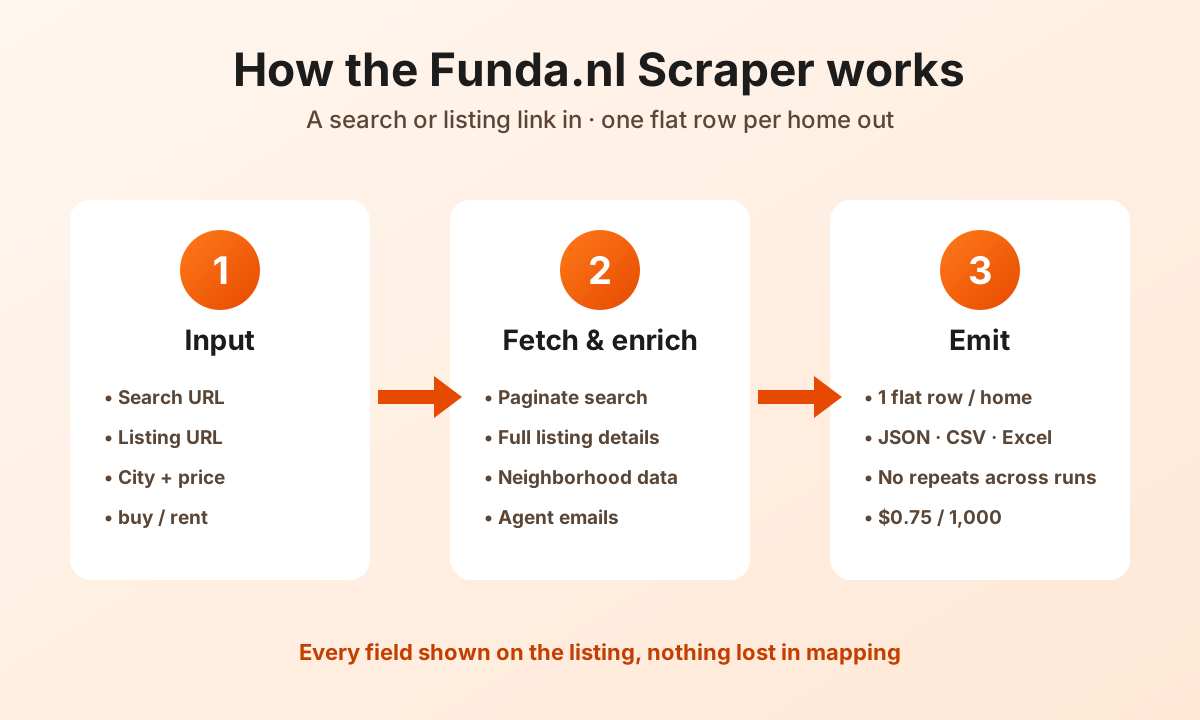
1. **Input** — you paste search/listing URLs, or fill the filter fields (location, price, buy/rent).
2. **Search** — the actor queries Funda's listing-search API, paginating through every result page up to `maxItems`.
3. **Detail fetch** — each listing's full detail payload is fetched over plain HTTP (no browser), with automatic retries.
4. **Optional enrichment** — neighborhood demographics and/or agent emails are attached when enabled.
5. **Emit** — one flat JSON row per property lands in your dataset, exportable as JSON, CSV, Excel, or via API.
***
### Input configuration
| Field | Type | Required | Notes |
| --- | --- | --- | --- |
| `startUrls` | array | — | Funda search or listing URLs. If any are present, filter fields are ignored (URLs win). |
| `searchTransactionType` | select | — | `buy` (default) or `rent`. |
| `searchLocation` | string | — | City / area, e.g. `amsterdam`. |
| `searchKeywords` | string | — | Free-text keyword, e.g. `gracht`. |
| `searchPriceMin` | integer | — | Minimum price in EUR, e.g. `200000`. |
| `searchPriceMax` | integer | — | Maximum price in EUR, e.g. `450000`. |
| `includeNeighborhoodData` | boolean | — | Append inhabitants, families-with-children %, avg €/m² per neighborhood. Default `false`. |
| `enrichEmails` | boolean | — | Append the listing agent's contact email (experimental). Default `false`. |
| `contentLanguage` | select | — | Listing text language, `en` (default) or `nl`. |
| `maxItems` | integer | — | Cap on listings per search URL. Default `100000` (everything). |
| `maxConcurrency` | integer | — | Max simultaneous requests. Default `3`. |
| `minConcurrency` | integer | — | Min simultaneous requests. Default `1`. |
| `maxRequestRetries` | integer | — | Retries per failed request. Default `100`. |
| `storeName` | string | — | Named key-value store for cross-run deduplication. |
| `proxy` | object | — | Proxy override. Defaults to Apify Proxy. |
#### Example input
```json
{
"searchLocation": "amsterdam",
"searchTransactionType": "buy",
"searchPriceMin": 400000,
"searchPriceMax": 700000,
"includeNeighborhoodData": true,
"contentLanguage": "en",
"maxItems": 50
}
```
***
### Output overview
One flat JSON object per property. The object is Funda's own detail payload (so field names mirror Funda's API — `Price`, `AddressDetails`, `Coordinates`, `KenmerkSections`, `Media`, etc.), with `basicInfo` (the search-result summary) and, when enabled, `NeighborhoodInsights` and agent email attached.
#### Output sample (real row, trimmed)
```jsonc
{
"_id": "7830753",
"ObjectType": "Apartment",
"OfferingType": "Sale",
"Price": {
"SellingPrice": "€ 630,000 k.k.",
"NumericSellingPrice": 630000,
"IsAuction": false
},
"AddressDetails": {
"Title": "Van Tuyll van Serooskerkenweg 32-1",
"SubTitle": "1076 JL Amsterdam",
"NeighborhoodName": "Van Tuyllbuurt",
"NeighborhoodIdentifier": "amsterdam/van-tuyllbuurt",
"City": "Amsterdam",
"Province": "Noord-Holland",
"Country": "The Netherlands",
"PostCode": "1076JL"
},
"Coordinates": { "Latitude": 52.344856, "Longitude": 4.862702 },
"GoogleMapsObjectUrl": "https://www.google.nl/maps/place/Van+Tuyll+van+Serooskerkenweg+32+1+1076JL+Amsterdam",
"KadastraleKaartBaseUrl": "https://service.pdok.nl/kadaster/kadastralekaart/wms/v5_0",
"PublicationDate": "2025-12-11T00:00:00",
"Urls": {
"FriendlyUrl": {
"FullUrl": "https://www.funda.nl/en/detail/koop/amsterdam/appartement-van-tuyll-van-serooskerkenweg-32-1/43285116/"
}
},
"KenmerkSections": [ "…8 sections: Construction, Surface areas, Layout, Energy, Cadastral data, Exterior space, VVE checklist…" ],
"Media": { "Photos": "[…]", "Layout": "[floor plans]", "Brochure": "[…]" },
"NeighborhoodInsights": {
"city": "Amsterdam",
"neighbourhood": "Van Tuyllbuurt",
"inhabitants": 4140,
"familiesWithChildren": 20.59,
"averageAskingPricePerM2": 8837
}
}
```
***
### Key output fields
**Identity & type** — `_id`, `ObjectType`, `OfferingType`, `PublicationDate`, `IsSoldOrRented`
**Pricing** — `Price.SellingPrice`, `Price.NumericSellingPrice`, `Price.IsAuction`
**Address & geo** — `AddressDetails` (street, postcode, city, province, neighborhood), `Coordinates` (lat/long), `GoogleMapsObjectUrl`
**Cadastral** — `KadastraleKaartBaseUrl`, plus a "Cadastral data" `KenmerkSections` block
**Features** — `KenmerkSections` (transfer of ownership, construction, surface areas & volume, layout, energy, exterior space, VVE checklist)
**Media** — `Media.Photos`, `Media.Layout` (floor plans), `Media.Brochure`
**URLs** — `Urls.FriendlyUrl.FullUrl`
**Neighborhood (opt-in)** — `NeighborhoodInsights.inhabitants`, `.familiesWithChildren`, `.averageAskingPricePerM2`
**Agent email (opt-in)** — appended when `enrichEmails` is enabled
***
### What makes this richer than the competition
| Capability | Other Funda actors | This actor |
| --- | --- | --- |
| Full raw Funda detail payload | Hand-mapped subset | ✅ Complete payload |
| Search by filters (no URL) | URL-only (most) | ✅ City + price + buy/rent |
| Geo-coordinates + Google Maps link | Some | ✅ |
| Cadastral (Kadaster) map URL | ❌ | ✅ |
| Neighborhood demographics | ❌ | ✅ `includeNeighborhoodData` |
| Agent email enrichment | ❌ | ✅ `enrichEmails` |
| English **or** Dutch output | ❌ | ✅ `contentLanguage` |
| Billing | — | Per returned row; see the Pricing tab |
***
### Pricing
Pay-per-result: you are billed per listing returned, with no monthly commitment. Current rates are on the **Pricing** tab.
Three optional features bill on their own events, so a run with them switched on costs more than the per-row rate alone:
| Feature | Billable event | Charged when |
|---|---|---|
| `enrichEmails` | `additional-data` | Only when an agent email is actually found |
| `marketAnalysis` | `market-analysis` | Per area analysed, at most 8 per run, and only when the analysis returns something — a thin-signal area is not charged |
| `includeNeighborhoodData` | none | Adds requests and run time, no separate charge |
`market-analysis` is priced well above the per-row rate, so check the Pricing tab before enabling it on a large run.
***
### FAQ
**Does it work for rentals as well as sales?** Yes — set `searchTransactionType` to `rent`, or paste a `/zoeken/huur` URL.
**Can I scrape all of the Netherlands?** Yes — leave the filters empty for a nationwide buy search, or omit `searchLocation` while setting other filters.
**Why do field names look like Funda's API (PascalCase)?** Because we return Funda's own detail payload verbatim, so you never lose a field to our mapping choices. Flatten downstream as you like.
**How do I get neighborhood demographics?** Enable `includeNeighborhoodData`. Each row gains a `NeighborhoodInsights` object.
**How do I get agent emails?** Enable `enrichEmails` (experimental). It appends the listing agent's contact email where discoverable.
**Does it use a browser or a CAPTCHA solver?** No. It's pure HTTP against Funda's JSON endpoints, which keeps it fast and cheap.
**I pasted a fundainbusiness.nl URL and it failed.** That's expected — commercial properties use the separate [Fundainbusiness Scraper](https://apify.com/memo23/fundainbusiness-scraper).
**How do I avoid duplicates across runs?** Set a `storeName` — the actor deduplicates against that named key-value store.
***
### Support
Found a bug or need a field that isn't there? Open an issue on the actor's **Issues** tab, or contact us through the Apify Store. We actively maintain this actor.
### Additional services
Need a custom real-estate pipeline — scheduled runs, a webhook into your CRM, extra enrichment, or a scraper for another portal? We build bespoke scrapers and data workflows. Reach out via the Apify Store.
### Explore more scrapers
- [Fundainbusiness Scraper](https://apify.com/memo23/fundainbusiness-scraper) — commercial properties on fundainbusiness.nl
- [Immobilienscout24 Scraper](https://apify.com/memo23/immobilienscout24-scraper) — Germany's leading portal
- [Idealista Scraper](https://apify.com/memo23/idealista-scraper) — Spain / Italy / Portugal
- [Rightmove Scraper](https://apify.com/memo23/rightmove-scraper) — UK property
***
### 🤖 For AI Agents & LLM Apps
Compact reference for AI agents calling this actor via the [Apify MCP server](https://mcp.apify.com) or the Apify API (actor: `memo23/funda-scraper`).
**Purpose:** Scrapes funda.nl residential listings (search or detail URLs, or city/price filters) into one flat row per home carrying Funda's full detail payload, plus optional neighborhood demographics, agent emails, and English-or-Dutch output.
**Minimal input:**
```json
{
"searchLocation": "amsterdam",
"searchTransactionType": "buy",
"maxItems": 50
}
```
URL mode instead: `{ "startUrls": [{ "url": "https://www.funda.nl/zoeken/koop?selected_area=[\"amsterdam\"]" }], "maxItems": 50 }` — when any start URL is present, the filter fields are ignored (URLs win).
**Output:** one flat row per property — \_id, ObjectType, OfferingType, PublicationDate, Price {SellingPrice, NumericSellingPrice, IsAuction}, AddressDetails {Title, City, Province, PostCode, NeighborhoodName, NeighborhoodIdentifier}, Coordinates {Latitude, Longitude}, GoogleMapsObjectUrl, KadastraleKaartBaseUrl, KenmerkSections, Media {Photos, Layout, Brochure}, Urls {FriendlyUrl.FullUrl}, NeighborhoodInsights {inhabitants, familiesWithChildren, averageAskingPricePerM2} (opt-in), agent email (opt-in).
**Behaviors an agent should know:**
- `startUrls` override the filter fields — set one mode or the other.
- Always set `maxItems` — default is 100000 per search URL.
- `includeNeighborhoodData`, `enrichEmails`, and `collectAgentPhone` are opt-in and add an extra request per listing; `contentLanguage` picks `nl` or `en` (default `en`).
- `marketAnalysis` (opt-in, needs a paid plan) appends up to 8 `rowType: "marketAnalysis"` area rows, billed per area via the `market-analysis` event.
- `storeName` enables cross-run deduplication against a named key-value store.
- Only funda.nl residential is supported — fundainbusiness.nl URLs fail with a pointer to the separate Fundainbusiness Scraper. Billed per listing returned; optional features bill separately, see Pricing.
### ⚠️ Disclaimer
This Actor accesses publicly available data on Funda.nl for legitimate research, market-intelligence, and business-analysis purposes. Use of this Actor must comply with Funda's Terms of Service and all applicable laws, including EU data-protection regulation (GDPR). The Actor's authors are not responsible for any misuse. Users must:
- Respect rate limits and avoid overloading Funda's infrastructure
- Not use scraped data to violate individual privacy or Funda's terms
- Use the data in compliance with applicable jurisdictions
- Not republish scraped listing content in violation of copyright
Funda is a trademark of its respective owner; this Actor is not affiliated with, endorsed by, or sponsored by Funda. We do not store scraped data — the Actor returns it directly to your Apify dataset for your authorized use.
### SEO Keywords
funda scraper, funda.nl scraper, funda api, funda property scraper, netherlands real estate scraper, dutch property data, funda listings export, funda huur scraper, funda koop scraper, real estate data netherlands, property price scraper, funda json export, funda csv export, neighborhood demographics netherlands, kadaster data, real estate lead generation, dutch housing market data, apify real estate scraper, no-code property scraper, funda agent contacts
# Actor input Schema
## `startUrls` (type: `array`):
Search pages (/zoeken/koop, /zoeken/huur) or one home (/detail/…). Example: https://www.funda.nl/zoeken/koop?selected_area=\[%22amsterdam%22]
## `includeNeighborhoodData` (type: `boolean`):
Extra neighborhood stats from Funda Market Insights API.
## `marketAnalysis` (type: `boolean`):
If enabled, appends a `rowType: "marketAnalysis"` row per area found in your results (up to 8 areas per run, largest first). Billed per area row delivered via the `market-analysis` event. Never charged when analysis fails or signal is too thin.
## `enrichEmails` (type: `boolean`):
If enabled, finds a contact email for each result from its own website (or by discovering it from the name). Adds contactEmail + contactWebsite columns plus a detailed emailEnrichment object. Best-effort.
## `collectAgentPhone` (type: `boolean`):
If enabled, makes one extra request per listing to the agent's (makelaar) Funda profile to fetch their phone number. Adds a phone field to each agent object plus a top-level agentPhone. Off by default to keep runs fast and cheap.
## `contentLanguage` (type: `string`):
Accept-Language for listing copy: Dutch original vs English translated.
## `searchTransactionType` (type: `string`):
Koop (sale) or huur (rent). Example: pick Rent (huur) to search rentals only.
## `searchKeywords` (type: `string`):
Words Funda should match in listings. Examples: gracht, tuin, zuid, nieuwbouw. Leave empty to skip text filter.
## `searchLocation` (type: `string`):
City or area slug, or place, Nkm for radius. Examples: amsterdam, rotterdam, coevorden, 10km, den-haag, 5km.
## `searchPriceMin` (type: `integer`):
Lower bound in euros (whole numbers). Example: 200000 for €200,000.
## `searchPriceMax` (type: `integer`):
Upper bound in euros. Example: 450000 for €450,000. Use with min or alone.
## `maxItems` (type: `integer`):
Stop after this many listings per search URL. Leave unset to collect everything (up to 100,000 per search URL). Example: 50 for a small test run.
## `maxConcurrency` (type: `integer`):
Parallel requests cap. Example: 5 is often enough with a good proxy.
## `minConcurrency` (type: `integer`):
Minimum parallel workers. Example: 1.
## `maxRequestRetries` (type: `integer`):
Retries on failed HTTP calls. Example: 10–100.
## `storeName` (type: `string`):
Optional persistent store name for listing deduplication. Leave empty for default store.
## `proxy` (type: `object`):
Leave empty — the actor already routes all traffic through its own built-in residential proxy at no extra cost to you. Only set this if you want to use your own proxies.
## Actor input object example
```json
{
"startUrls": [
{
"url": "https://www.funda.nl/zoeken/koop?selected_area=[%22amsterdam%22]"
},
{
"url": "https://www.funda.nl/detail/koop/amsterdam/appartement-wildeman-97/43279645/"
}
],
"includeNeighborhoodData": false,
"marketAnalysis": false,
"enrichEmails": false,
"collectAgentPhone": false,
"contentLanguage": "en",
"searchTransactionType": "buy",
"searchKeywords": "gracht",
"searchLocation": "rotterdam",
"searchPriceMin": 200000,
"searchPriceMax": 450000,
"maxItems": 50,
"maxConcurrency": 5,
"minConcurrency": 1,
"maxRequestRetries": 10
}
```
# API
You can run this Actor programmatically using our API. Below are code examples in JavaScript, Python, and CLI, as well as the OpenAPI specification and MCP server setup.
## JavaScript example
```javascript
import { ApifyClient } from 'apify-client';
// Initialize the ApifyClient with your Apify API token
// Replace the '' with your token
const client = new ApifyClient({
token: '',
});
// Prepare Actor input
const input = {
"searchKeywords": "gracht",
"searchLocation": "amsterdam"
};
// Run the Actor and wait for it to finish
const run = await client.actor("memo23/funda-scraper").call(input);
// Fetch and print Actor results from the run's dataset (if any)
console.log('Results from dataset');
console.log(`💾 Check your data here: https://console.apify.com/storage/datasets/${run.defaultDatasetId}`);
const { items } = await client.dataset(run.defaultDatasetId).listItems();
items.forEach((item) => {
console.dir(item);
});
// 📚 Want to learn more 📖? Go to → https://docs.apify.com/api/client/js/docs
```
## Python example
```python
from apify_client import ApifyClient
# Initialize the ApifyClient with your Apify API token
# Replace '' with your token.
client = ApifyClient("")
# Prepare the Actor input
run_input = {
"searchKeywords": "gracht",
"searchLocation": "amsterdam",
}
# Run the Actor and wait for it to finish
run = client.actor("memo23/funda-scraper").call(run_input=run_input)
# Fetch and print Actor results from the run's dataset (if there are any)
print(f"💾 Check your data here: https://console.apify.com/storage/datasets/{run.default_dataset_id}")
for item in client.dataset(run.default_dataset_id).iterate_items():
print(item)
# 📚 Want to learn more 📖? Go to → https://docs.apify.com/api/client/python/docs/quick-start
```
## CLI example
```bash
echo '{
"searchKeywords": "gracht",
"searchLocation": "amsterdam"
}' |
apify call memo23/funda-scraper --silent --output-dataset
```
## MCP server setup
```json
{
"mcpServers": {
"apify": {
"type": "http",
"url": "https://mcp.apify.com/?tools=fetch-actor-details,memo23/funda-scraper"
}
}
}
```
The hosted server signs you in with OAuth on first connect, so no API token belongs in this config. Clients without OAuth support can send an `Authorization: Bearer ` header instead, using a token from API & Integrations in Apify Console (https://console.apify.com/settings/integrations).
## OpenAPI specification
Download the OpenAPI definition: https://api.apify.com/v2/actors/isEqQn5XKtr3D3fRW/builds/Kg9M0iIMd6wm1zGdN/openapi.json