# Capterra Reviews Scraper — Star & Date Filters · $0.9/1K 💰 (`memo23/capterra-scraper`) Actor
Capterra reviews scraper: paste product, reviews, category or compare URLs (capterra.com or regional sites). Sort newest or lowest rated; filter by stars, company size and date. Every review with pros, cons, 4 sub-ratings, NPS, reviewer role and company. From $0.9/1K. No login needed.
- **URL**: https://apify.com/memo23/capterra-scraper.md
- **Developed by:** [Muhamed Didovic](https://apify.com/memo23) (community)
- **Categories:** Business, Marketing, Lead generation
- **Features:** Limited permissions
- **Stats:** 161 total users, 64 monthly users, 99.4% runs succeeded, 0 bookmarks
- **User rating**: No ratings yet
## Pricing
from $0.90 / 1,000 results
This Actor is paid per event. You are not charged for the Apify platform usage, but only a fixed price for specific events.
Learn more: https://docs.apify.com/actors/running/actors-in-store.md#pay-per-event
## What's an Apify Actor?
An Actor is a serverless cloud program that runs on the Apify platform. It has two run modes.
In Batch mode, an Actor accepts a well-defined JSON input, performs an action which can take anything from a few seconds to a few hours,
and optionally produces a well-defined JSON output, datasets with results, or files in key-value store.
In Standby mode, an Actor provides a web server which can be used as a website, API, or an MCP server.
Apify vocabulary and the platform model are defined once, in the agent quickstart at https://apify.com/agents.md.
## How to integrate an Actor?
If asked about integration, you help developers integrate Actors into their projects.
You adapt to their stack and deliver integrations that are safe, well-documented, and production-ready.
Do not guess an integration path. Every one of them is in the agent quickstart at https://apify.com/agents.md: the Apify MCP server, Agent Skills with the Apify CLI, the JavaScript and Python clients, the REST API, and the account-free path for an agent with no human to sign in. It also carries the rule on stating cost before the first paid run.
For examples already wired to this Actor's own input schema, see the [API](#api) section below.
Each client library has reference documentation the quickstart does not restate: [JavaScript/TypeScript](https://docs.apify.com/api/client/js/docs.md) (`npm install apify-client`) and [Python](https://docs.apify.com/api/client/python/docs.md) (`pip install apify-client`).
# README
## Capterra Reviews Scraper — Star & Date Filters · $0.9/1K 💰
Turn any Capterra product into a clean table of reviews, sorted and filtered the way you need them.
Paste a reviews, product, category or compare URL from capterra.com or any of its regional sites, pick a sort order and filters (star rating, company size, posted-after date), and get one row per review with pros, cons, four sub-ratings, recommendation score, reviewer role, company size and vendor reply.
### Why Use This Scraper?
- **Capterra filters before you pay.** Ask for 1-2★ reviews only, reviews posted since 1 September, or reviewers from 51-200 employee companies, and Capterra itself does the filtering. You pay for the reviews you keep, not for the pages walked to find them.
- **Any sort order.** Most helpful (Capterra's default), most recent, highest rated or lowest rated.
- **Past the website's 2,500-review wall.** capterra.com stops paging at page 100. The actor keeps going, so a product like Slack (24,222 reviews) can be exported in full.
- **Regional URLs work.** www.capterra.co.uk, capterra.com.de, capterra.in, capterra.com.au and 33 more regional sites resolve to the matching capterra.com product.
- **Product URL → reviews in one step.** Turn on *Also scrape reviews for product URLs* and a product link brings its reviews along.
- **Every input gets an answer.** A delisted product, a URL from another site or a filter that matches nothing each produce a row that says so, never a silent empty run.
- **Products, categories and comparisons too**, in the same actor and the same run.
- **$0.90 per 1,000 rows.** No login or API key needed, and the proxy is included at no extra cost.
### Overview
The dataset is flat: **one row per review**, with the product-level numbers (overall rating, review count, rating distribution of the collected reviews, sub-rating averages, and the sort and filters used) nested on every row under `productAggregate`. A spreadsheet export needs no joins.
The other URL kinds follow the same idea: a category URL gives one row per listed product, a product URL gives one rich product row, a compare URL gives one comparison row. A `rowType` field tells the row kinds apart.
### Supported Inputs
| Input | Example | Rows |
|---|---|---|
| Reviews page | `https://www.capterra.com/p/135003/Slack/reviews/` | one `review` row per review |
| Product page | `https://www.capterra.com/p/135003/Slack/` | one `product` row (plus its reviews with *Also scrape reviews for product URLs*) |
| Category page | `https://www.capterra.com/project-management-software/` | one `category-product` row per listed product |
| Compare page | `https://www.capterra.com/compare/137005-229614/SmartPM-vs-Notion/` | one `compare` row |
| Regional product or reviews page | `https://www.capterra.co.uk/software/135003/slack`, `https://www.capterra.in/software/135003/slack/reviews/` | same as the capterra.com equivalent |
| Bare product ID | `135003` | one `product` row |
| Bare category slug | `project-management` | one `category-product` row per product |
Copy-paste starter list:
```json
[
"https://www.capterra.com/p/135003/Slack/reviews/",
"https://www.capterra.com/p/137005/SmartPM/",
"https://www.capterra.com/project-management-software/",
"https://www.capterra.co.uk/software/135003/slack"
]
```
**Not supported:** regional category and comparison pages (paste the capterra.com URL instead), other review sites, and anything behind a Capterra login. Each unsupported input produces a `url-not-supported` row with the reason.
### Use Cases
| Who | What they pull | Typical input |
|---|---|---|
| Product managers | Complaints and feature requests about their own product | Own reviews URL, stars 1-3, most recent |
| Competitive intelligence | Why customers leave a competitor and where they go | Competitor reviews URL, lowest rated, read `switchedProducts` and `alternativeProducts` |
| Customer success | New reviews every week, routed to the right team | Scheduled run with *posted after* set to last run's date |
| Market research | Ratings and positioning across a whole category | Category URL, then product URLs with reviews |
| Sales and partnerships | Mid-market and enterprise reviewers of a tool | Reviews URL, company sizes 201-500 to 10,001+ |
| AI and LLM teams | Labeled review text (stars, pros, cons) for training or RAG | Reviews URL, maxReviewsPerProduct 0 |
### How It Works
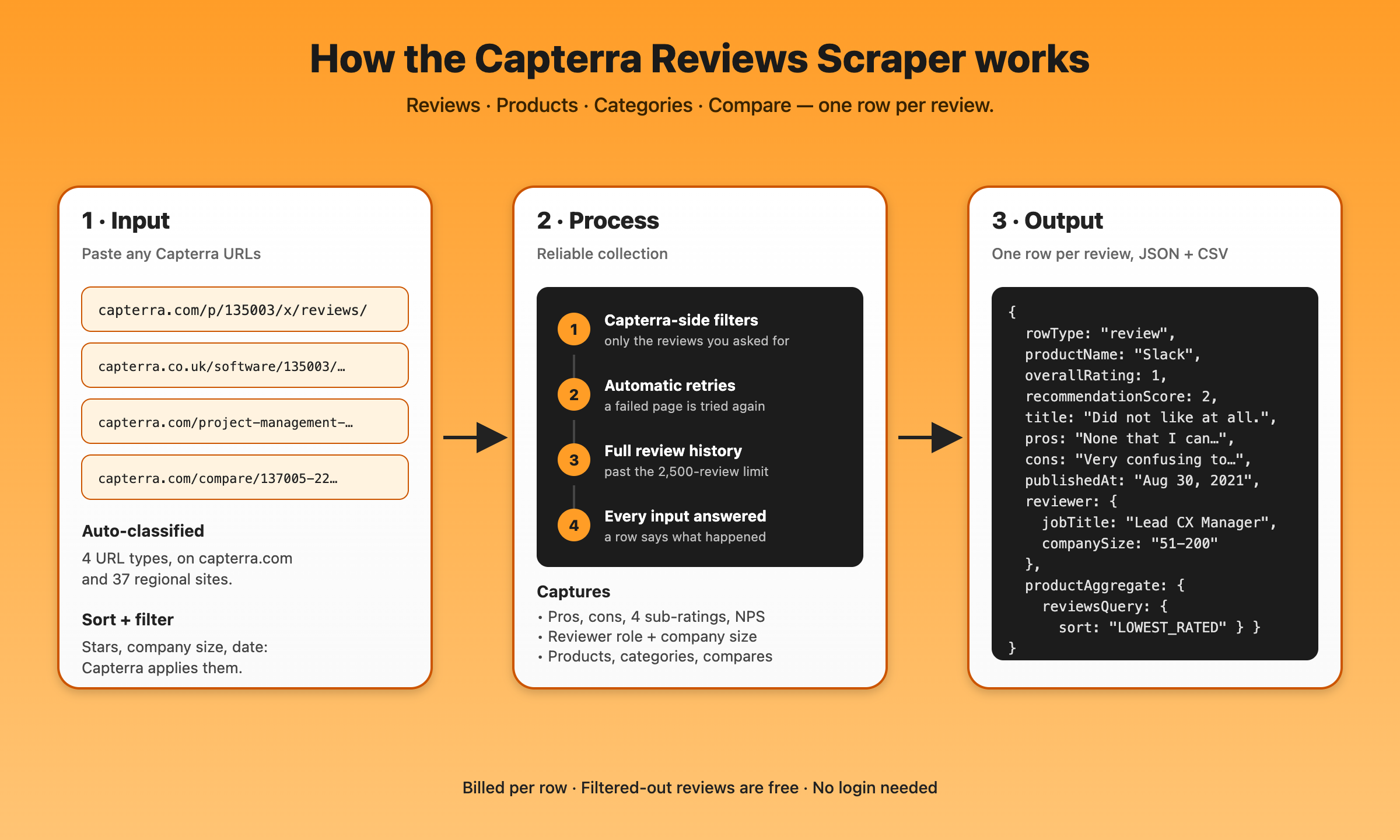
1. **Classify.** Each input is matched to a reviews, product, category or compare page. Regional URLs are mapped to the matching capterra.com product.
2. **Open the pages.** The actor reads the same public pages a logged-out visitor sees.
3. **Collect the reviews.** Sorting and filters are applied on Capterra's side, the same as when you change the sort or tick a star filter on the website, so you get exactly the reviews you asked for, page after page.
4. **Emit flat rows.** One row per review with the product aggregate nested, ready for JSON, CSV or Excel.
Failed pages are retried automatically, and one URL that cannot be fetched does not stop the rest of the run.
### Input Configuration
| Field | Type | Default | What it does |
|---|---|---|---|
| `startUrls` | array | required | Capterra URLs, IDs or category slugs, any mix |
| `maxItems` | integer | 1000 | Cap on total dataset rows for the run |
| `maxReviewsPerProduct` | integer | 100 | Review rows per product; `0` = all |
| `includeReviews` | boolean | true | Product URLs also return their reviews; turn off for product rows only |
| `reviewsSort` | string | `MOST_HELPFUL` | `MOST_HELPFUL`, `MOST_RECENT`, `HIGHEST_RATED` or `LOWEST_RATED` |
| `reviewStarRatings` | array | all | Keep only these star ratings, e.g. `["1","2"]` |
| `reviewCompanySizes` | array | all | Keep only these company sizes: `Self-employed`, `1-10`, `11-50`, `51-200`, `201-500`, `501-1000`, `1001-5000`, `5001-10000`, `10001+` |
| `reviewsPostedAfter` | string | none | Keep reviews posted on or after a `YYYY-MM-DD` date (sorts newest first) |
| `maxProductsPerCategory` | integer | 50 | Category rows per category URL; `0` = all on the page |
| `reviewInsights` | boolean | false | Add a no-AI review digest per product |
| `painPointAnalysis` | boolean | false | Add an AI complaint-theme report per product (paid plans) |
| `reviewGapReport` | boolean | false | Add one AI you-vs-competitors report per run (paid plans) |
| `gapReportSubject` | string | first product | Which product is yours in the gap report |
| `enrichEmails` | boolean | false | Find a contact email per product (experimental) |
| `qualifyByPayment` | boolean | false | Flag vendors that take payments online (needs `enrichEmails`) |
| `proxy` | object | built-in | Leave empty; set only to use Apify Proxy or your own proxies |
#### Common scenarios
Complaints only, newest first:
```json
{
"startUrls": ["https://www.capterra.com/p/135003/Slack/reviews/"],
"reviewsSort": "MOST_RECENT",
"reviewStarRatings": ["1", "2"],
"maxReviewsPerProduct": 200
}
```
Weekly monitoring of new reviews for three products:
```json
{
"startUrls": [
"https://www.capterra.com/p/135003/Slack/reviews/",
"https://www.capterra.com/p/211559/Trello/reviews/",
"https://www.capterra.com/p/19319/JIRA/reviews/"
],
"reviewsPostedAfter": "2026-10-06",
"maxReviewsPerProduct": 0
}
```
Mid-market reviewers of a competitor, from a UK link:
```json
{
"startUrls": ["https://www.capterra.co.uk/reviews/135003/slack"],
"reviewCompanySizes": ["201-500", "501-1000", "1001-5000"],
"maxReviewsPerProduct": 100
}
```
### Output Overview
| `rowType` | One row per | Billed |
|---|---|---|
| `review` | review | yes |
| `product` | product URL | yes, plus its nested items |
| `category-product` | product listed in a category | yes |
| `compare` | compare URL | yes, plus one item per compared product |
| `no-reviews` | reviews request with nothing to return (no reviews yet, or none match the filters) | yes |
| `url-not-found` | input Capterra answers with a 404 | yes |
| `url-not-supported` | input that is not a supported Capterra page | yes |
| `review_insights`, `painPointAnalysis`, `reviewGapReport` | opt-in add-on reports | per their own event |
### Output Samples
A `review` row from a filtered run (lowest rated, 1-2★, companies of 11-200 people). Real data, a few empty fields left out:
```json
{
"rowType": "review",
"reviewsUrl": "https://www.capterra.com/p/135003/x/reviews/",
"productId": "135003",
"productName": "Slack",
"reviewId": "Capterra___3052145",
"title": "Did not like at all.",
"overallRating": 1,
"recommendationScore": 2,
"subRatings": { "easeOfUse": 1, "customerService": 0, "features": 1, "valueForMoney": 0 },
"text": null,
"pros": "None that I can think of. Was not a very good option.",
"cons": "It was not clear cut, very confusing to use. Did not really have a user friendly feel.",
"switchedFrom": null,
"alternativeProducts": [],
"publishedAt": "August 30, 2021",
"timeUsed": "Less than 6 months",
"reviewer": {
"name": "Jose C.",
"jobTitle": "Lead Client Experience Manager",
"industry": "Information Technology and Services",
"companySize": "51-200 employees",
"verifiedLinkedIn": false,
"validationsPassed": ["ProofOfLink"]
},
"verified": true,
"incentivization": "nominal-gift",
"reviewUrl": "https://www.capterra.com/p/135003/x/#Capterra___3052145",
"vendorResponse": null,
"productAggregate": {
"rating": { "average": 4.7, "count": 24222, "bestRating": 5 },
"subRatingAverages": { "easeOfUse": 1.8, "customerService": 1, "features": 1.3, "valueForMoney": 1 },
"ratingDistribution": [
{ "stars": 5, "count": 0, "percentage": 0 },
{ "stars": 4, "count": 0, "percentage": 0 },
{ "stars": 3, "count": 0, "percentage": 0 },
{ "stars": 2, "count": 15, "percentage": 50 },
{ "stars": 1, "count": 15, "percentage": 50 }
],
"totalReviews": 30,
"pagesScraped": 2,
"reviewsQuery": {
"sort": "LOWEST_RATED",
"starRatings": [1, 2],
"companySizes": ["11-50", "51-200"],
"postedAfter": null,
"matchingReviews": 54,
"source": "capterra-sorted"
}
},
"scrapedAt": "2026-10-13T06:55:22.929Z"
}
```
A `product` row (selected fields; the full row also carries features, screenshots, integrations, awards, alternatives, pricing and breadcrumbs):
```json
{
"rowType": "product",
"productId": "135003",
"name": "Slack",
"rating": { "average": 4.7, "count": 24222, "bestRating": 5 },
"pricingStarts": "$9",
"subRatingAverages": {
"easeOfUse": { "rating": 4.6, "reviews": 22777 },
"customerService": { "rating": 4.4, "reviews": 13589 },
"valueForMoney": { "rating": 4.5, "reviews": 15331 }
},
"reviewSentiment": {
"totalReviews": 24222,
"positive": { "count": 96, "percentage": 96 },
"neutral": { "count": 4, "percentage": 4 },
"negative": { "count": 1, "percentage": 1 }
},
"regionalInputUrl": "https://www.capterra.co.uk/software/135003/slack"
}
```
Diagnostic rows, each from a real run:
```json
{ "rowType": "no-reviews", "productName": "SmartPM", "message": "This product has reviews, but none match the requested filters (star ratings, company sizes or posted-after date). Widen the filters to get rows." }
{ "rowType": "url-not-found", "inputUrl": "https://www.capterra.in/software/1105143/CLEO-by-RegenAI/reviews/", "httpStatus": 404, "message": "www.capterra.in returned 404 — this product page no longer exists on that regional site (delisted or moved). Find the product on capterra.com and paste that URL instead." }
{ "rowType": "url-not-supported", "inputUrl": "https://www.g2.com/products/slack/reviews", "message": "Not a Capterra URL (www.g2.com). This actor reads capterra.com and its regional sites only." }
```
### Key Output Fields
**Review content:** `title`, `text`, `pros`, `cons`, `adviceToOthers`, `reasonsForChoosing`, `reasonsForSwitching`, `publishedAt`, `reviewUrl`
**Ratings:** `overallRating` (1-5), `recommendationScore` (0-10), `subRatings.easeOfUse`, `subRatings.customerService`, `subRatings.features`, `subRatings.valueForMoney`
**Reviewer:** `reviewer.name` (null for anonymous reviews), `reviewer.jobTitle`, `reviewer.industry`, `reviewer.companySize`, `reviewer.verifiedLinkedIn`, `reviewer.validationsPassed`, `timeUsed`
**Trust signals:** `verified`, `incentivization` (`none`, `vendor-referred`, `nominal-gift`, `vendor-referred-incentive`), `reviewSourceTooltip`
**Competitive signals:** `switchedFrom`, `switchedProducts[]`, `alternativeProducts[]`, `vendorResponse`
**Product aggregate (on every review row):** `productAggregate.rating`, `productAggregate.ratingDistribution` and `productAggregate.subRatingAverages` (both computed from the collected reviews), `productAggregate.totalReviews`, `productAggregate.reviewsQuery.matchingReviews` (Capterra's own count for the star and company-size filters)
**Product rows:** `name`, `description`, `rating`, `pricing`, `features[]`, `integrations[]`, `awards[]`, `alternatives[]`, `screenshotUrls[]`, `subRatingAverages` (with reviewer counts), `reviewSentiment`
### Pricing
Pay per event. You only pay for what lands in your dataset.
| Event | When | Price |
|---|---|---|
| Actor start | once per run | $0.01 |
| Dataset row | every row: review, product, category product, compare, and the diagnostic rows | $0.0009 ($0.90 per 1,000) |
| Additional data | per nested item on product rows (features, screenshots, review snippets, alternatives, categories) and per compared product on compare rows | $0.001 |
| Contact email | per email found by `enrichEmails`, never for misses | $0.05 |
| Review insights | per product digest | $0.02 |
| AI pain-point analysis | per product report (paid plans) | $0.05 |
| AI review-gap report | per report (paid plans) | $0.10 |
Examples: 1,000 reviews cost about $0.91. A product row carries 100-150 nested items, so a full product row costs about $0.10-0.15; review rows carry no nested charges. Sorting and filtering are free, and filtered-out reviews are never billed.
### FAQ
#### How do the filters work, and do I pay for reviews that get filtered out?
Star rating and company size are applied by Capterra before the reviews come back, so filtered-out reviews are never fetched or billed. The posted-after date sorts reviews newest first and stops at the first older review.
#### How many reviews can I get per product?
Set `maxReviewsPerProduct` to `0` for all of them. The capterra.com website stops at 100 pages (2,500 reviews); the actor pages through Capterra's own review cursor instead, so larger products export in full. `maxItems` still caps the whole run.
#### Which regional Capterra sites work?
All 37 regional sites Capterra links from its pages, including capterra.co.uk, capterra.com.de, capterra.fr, capterra.es, capterra.in, capterra.com.au, capterra.ca, capterra.com.br and capterra.jp. Product and review pages are supported; the actor maps them to the capterra.com product and returns its reviews, which are the same review pool.
#### Does a product URL return reviews?
Yes. A product URL returns the product row plus its reviews, because `includeReviews` is on by default. Turn it off if you only want the product row.
#### Why did a product that exists come back as `url-not-found`?
Capterra sometimes answers a product page with its "page doesn't exist" page while the reviews page of the same product works (seen on Slack and SmartPM in October 2026). The actor retries first; if Capterra keeps answering 404, the row says so and names the product's reviews URL. With `includeReviews` on, the reviews are still collected.
#### Is `ratingDistribution` Capterra's histogram?
It is computed from the reviews this run collected (Capterra renders its histogram in the browser). With filters on, it describes the filtered set. The product's real total is `productAggregate.rating.count`.
#### Can I run it on a free Apify plan?
Yes: up to 100 rows and 100 URLs per run, with the same proxy and filters. The AI reports need a paid plan.
#### Can I schedule it?
Yes. Save the input as a task, set `reviewsPostedAfter` (or sort by most recent with a small `maxReviewsPerProduct`) and schedule it in Apify Console; a webhook or the Make, Zapier and n8n integrations can pick up each run's dataset.
#### Can it read reviews behind a login?
No. Only publicly visible pages.
### Support
Open an issue on the actor's Issues tab with the input you used and the run link. Feature requests are welcome there too.
### Additional Services
Need another review site, a custom field, a scheduled feed into your warehouse or a one-off bulk export? Open an issue or message the maintainer through the Apify profile.
### Explore More Scrapers
- [Trustpilot All Reviews Scraper](https://apify.com/memo23/trustpilot-scraper-ppe): business and product reviews, no 200-review cap
- [G2 Scraper](https://apify.com/memo23/g2-scraper): software reviews by product name
- [Gartner Peer Insights Reviews](https://apify.com/memo23/apify-gartner-scraper-ppr): enterprise software reviews
- [TrustRadius Scraper](https://apify.com/memo23/trustradius-scraper): reviews, products, categories and compares
- [Glassdoor Reviews & Jobs](https://apify.com/memo23/glassdoor-scraper-ppr): employee reviews for the vendors you research
- [Reviews MCP Server](https://apify.com/memo23/reviews-mcp-server): Trustpilot, App Store and Google Play reviews inside Claude, Cursor or ChatGPT
### 🤖 For AI Agents & LLM Apps
Compact reference for AI agents calling this actor through the [Apify MCP server](https://mcp.apify.com) or the Apify API (actor: `memo23/capterra-scraper`).
**Purpose:** Capterra reviews (capterra.com and 37 regional sites) as one flat row per review, with Capterra-side sort and star, company-size and date filters; also product, category and compare pages.
**Minimal input:**
```json
{
"startUrls": ["https://www.capterra.com/p/135003/Slack/reviews/"],
"reviewsSort": "MOST_RECENT",
"reviewStarRatings": ["1", "2"],
"maxReviewsPerProduct": 25,
"maxItems": 25
}
```
**Output:** one row per review: rowType, reviewId, productId, productName, title, text, pros, cons, overallRating, recommendationScore, subRatings {easeOfUse, customerService, features, valueForMoney}, publishedAt, timeUsed, reviewer {name, jobTitle, industry, companySize}, incentivization, switchedProducts, alternativeProducts, vendorResponse, productAggregate {rating, totalReviews, reviewsQuery {sort, starRatings, companySizes, postedAfter, matchingReviews}}.
**Behaviors an agent should know:**
- Always set `maxItems`; `maxReviewsPerProduct: 0` means every review, which is tens of thousands on large products.
- A product URL returns its product row plus its reviews; set `includeReviews: false` for the product row only.
- `reviewsPostedAfter` (YYYY-MM-DD) forces newest-first order and stops early; use it for incremental runs.
- Inputs that cannot be scraped still return a row (`url-not-found`, `url-not-supported`, `no-reviews`) with a `message`.
- Billing: $0.0009 per row, $0.01 per run, $0.001 per nested item on product and compare rows only; filtered-out reviews are free.
- Public pages only; regional category and compare pages are not supported.
### ⚠️ Disclaimer
This Actor is an independent tool and is not affiliated with, endorsed by, or sponsored by Gartner, Inc. (owner of Capterra) or any of its subsidiaries. All trademarks mentioned are the property of their respective owners.
The scraper accesses only publicly available Capterra pages: product listings, reviews, categories and comparisons as any logged-out visitor sees them. No authenticated endpoints and nothing behind the Capterra login. Users are responsible for ensuring their use complies with Capterra's Terms of Service, applicable data-protection law (GDPR, CCPA and others) when storing or processing reviewer information, and their own organization's obligations. Do not contact reviewers without consent, and do not republish review content in a way that misrepresents its authorship.
### SEO Keywords
capterra scraper, capterra reviews scraper, scrape capterra reviews, capterra api, capterra review export, Apify capterra, capterra reviews to csv, software reviews scraper, b2b software reviews data, SaaS reviews scraper, capterra star rating filter, capterra negative reviews, capterra uk scraper, capterra regional sites, competitor review analysis, churn reasons from reviews, product feedback mining, voice of customer data, software market research, review monitoring, gartner digital markets reviews
# Actor input Schema
## `startUrls` (type: `array`):
Capterra pages to scrape, any mix, one per line. Each entry is auto-classified:
• Reviews URL `https://www.capterra.com/p/{id}/{slug}/reviews/` → one row per review
• Product URL `https://www.capterra.com/p/{id}/{slug}/` → one product row (add its reviews with "Also scrape reviews for product URLs")
• Category URL `https://www.capterra.com/{slug}-software/` → one row per listed product
• Compare URL `https://www.capterra.com/compare/{ids}/{slug-a}-vs-{slug-b}/` → one compare row
Regional sites work for product and review pages, e.g. `https://www.capterra.co.uk/software/135003/slack` or `https://www.capterra.in/software/135003/slack/reviews/`; they resolve to the matching capterra.com product. Bare product IDs (`135003`) and category slugs (`project-management`) also work. Anything else gets a `url-not-supported` row explaining why.
## `maxItems` (type: `integer`):
Cap on total dataset rows for the whole run, across all URLs. A reviews URL emits one row per review, a category URL one row per listed product, product and compare URLs one row each. Example: 500. Default 1000. Free Apify plans are capped at 100 rows per run.
## `maxReviewsPerProduct` (type: `integer`):
Maximum review rows per product. Example: 500. Default 100. Set 0 for every review the product has (large products have tens of thousands; maxItems still caps the run).
## `includeReviews` (type: `boolean`):
When on (default), every product URL also returns that product's reviews, as if its /reviews/ URL had been pasted too, using the sort, filters and Max reviews per product below. Turn it off to get only the one product row per product URL. Default on.
## `reviewsSort` (type: `string`):
Order in which reviews are collected, which decides the set you get when Max reviews per product is lower than the product's total. MOST_HELPFUL is Capterra's default (most complete reviews first), MOST_RECENT is newest first, HIGHEST_RATED and LOWEST_RATED sort by stars. Default MOST_HELPFUL.
## `reviewStarRatings` (type: `array`):
Keep only reviews with these overall star ratings. Example: \["1", "2"] for complaints only. Leave empty for all ratings (default).
## `reviewCompanySizes` (type: `array`):
Keep only reviews written by people at companies of these sizes (Capterra's own buckets). Example: \["201-500", "501-1000"] for mid-market. Leave empty for all sizes (default).
## `reviewsPostedAfter` (type: `string`):
Keep only reviews posted on or after this date (YYYY-MM-DD), e.g. 2026-09-01. Sorts newest first and stops at the first older review, which makes scheduled "new reviews since last run" monitoring cheap. Leave empty for no date limit (default).
## `maxProductsPerCategory` (type: `integer`):
Maximum category-product rows per category URL. A category page lists up to about 100 products. Example: 25. Default 50. Set 0 for every product on the page.
## `enrichEmails` (type: `boolean`):
If enabled, finds a contact email for each product and category-product row from the vendor's own website (or by discovering it from the product name). Adds contactEmail + contactWebsite columns plus a detailed emailEnrichment object. Billed per contact email found; never charged for misses. Default off.
## `qualifyByPayment` (type: `boolean`):
Requires "Enrich with contact emails". Scans each business's website — reusing the pages already fetched for email discovery, so no extra cost or time — for payment processors and e-commerce platforms (Stripe, Shopify, PayPal, Paddle, Lemon Squeezy, WooCommerce, Square, Chargebee and more). Adds takesPayments, paymentProcessors, stripeLiveKey (the public key if exposed) and paymentConfidence. No extra charge. Default off.
## `reviewInsights` (type: `boolean`):
Adds one `review_insights` row per product: rating breakdown and sentiment split, the recurring software complaint themes (bugs, pricing, support, missing features, onboarding, integrations), top negative-review terms, and feature-request snippets. Deterministic, instant, no AI. Billed per product analyzed. Default off.
## `painPointAnalysis` (type: `boolean`):
Adds a single `painPointAnalysis` row per product alongside the reviews: the top complaint themes (each with a severity score and how often it recurs), the missing features users keep asking for, quick wins, overall sentiment, and a short summary, straight from real reviews. Analyzes up to 200 reviews per product. Requires a paid Apify plan; billed per product analyzed. Default off.
## `reviewGapReport` (type: `boolean`):
Adds a single `reviewGapReport` row comparing the subject product against the other products scraped in this run (up to 4 competitors, biggest first). Needs at least 2 products with 3+ reviews each. Billed once via the `review-gap-report` event; never charged when the report can't be built. Default off.
## `gapReportSubject` (type: `string`):
Which of the scraped products is YOURS (the report subject). Use part of the product name or slug, e.g. `monday` or `Asana`. If empty, the first product scraped is the subject.
## `maxConcurrency` (type: `integer`):
Inert. The actor processes URLs one after another. Kept only so existing run configs keep validating. Default 1.
## `minConcurrency` (type: `integer`):
Inert, see Max concurrency. Default 1.
## `maxRequestRetries` (type: `integer`):
Maximum retries per URL inside the warm session before giving up on it. Example: 8. Default 8.
## `proxy` (type: `object`):
Leave empty: every run already goes through the actor's built-in residential proxy at no extra cost to you. Set it only to use Apify Proxy or your own proxy URLs instead.
## Actor input object example
```json
{
"startUrls": [
"https://www.capterra.com/p/135003/Slack/reviews/"
],
"maxItems": 1000,
"maxReviewsPerProduct": 100,
"includeReviews": true,
"reviewsSort": "MOST_HELPFUL",
"maxProductsPerCategory": 50,
"enrichEmails": false,
"qualifyByPayment": false,
"reviewInsights": false,
"painPointAnalysis": false,
"reviewGapReport": false,
"maxConcurrency": 1,
"minConcurrency": 1,
"maxRequestRetries": 8
}
```
# Actor output Schema
## `reviews` (type: `string`):
All rows in the reviews view.
## `products` (type: `string`):
All rows in the products view.
## `categoryProducts` (type: `string`):
All rows in the category products view.
## `allRows` (type: `string`):
Every dataset row with all fields, including compare rows and diagnostic rows.
# API
You can run this Actor programmatically using our API. Below are code examples in JavaScript, Python, and CLI, as well as the OpenAPI specification and MCP server setup.
## JavaScript example
```javascript
import { ApifyClient } from 'apify-client';
// Initialize the ApifyClient with your Apify API token
// Replace the '' with your token
const client = new ApifyClient({
token: '',
});
// Prepare Actor input
const input = {
"startUrls": [
"https://www.capterra.com/p/135003/Slack/reviews/"
]
};
// Run the Actor and wait for it to finish
const run = await client.actor("memo23/capterra-scraper").call(input);
// Fetch and print Actor results from the run's dataset (if any)
console.log('Results from dataset');
console.log(`💾 Check your data here: https://console.apify.com/storage/datasets/${run.defaultDatasetId}`);
const { items } = await client.dataset(run.defaultDatasetId).listItems();
items.forEach((item) => {
console.dir(item);
});
// 📚 Want to learn more 📖? Go to → https://docs.apify.com/api/client/js/docs
```
## Python example
```python
from apify_client import ApifyClient
# Initialize the ApifyClient with your Apify API token
# Replace '' with your token.
client = ApifyClient("")
# Prepare the Actor input
run_input = { "startUrls": ["https://www.capterra.com/p/135003/Slack/reviews/"] }
# Run the Actor and wait for it to finish
run = client.actor("memo23/capterra-scraper").call(run_input=run_input)
# Fetch and print Actor results from the run's dataset (if there are any)
print(f"💾 Check your data here: https://console.apify.com/storage/datasets/{run.default_dataset_id}")
for item in client.dataset(run.default_dataset_id).iterate_items():
print(item)
# 📚 Want to learn more 📖? Go to → https://docs.apify.com/api/client/python/docs/quick-start
```
## CLI example
```bash
echo '{
"startUrls": [
"https://www.capterra.com/p/135003/Slack/reviews/"
]
}' |
apify call memo23/capterra-scraper --silent --output-dataset
```
## MCP server setup
```json
{
"mcpServers": {
"apify": {
"type": "http",
"url": "https://mcp.apify.com/?tools=fetch-actor-details,memo23/capterra-scraper"
}
}
}
```
The hosted server signs you in with OAuth on first connect, so no API token belongs in this config. Clients without OAuth support can send an `Authorization: Bearer ` header instead, using a token from API & Integrations in Apify Console (https://console.apify.com/settings/integrations).
## OpenAPI specification
Download the OpenAPI definition: https://api.apify.com/v2/actors/38fecrqnnLVEdV9n7/builds/C7A6DB0kcsVlCZOzI/openapi.json