# Etsy Scraper (`epctex/etsy-scraper`) Actor
Scrape valuable data from over 4 million Etsy sellers. Extract product details, descriptions, listed date, images, seller info, and more. Customize your searches and filters to gather the desired information effortlessly.
- **URL**: https://apify.com/epctex/etsy-scraper.md
- **Developed by:** [epctex](https://apify.com/epctex) (community)
- **Categories:** E-commerce
- **Features:** Limited permissions
- **Stats:** 5,696 total users, 206 monthly users, 99.7% runs succeeded, 78 bookmarks
- **User rating**: 4.20 out of 5 stars
## Pricing
from $3.40 / 1,000 results
This Actor is paid per event and usage. You are charged both the fixed price for specific events and for Apify platform usage.
Learn more: https://docs.apify.com/actors/running/actors-in-store.md#pay-per-event
## What's an Apify Actor?
An Actor is a serverless cloud program that runs on the Apify platform. It has two run modes.
In Batch mode, an Actor accepts a well-defined JSON input, performs an action which can take anything from a few seconds to a few hours,
and optionally produces a well-defined JSON output, datasets with results, or files in key-value store.
In Standby mode, an Actor provides a web server which can be used as a website, API, or an MCP server.
Apify vocabulary and the platform model are defined once, in the agent quickstart at https://apify.com/agents.md.
## How to integrate an Actor?
If asked about integration, you help developers integrate Actors into their projects.
You adapt to their stack and deliver integrations that are safe, well-documented, and production-ready.
Do not guess an integration path. Every one of them is in the agent quickstart at https://apify.com/agents.md: the Apify MCP server, Agent Skills with the Apify CLI, the JavaScript and Python clients, the REST API, and the account-free path for an agent with no human to sign in. It also carries the rule on stating cost before the first paid run.
For examples already wired to this Actor's own input schema, see the [API](#api) section below.
Each client library has reference documentation the quickstart does not restate: [JavaScript/TypeScript](https://docs.apify.com/api/client/js/docs.md) (`npm install apify-client`) and [Python](https://docs.apify.com/api/client/python/docs.md) (`pip install apify-client`).
# README
## Etsy Scraper Actor
### What is Etsy Scraper actor?
The Etsy Scraper actor is an advanced data extraction tool tailored for the bustling marketplace of Etsy. With no official API available, this actor serves as a crucial bridge to access a wealth of information from Etsy's database. It's designed to help you effortlessly retrieve detailed data from product listings, search results, and various categories within Etsy, offering invaluable insights for market analysis, competitive research, and strategic planning.
#### Key features
- 📋 Product Details Scraping: Access an extensive range of product attributes including images, seller information, and listing times.
- 🔍 Search Result Scraping: Extract data for any specific search result by keyword, giving you the flexibility to target niche markets.
- 🗂️ Category Scraping and Filtering: Navigate and scrape through any category with custom filters to refine your search.
- 🎛️ Controlled Scraping: Specify the number of pages you wish to scrape, from a single page to the entire category listing - If you only want to scrape the first 3 pages, there is an option for that.
### Use Cases | Who Can Use Etsy Scraper
- SMBs & Entrepreneurs to conduct **comprehensive market research** and analysis.
- Marketers & Strategists to gain **insights into customer preferences and trends**.
- **Shoppers & Collectors** to find unique items and compare prices across the platform.
### Need to find product pairs between Etsy and another online shop?
Use the [AI Product Matcher🔗](https://apify.com/equidem/ai-product-matcher?fpr=yhdrb). This AI model allows you to compare items from different web stores, identifying exact matches and comparing real-time data obtained via web scraping.
With the AI Product Matcher, you can use scraped product data to monitor product matches across the industry, implement dynamic pricing for your website, replace or complement manual mapping, and obtain realistic estimates against your competition for upcoming promo campaigns. Most importantly, it is relatively easy to get started with (just follow [this guide](https://blog.apify.com/product-matching-ai-pricing-intelligence-web-scraping/)) and can **match thousands of product pairs**.
### Input
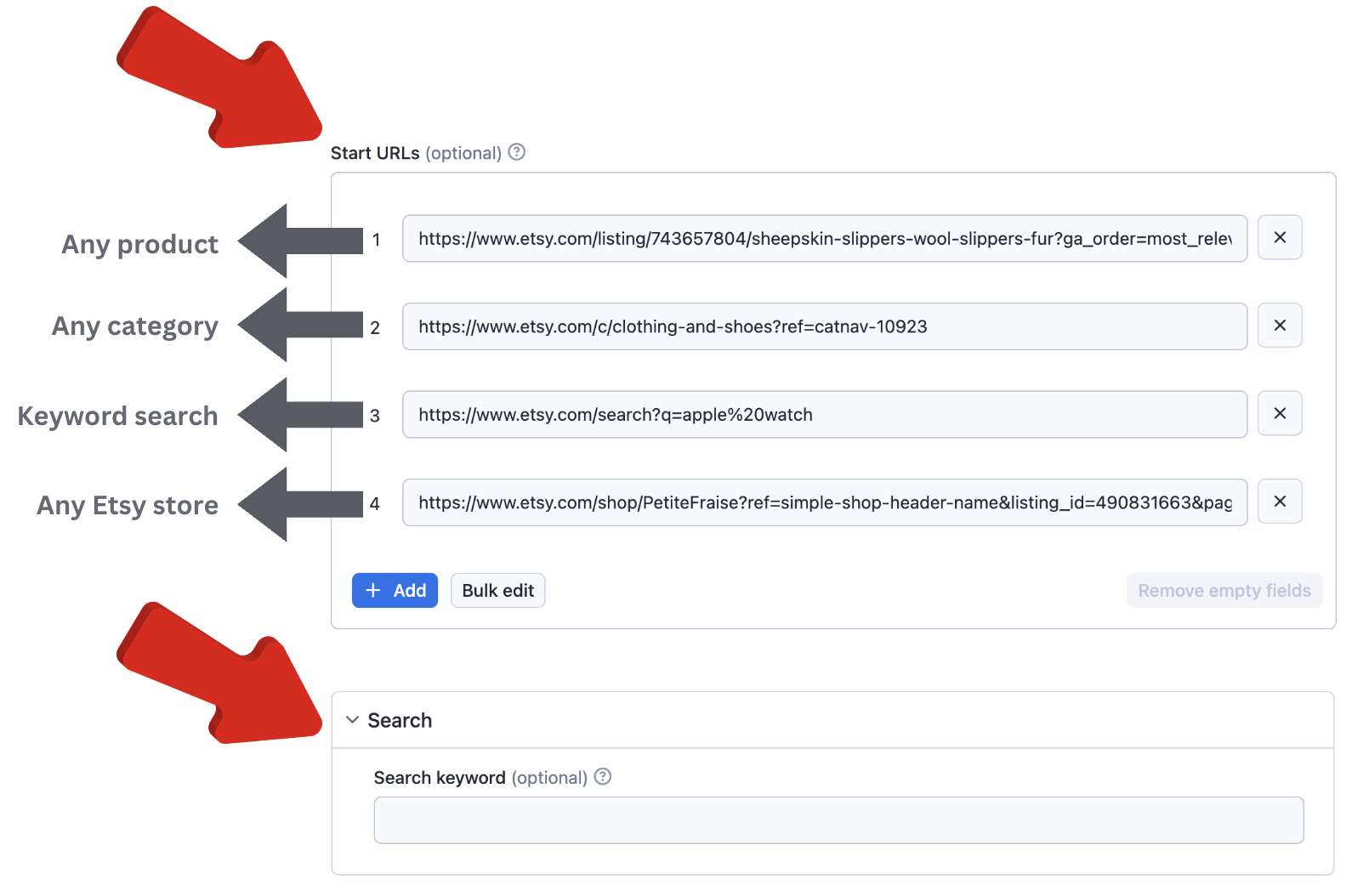
Either start with a keyword or specific URL to your research. You can use any product, category, keyword research, or Etsy store URL.
💡When you want to have filtering over a category URL; go to Etsy, create filters over the category, and copy and paste the link as one of the **startUrl**.
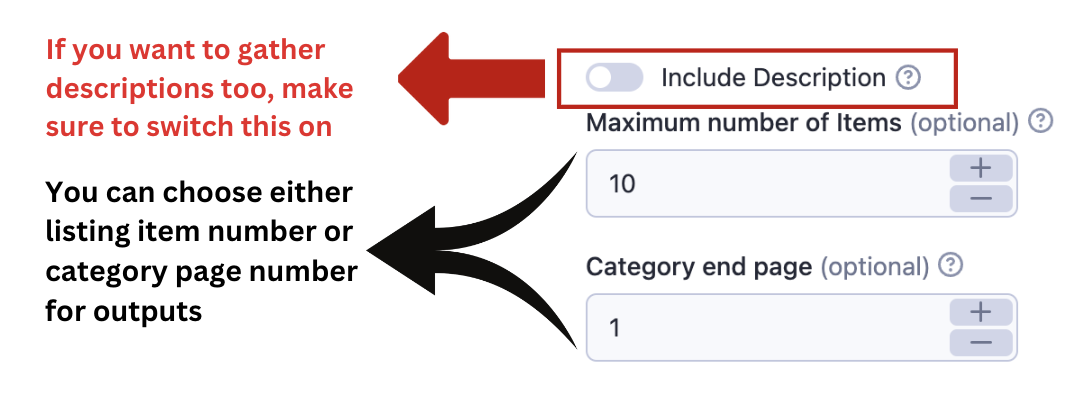
💡If you would like to scrape only the first page of a search list or category list, then put the link for the page and have the *endPage* as 1.
With the last approach that is explained above you can also fetch any interval of pages. If you provide the 5th page of a category and define the *endPage* parameter as 6 then you'll have the 5th and 6th pages only.
It is recommended to keep the other options as default.

#### Input Parameters Explained
The input of this scraper should be JSON containing the list of pages on Etsy that should be visited. Possible fields are:
- `search`: (Optional) (String)
Keywords that can be searched in the Etsy search engine.
- `startUrls`: (Optional) (Array)
List of Etsy URLs. You should only provide category details, product details, seller items, or search URLs.
- `includeDescription`: (Optional) (Boolean)
If you want to fetch description HTML (or text) you can enable this option. The default value is false.
- `endPage`: (Optional) (Number)
Final number of pages that you want to scrape. The default is Infinite. This applies to all search requests and startUrls individually.
- `maxItems`: (Optional) (Number)
You can limit scraped items. This should be useful when you search through the big lists or search results.
- `proxy`: (Required) (Proxy Object)
Proxy configuration.
- `extendOutputFunction`: (Optional) (String)
A function that takes a JQuery handle ($) as an argument and returns an object with data.
- `customMapFunction`: (Optional) (String)
A function that takes each object's handle as an argument and returns the object with executing the function.
This solution requires the use of **Proxy servers**, either your own proxy servers or you can use [Apify Proxy](https://docs.apify.com/platform/proxy).
#### Etsy Scraper Input Example
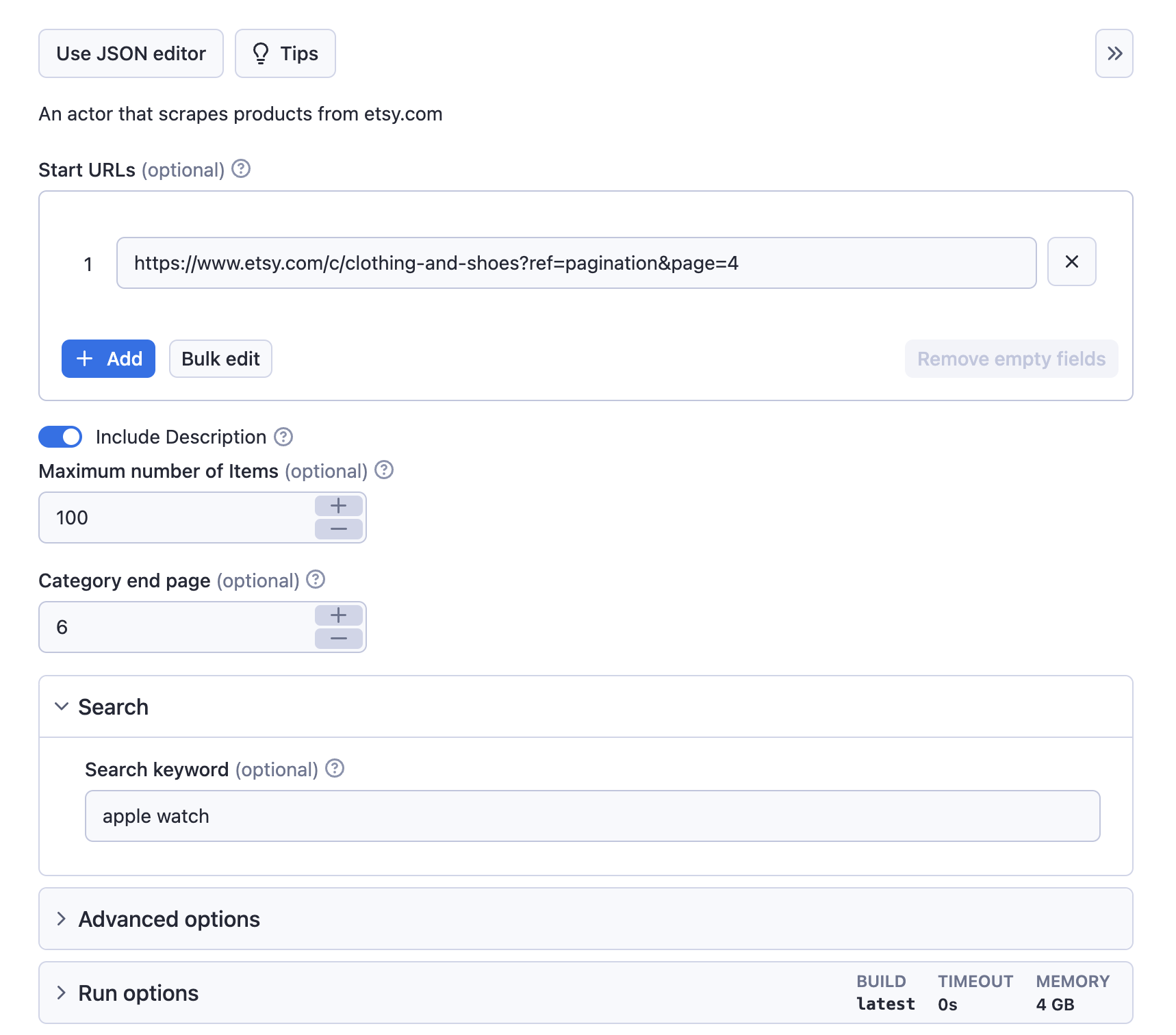
```json
{
"startUrls": [
"https://www.etsy.com/c/clothing-and-shoes?ref=pagination&page=4"
],
"search": "apple watch",
"endPage": 6,
"includeDescription": true,
"maxItems": 100
}
```
#### Compute Unit Consumption
The actor is optimized to run blazing fast and scrape as many products as possible. Therefore, it forefronts all product detail requests. If the actor doesn't block very often it'll scrape 50 products in 1 minute with ~0.04-0.05 compute units.
#### Bugs, fixes, updates, and changelog
This scraper is under active development. If you have any feature requests you can create an issue from [here](https://github.com/epctex-support/etsy-scraper/issues).
### During the Run
During the run, the actor will output messages letting you know what is going on. Each message always contains a short label specifying which page from the provided list is currently specified. When items are loaded from the page, you should see a message about this event with a loaded item count and total item count for each page.
If you provide incorrect input to the actor, it will immediately stop with a failure state and output an explanation of what is wrong.
#### Etsy Export
During the run, the actor stores results into a dataset. Each item is a separate item in the dataset.
You can manage the results in any language (Python, PHP, Node JS/NPM). See the FAQ or our API reference to learn more about getting results from this Amazon actor.
### Output
The structure of each item in Etsy products looks like this:
```json
{
"url": "https://www.etsy.com/listing/498417899/edc-slim-valet-personalized-pocket?ga_order=most_relevant&ga_search_type=all&ga_view_type=gallery&ga_search_query=&ref=sr_gallery-4-29&frs=1&cns=1&col=1",
"name": "EDC Slim Valet - Personalized Pocket Organizer, Handmade in the USA\nRegions Etsy does business in:",
"images": [
"https://i.etsystatic.com/13963159/r/il/3d1876/3180744258/il_794xN.3180744258_olzc.jpg",
"https://i.etsystatic.com/13963159/r/il/a3c7cf/1617748881/il_794xN.1617748881_1o26.jpg",
"https://i.etsystatic.com/13963159/r/il/9eb645/1570294448/il_794xN.1570294448_oe8w.jpg",
"https://i.etsystatic.com/13963159/r/il/6b2a6a/1570293332/il_794xN.1570293332_8z6i.jpg",
"https://i.etsystatic.com/13963159/r/il/39f7ad/3180744724/il_794xN.3180744724_2baa.jpg",
"https://i.etsystatic.com/13963159/r/il/08b20b/3180745230/il_794xN.3180745230_95a2.jpg",
"https://i.etsystatic.com/13963159/r/il/31e60f/3494515703/il_794xN.3494515703_54ci.jpg",
"https://i.etsystatic.com/13963159/r/il/352b64/3458390857/il_794xN.3458390857_4ity.jpg"
],
"seller": {
"name": "OnMyWristCo",
"url": "https://www.etsy.com/uk/shop/OnMyWristCo?ref=shop-header-name&listing_id=1515784194&from_page=listing",
"numberOfReviews": 12000,
"rating": 3.9179
},
"numberOfReviews": 78,
"Price": "$49.00+",
"variations": [
{
"label": "Color",
"values": [
"Dark Chocolate",
"Mahogany",
"Cordovan"
]
},
{
"label": "Personalize / Monogram",
"values": [
"None ($49.00)",
"Monogram ($59.00)"
]
}
],
"highlights": [
"Handmade",
"Materials: leather, metal rivets"
],
"listedOn": "Dec 26, 2022",
"favorites": 806,
"relatedSearches": [
{
"name": "EDC Pocket Organizer",
"link": "https://www.etsy.com/market/edc_pocket_organizer?ref=seller_tag_bottom_image-0"
},
{
"name": "EDC Wallet",
"link": "https://www.etsy.com/market/edc_wallet?ref=seller_tag_bottom_image-1"
},
{
"name": "EDC Organizer",
"link": "https://www.etsy.com/market/edc_organizer?ref=seller_tag_bottom_image-2"
},
{
"name": "EDC Pocket",
"link": "https://www.etsy.com/market/edc_pocket?ref=seller_tag_bottom_image-3"
},
{
"name": "Everyday Carry Gear",
"link": "https://www.etsy.com/market/everyday_carry_gear?ref=seller_tag_bottom_image-4"
},
{
"name": "Pocket Organizer",
"link": "https://www.etsy.com/market/pocket_organizer?ref=seller_tag_bottom_image-5"
},
{
"name": "Leather Organizer",
"link": "https://www.etsy.com/market/leather_organizer?ref=seller_tag_bottom_image-6"
},
{
"name": "EDC",
"link": "https://www.etsy.com/market/edc?ref=seller_tag_bottom_image-7"
},
{
"name": "EDC Gear",
"link": "https://www.etsy.com/market/edc_gear?ref=seller_tag_bottom_image-8"
},
{
"name": "Minimalist EDC",
"link": "https://www.etsy.com/market/minimalist_edc?ref=seller_tag_bottom_image-9"
},
{
"name": "Gift for Men",
"link": "https://www.etsy.com/market/gift_for_men?ref=seller_tag_bottom_image-10"
},
{
"name": "Holiday Gift",
"link": "https://www.etsy.com/market/holiday_gift?ref=seller_tag_bottom_image-11"
},
{
"name": "Rutsu Designs",
"link": "https://www.etsy.com/market/rutsu_designs?ref=seller_tag_bottom_text-0"
}
]
}
```
#### Important Note for Etsy
Don't worry when you get a little bit different products than you saw on the browser page. Etsy is ordering products differently for each user.
### How to use Etsy Scraper
https://www.youtube.com/watch?v=MtZsDh4HZ10\&ab_channel=epctex
### FAQ
**How do I begin scraping Etsy listings?**
Simply input your targeted URLs or search terms into the actor, and it will navigate the Etsy marketplace to gather the data you need. 💻
**Is real-time data scraping possible with Etsy Scraper?**
Yes, Etsy Scraper can fetch real-time data, ensuring you're always informed with the most current insights. ⏱️
**Is it legal to scrape data from Etsy?**
While scraping public data is generally permissible, it's crucial to adhere to Etsy's terms of service and conduct your data scraping responsibly. Avoid excessive server requests and ensure you're not infringing on any personal data privacy regulations. ⚖️
### Contact
Please visit us through [epctex.com](https://epctex.com) to see all the products that are available for you. If you are looking for any custom integration or so, please reach out to us through the chat box in [epctex.com](https://epctex.com). In need of support? is at your service.
# Actor input Schema
## `startUrls` (type: `array`):
URLs to start with. It should be category or product detail URLs
## `includeDescription` (type: `boolean`):
Include description for products.
## `includeVariationPrices` (type: `boolean`):
Include variation prices for products. It includes all the prices for all the variations of a product. Please be aware that this option increases the runtime dramatically.
## `maxItems` (type: `integer`):
Maximum number of items that you want to scrape
## `endPage` (type: `integer`):
The page number that you want to end with. By default there is no end page.
## `search` (type: `string`):
Keyword that you want to search on the platform
## `extendOutputFunction` (type: `string`):
A function which result will get merged with the default result
## `customMapFunction` (type: `string`):
Function that takes each of the objects as argument and returns data that will be mapped by the function itself.
## `proxy` (type: `object`):
Select proxies to be used by your crawler.
## Actor input object example
```json
{
"startUrls": [
"https://www.etsy.com/listing/743657804/sheepskin-slippers-wool-slippers-fur?ga_order=most_relevant&ga_search_type=all&ga_view_type=gallery&ga_search_query=&ref=sc_gallery-5-1&plkey=89e47f49c28602795b44fc71559e2839056339d8%3A743657804&frs=1",
"https://www.etsy.com/c/clothing-and-shoes?ref=catnav-10923",
"https://www.etsy.com/search?q=apple%20watch",
"https://www.etsy.com/shop/PetiteFraise?ref=simple-shop-header-name&listing_id=490831663&page=2#items"
],
"includeDescription": false,
"includeVariationPrices": false,
"maxItems": 10,
"endPage": 1,
"extendOutputFunction": "($) => {\n const result = {};\n // Uncomment to add a title to the output\n // result.title = $('title').text().trim();\n\n return result;\n}",
"customMapFunction": "(object) => { return {...object} }",
"proxy": {
"useApifyProxy": true,
"apifyProxyGroups": [
"RESIDENTIAL"
]
}
}
```
# API
You can run this Actor programmatically using our API. Below are code examples in JavaScript, Python, and CLI, as well as the OpenAPI specification and MCP server setup.
## JavaScript example
```javascript
import { ApifyClient } from 'apify-client';
// Initialize the ApifyClient with your Apify API token
// Replace the '' with your token
const client = new ApifyClient({
token: '',
});
// Prepare Actor input
const input = {
"startUrls": [
"https://www.etsy.com/listing/743657804/sheepskin-slippers-wool-slippers-fur?ga_order=most_relevant&ga_search_type=all&ga_view_type=gallery&ga_search_query=&ref=sc_gallery-5-1&plkey=89e47f49c28602795b44fc71559e2839056339d8%3A743657804&frs=1",
"https://www.etsy.com/c/clothing-and-shoes?ref=catnav-10923",
"https://www.etsy.com/search?q=apple%20watch",
"https://www.etsy.com/shop/PetiteFraise?ref=simple-shop-header-name&listing_id=490831663&page=2#items"
],
"maxItems": 10,
"endPage": 1,
"extendOutputFunction": ($) => {
const result = {};
// Uncomment to add a title to the output
// result.title = $('title').text().trim();
return result;
},
"customMapFunction": (object) => { return {...object} },
"proxy": {
"useApifyProxy": true,
"apifyProxyGroups": [
"RESIDENTIAL"
]
}
};
// Run the Actor and wait for it to finish
const run = await client.actor("epctex/etsy-scraper").call(input);
// Fetch and print Actor results from the run's dataset (if any)
console.log('Results from dataset');
console.log(`💾 Check your data here: https://console.apify.com/storage/datasets/${run.defaultDatasetId}`);
const { items } = await client.dataset(run.defaultDatasetId).listItems();
items.forEach((item) => {
console.dir(item);
});
// 📚 Want to learn more 📖? Go to → https://docs.apify.com/api/client/js/docs
```
## Python example
```python
from apify_client import ApifyClient
# Initialize the ApifyClient with your Apify API token
# Replace '' with your token.
client = ApifyClient("")
# Prepare the Actor input
run_input = {
"startUrls": [
"https://www.etsy.com/listing/743657804/sheepskin-slippers-wool-slippers-fur?ga_order=most_relevant&ga_search_type=all&ga_view_type=gallery&ga_search_query=&ref=sc_gallery-5-1&plkey=89e47f49c28602795b44fc71559e2839056339d8%3A743657804&frs=1",
"https://www.etsy.com/c/clothing-and-shoes?ref=catnav-10923",
"https://www.etsy.com/search?q=apple%20watch",
"https://www.etsy.com/shop/PetiteFraise?ref=simple-shop-header-name&listing_id=490831663&page=2#items",
],
"maxItems": 10,
"endPage": 1,
"extendOutputFunction": """($) => {
const result = {};
// Uncomment to add a title to the output
// result.title = $('title').text().trim();
return result;
}""",
"customMapFunction": "(object) => { return {...object} }",
"proxy": {
"useApifyProxy": True,
"apifyProxyGroups": ["RESIDENTIAL"],
},
}
# Run the Actor and wait for it to finish
run = client.actor("epctex/etsy-scraper").call(run_input=run_input)
# Fetch and print Actor results from the run's dataset (if there are any)
print(f"💾 Check your data here: https://console.apify.com/storage/datasets/{run.default_dataset_id}")
for item in client.dataset(run.default_dataset_id).iterate_items():
print(item)
# 📚 Want to learn more 📖? Go to → https://docs.apify.com/api/client/python/docs/quick-start
```
## CLI example
```bash
echo '{
"startUrls": [
"https://www.etsy.com/listing/743657804/sheepskin-slippers-wool-slippers-fur?ga_order=most_relevant&ga_search_type=all&ga_view_type=gallery&ga_search_query=&ref=sc_gallery-5-1&plkey=89e47f49c28602795b44fc71559e2839056339d8%3A743657804&frs=1",
"https://www.etsy.com/c/clothing-and-shoes?ref=catnav-10923",
"https://www.etsy.com/search?q=apple%20watch",
"https://www.etsy.com/shop/PetiteFraise?ref=simple-shop-header-name&listing_id=490831663&page=2#items"
],
"maxItems": 10,
"endPage": 1,
"extendOutputFunction": "($) => {\\n const result = {};\\n // Uncomment to add a title to the output\\n // result.title = $('\''title'\'').text().trim();\\n\\n return result;\\n}",
"customMapFunction": "(object) => { return {...object} }",
"proxy": {
"useApifyProxy": true,
"apifyProxyGroups": [
"RESIDENTIAL"
]
}
}' |
apify call epctex/etsy-scraper --silent --output-dataset
```
## MCP server setup
```json
{
"mcpServers": {
"apify": {
"type": "http",
"url": "https://mcp.apify.com/?tools=fetch-actor-details,epctex/etsy-scraper"
}
}
}
```
The hosted server signs you in with OAuth on first connect, so no API token belongs in this config. Clients without OAuth support can send an `Authorization: Bearer ` header instead, using a token from API & Integrations in Apify Console (https://console.apify.com/settings/integrations).
## OpenAPI specification
Download the OpenAPI definition: https://api.apify.com/v2/actors/MiEVd9O3R4Td5AbV9/builds/ecNBAZu3AKhwH03nH/openapi.json